EasyManua.ls Logo

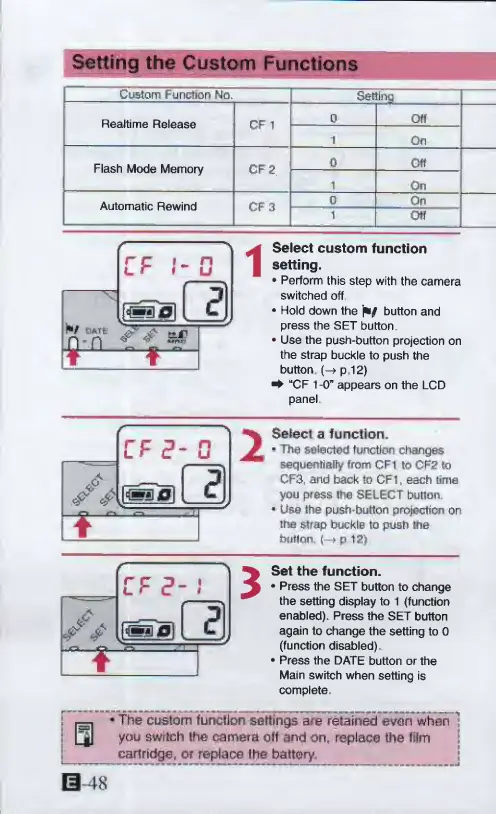
Canon ELPH 2 - Setting the Custom Functions; Select custom function setting; Select a function; Set the function

Canon ELPH 2
53 pages
Print Icon
To Next Page IconTo Next Page
To Previous Page IconTo Previous Page
Loading...
Setting
the
Custom
Functions
Custom
Function
No.
Setting
Realtime
Release
CF
1
0
Off
1
On
Flash
Mode
Memory
CF
2
0
Off
1
On
Automatic
Rewind
CF
3
0
On
1
Otf
CF
I*
0
Wf
flATt:
n-n
T
f
1
Select
custom
function
setting.
Perform
this
step
with
the
camera
switched
off
Hold
down
the
button
and
press
the
SET
button
Use
the
push-button
projection
on
the
strap
buckle
to
push
the
button
(—»
p
12)
^
“CF
1-0"
appears
on
the
LCD
panel
/A
CF
0
J«fll
~fr—
-
2
Select
a
function.
*
The
selected
function
changes
sequentially
From
GF1
to
GF2
to
CF3.
and
back
to
CFT
each
time
you
press
the
SELECT
button.
*
Use
the
push-button
projection
on
thfi
strap
buckle
to
push
me
button,
(—»
p
12
)
CF
?
*
-
*
i
&
3
Set
the
function.
Press
the
SET
button
to
change
the
setting
display
to
1
(function
enabled).
Press
the
SET
button
again
to
change
the
setting
to
0
(function
disabled)
Press
the
DATE
button
or
the
Main
switch
when
setting
is
complete
The
custom
function
settings
are
retained
even
whan
]
you
switch
the
camera
off
and
on,
replace
the
film
cartridge
f
or
replace
the
battery.

Other manuals for Canon ELPH 2

Related product manuals