EasyManua.ls Logo

Canon EOS 5000 - Page 18

Canon EOS 5000
33 pages
Print Icon
To Next Page IconTo Next Page
To Previous Page IconTo Previous Page
Loading...
SFrr";tiryr
ffi*tt*rI
irffid
&*t*f*cus
#ffierr*timns
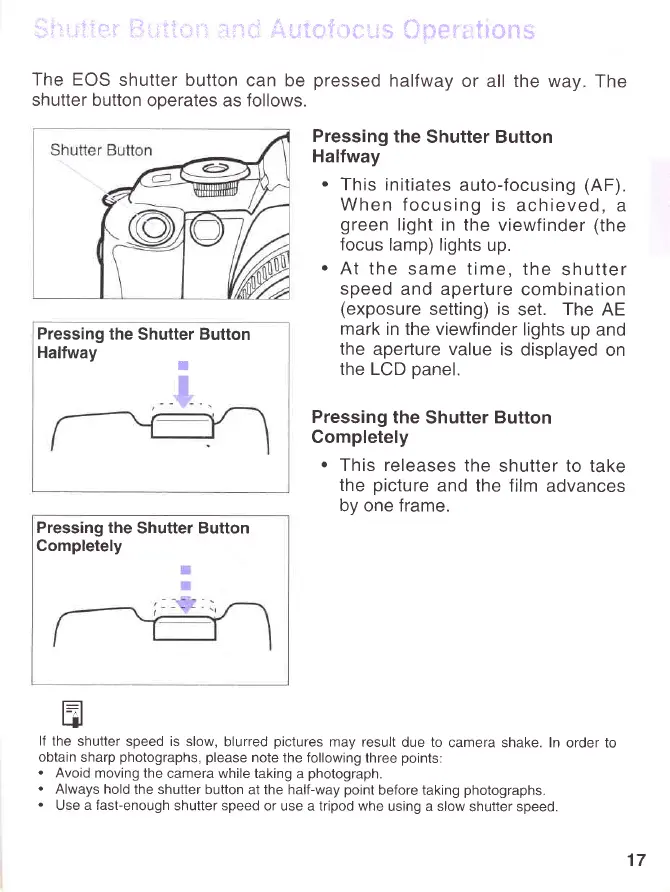
The EOS
shutter button
can be
pressed
halfway
or all the way.
The
shutter button
operates
as
follows.
Pressing
the
Shutter
Button
Halfway
r
Pressing
the
Shutter Button
Halfway
.
This initiates
auto-focusing
(AF).
When focusing
is
achieved,
a
green
light in the
viewfinder
(the
focus
lamp) lights
up.
.
At
the same time,
the
shutter
speed
and aperture
combination
(exposure
setting) is
set.
The
AE
mark
in the viewfinder
lights
up and
the aperture value
is displayed
on
the LCD
panel.
Pressing
the
Shutter
Button
Completely
.
This releases
the
shutter to take
the
picture
and the film
advances
by one frame.
Pressing the
Shutter Button
Completely
t--=l
qJ
lf the
shutter speed is slow,
blurred
pictures
may result
due to
camera shake. In
order to
obtain
sharp
photographs,
please
note the following
three
points:
.
Avoid
moving the
camera while taking
a
photograph.
.
Always hold
the shutter button
at the half-way
point
before taking
photographs.
.
Use a fast-enough
shutter speed
or use a tripod whe
using a slow
shutter speed.
17
www.orphancameras.com