EasyManua.ls Logo

Canon EOS 5000 - Page 20

Canon EOS 5000
33 pages
Print Icon
To Next Page IconTo Next Page
To Previous Page IconTo Previous Page
Loading...
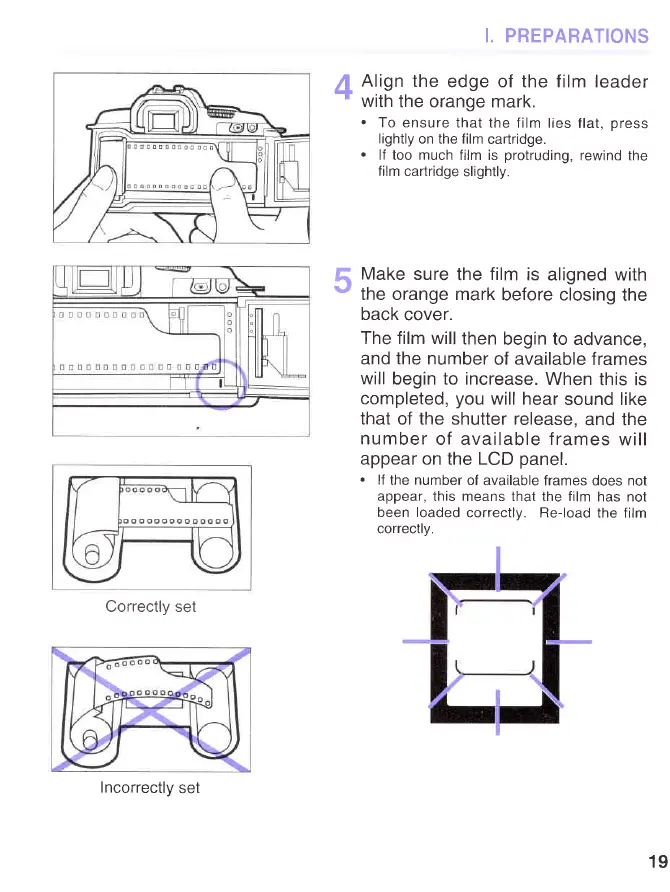
Correctly set
I. PREPARATIONS
2[
Align
the
edge of the film leader'
'
with
the orange mark.
.
To ensure
that the film lies
flat,
press
lightly
on the film
cartridge.
.
lf too much
film is
protruding,
rewind the
film cartridge
slightly.
I
Make sure
the
film
is
aligned with
v
the orange mark
before closing
the
back
cover.
The film will
then
begin to advance,
and the number
of available
frames
will
begin to increase.
When
this is
completed,
you
will hear
sound like
that of the shutter release,
and the
number
of available frames
will
appear on the LCD
panel.
.
lf
the number of
available frames
does
not
appear,
this means that the film
has not
been loaded
correctlv. Re-load
the film
correctlv.
Incorrectlv
set
19
www.orphancameras.com