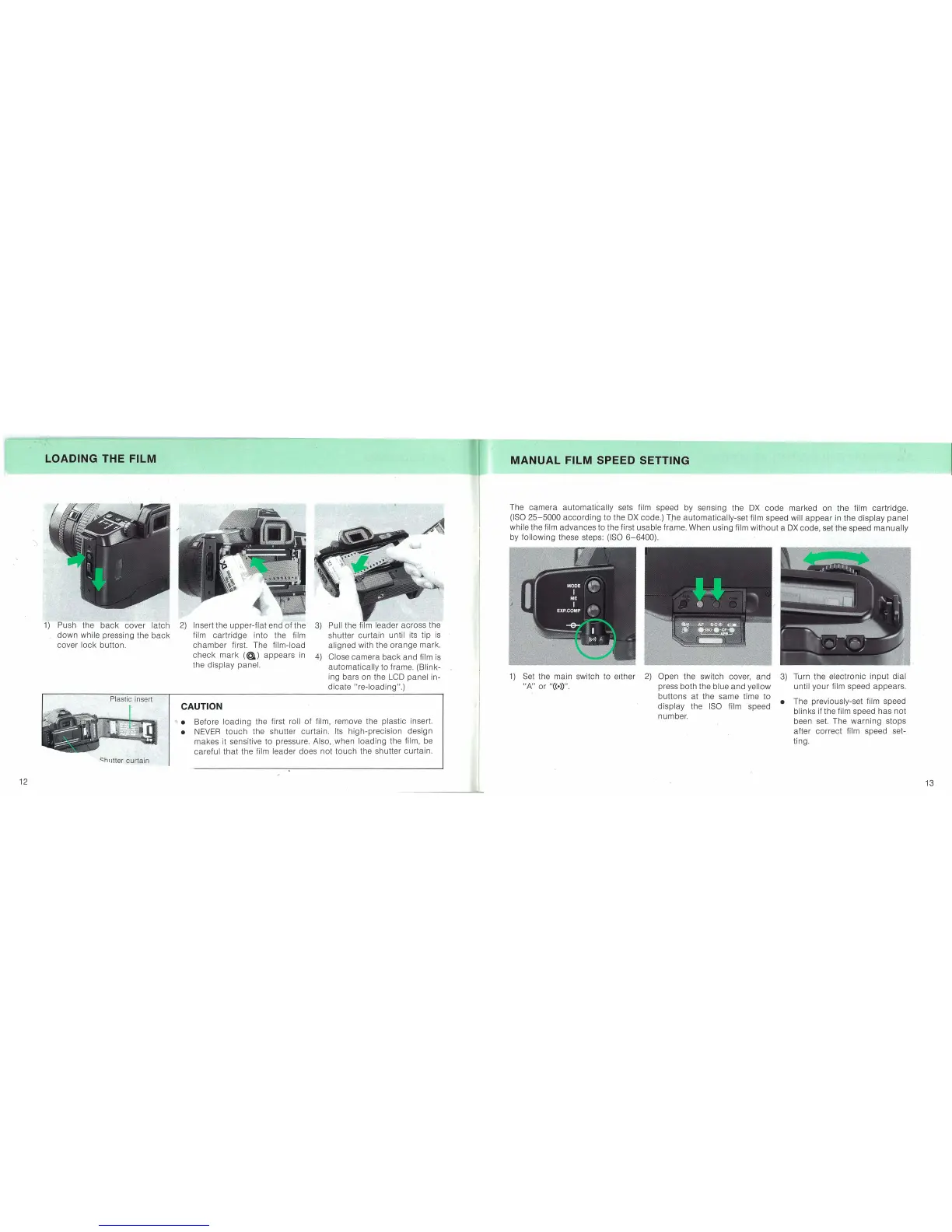
LOADING THE FILM
MANUAL FILM SPEED SETTING
..... Before
loading
the first roll
of
film, remove the plastic insert.
• NEVER
touch
the shutter curtain. Its
high-precision
design
makes it sensitive
to
pressure.
Also"when
loading
the film, be
careful
that
the film leader does
not
touch
the shutter curtain.
3)
Turn the electronic
input
dial
until
your
film speed appears.
• The previously-set film speed
blinks if the film speed has
not
been set. The
warning
stops
after
correct
film speed set-
ting.
The
Gqmera
automatically
sets film speed by sensing the
OX
code
marked
on the film cartridge.
(ISO
25-5000
according
to
the
OX
code.)
T,he
automatically-set
film speed will
appear
in the
display
panel
while the film
advances
to
the first usable frame. When using film
without
a
OX
code, set the speed
manually
by
following
these steps: (ISO
6-6400).
1)
Set the main switch to either
2)
Open the switch cover,
and
"A"
or
"CCe»)".
press both the blue
and
yellow
buttons
at the same time to
display
the
ISO
film speed
number.
Pull the leader
across
the
shutter
curtain
until its tip
is
aligned with the
orange
mark.
Close
camera
back
and
film
is
automatically
to frame. (Blink- ,
ing bars on the LCO panel in-
dicate
"re-loading".)
CAUTION
2)
Insert the
upper-flat
end
of
the
3)
film
cartridge
into the film
chamber
first. The film-load
check
mark
(@.)
appears
in
4)
the
display
panel.
1)
Push the
back
cover latch
down
while pressing the
back
cover
lock
button.
~hlJtter
curtain
12
13


 To Next Page