EasyManua.ls Logo

Canon EOS 66 - Exposure Compensation

Canon EOS 66
80 pages
Print Icon
To Next Page IconTo Next Page
To Previous Page IconTo Previous Page
Loading...
Exposure
Compensation
Changing
the
exposure
level
set
by
the
camera
is
called
exposure
compensation.
Bcposure
compensation
can
be
used
to
make
the
picture
darker
or
brighter
intentionally.
Exposure
compensation
can
be
set
up
to
±2
stops
in
half-stop
increments.
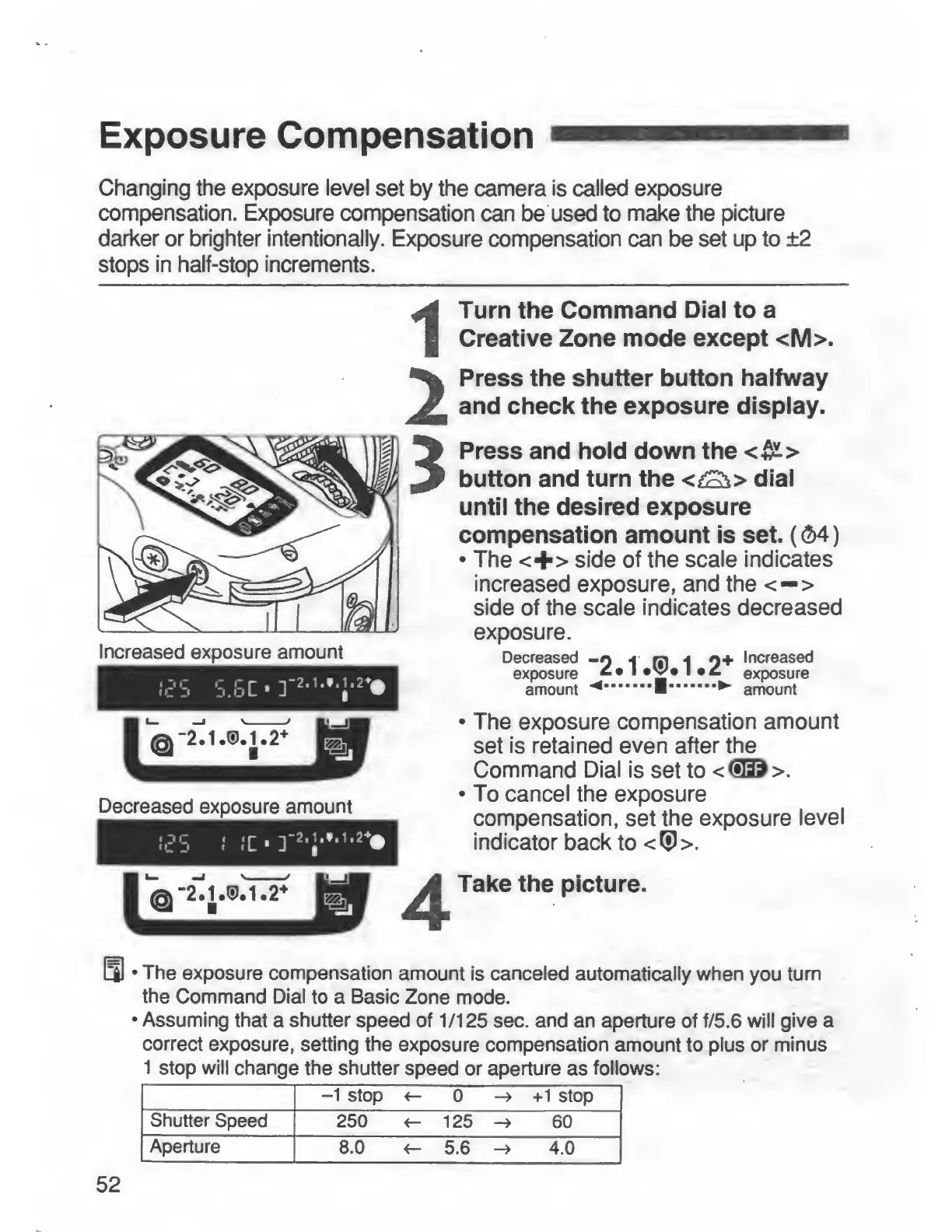
Decreased
exposure
amount
Turn
the
Command
Dial
to
a
Creative
Zone
mode
except
<M>.
Press
the
shutter
button
halfway
and
check
the
exposure
display.
Press
and
hold
down
the
<^>
button
and
turn
the
dial
until
the
desired
exposure
compensation
amount
is
set.
((M)
•
The
<+>
side
of
the
scale
indicates
increased
exposure,
and
the
<—>
side
of
the
scale
indicates
decreased
exposure.
Decreased
-O
i
m
i
O-f
Increased
exposure
'
•j*
•
exposure
amount
^
.
■
.
►
amount
•
The
exposure
compensation
amount
set
is
retained
even
after
the
Command
Dial
is
set
to
<(!lD>.
•
To
cancel
the
exposure
compensation,
set
the
exposure
level
indicator
back
to
<®>.
Take
the
picture.
•
The
exposure
compensation
amount
is
canceled
automatically
when
you
turn
the
Command
Dial
to
a
Basic
Zone
mode.
•
Assuming
that
a
shutter
speed
of
1/125
sec.
and
an
aperture
of
f/5.6
will
give
a
correct
exposure,
setting
the
exposure
compensation
amount
to
plus
or
minus
1
stop
will
change
the
shutter
speed
or
aperture
as
follows:
-1
stop
<-
0
->
+1
stop
Shutter
Speed
250
<-
125
->
60
Aperture
8.0
5.6
4.0
52