EasyManua.ls Logo

Canon EOS 66 - Quick Start Guide

Canon EOS 66
80 pages
Print Icon
To Next Page IconTo Next Page
To Previous Page IconTo Previous Page
Loading...
Quick
Start
Guide
Bi
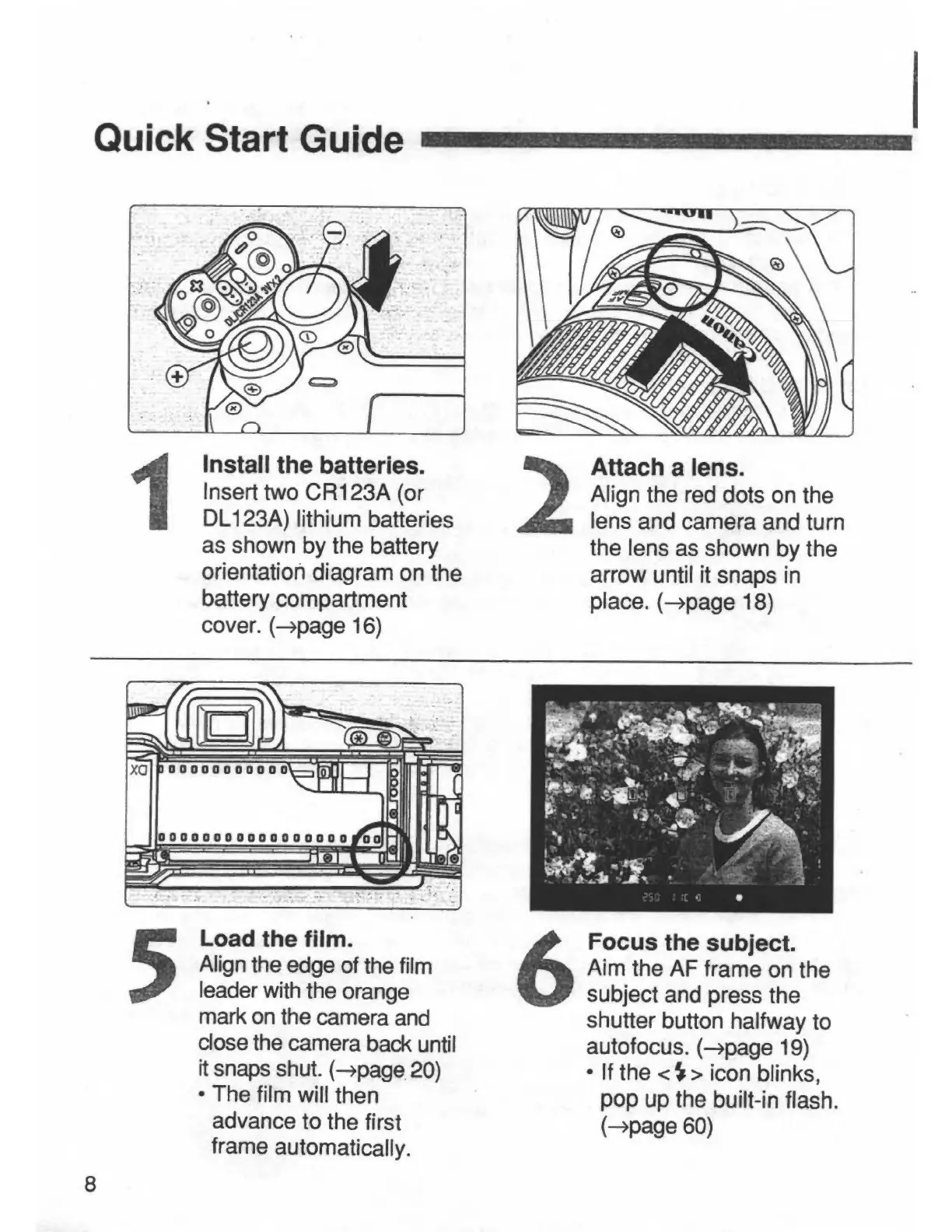
1
Install
the
batteries.
Insert
two
CR123A
(or
DL123A)
lithium
batteries
as
shown
by
the
battery
orientation
diagram
on
the
battery
compartment
cover,
(^page
16)
Attach
a
lens.
Align
the
red
dots
on
the
lens
and
camera
and
turn
the
lens
as
shown
by
the
arrow
until
it
snaps
in
place,
{-^page
18)
Load
the
film.
Align
the
edge
of
the
film
leader
with
the
orange
mark
on
the
camera
and
close
the
camera
back
until
it
snaps
shut.
(->page
20)
The
film
will
then
advance
to
the
first
frame
automatically.
Focus
the
subject.
Aim
the
AF
frame
on
the
subject
and
press
the
shutter
button
halfway
to
autofocus.
(->page
19)
If
the
<^>
Icon
blinks,
pop
up
the
built-in
flash,
(^page
60)
8