
 Need help?
Do you have a question about the Canon EOS M10 and is the answer not in the manual?
Provides essential safety precautions to prevent injury or damage to the camera and user.
Outlines common operations for shooting, viewing, recording, printing, saving, and Wi-Fi.
Identifies and labels the various parts of the camera for user reference.
Explains the icons, symbols, and conventions used throughout the manual.
Covers essential operations from initial preparations to shooting and playback.
Steps to prepare the camera for shooting, including attaching strap and holding.
Detailed steps for charging the camera's battery pack using the provided charger.
Steps for inserting a memory card, including checking the write-protect switch.
Guide to setting the camera's date, time, and home time zone for accurate image data.
Instructions for attaching and detaching lenses, including removing caps.
A guide to turning on the camera and shooting still images in Scene Intelligent Auto mode.
Covers fundamental camera operations like power, menus, and display.
Guide to shooting in Auto and Hybrid Auto modes for easy, automatic shots.
Explores various shooting modes like Creative Assist, Special Effects, and Scene modes.
Detailed instructions for using Tv, Av, and M modes for greater control over exposure.
Instructions for reviewing, managing, editing, and protecting images and movies.
Covers wireless image transfer, remote shooting, and connecting to networks.
Guides on adjusting basic camera functions, formatting, cleaning, and system settings.
Information on optional Canon accessories and software for enhancing camera use.
Contains troubleshooting guides for common issues and error messages.
 General
| Megapixel | 18 MP |
|---|---|
| Camera type | MILC |
| Sensor type | CMOS |
| Sensor format | Advanced Photo System type-C (APS-C) |
| Image stabilizer | Yes |
| Total megapixels | 18.5 MP |
| Image sensor size | - \ |
| Image formats supported | JPEG XR, RAW |
| Supported aspect ratios | 3:2 |
| Maximum image resolution | 5184 x 3456 pixels |
| Image sensor size (W x H) | 22.3 x 14.9 mm |
| Image stabilizer location | Lens |
| Still image resolution(s) | 17.9MP (5184x3456), 12.4MP (4320x2880), 5.5MP (2880x1920), 3.5MP (2304x1536) |
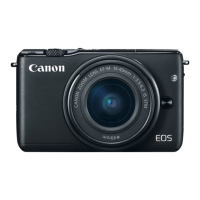
| Product color | Black |
| Lens type | Wide-angle |
| Filter size | 49 mm |
| Optical zoom | - x |
| Mounting type | Bayonet |
| Focal length range | 15 - 45 mm |
| Lens mount interface | Canon EF-M |
| Maximum aperture number | 6.3 |
| Minimum aperture number | 3.5 |
| Focus adjustment | Auto/Manual |
| Auto Focus (AF) points | 49 |
| Auto focusing (AF) modes | - |
| Normal focusing range (tele) | - m |
| Auto Mode focusing range (tele) | 1 - 18 m |
| Auto Focus (AF) points selection | Auto, Manual |
| Light metering | Centre-weighted, Evaluative (Multi-pattern), Partial, Spot |
| ISO sensitivity | 100, 125, 160, 200, 250, 320, 400, 500, 640, 800, 1000, 1250, 1600, 2000, 2250, 2500, 3200, 4000, 5000, 6400, 8000, 12500, 12800 |
| ISO sensitivity (max) | 12800 |
| ISO sensitivity (min) | 100 |
| Light exposure correction | ± 3EV (1/3EV step) |
| Camera shutter type | Electronic |
| Fastest camera shutter speed | 1/4000 s |
| Slowest camera shutter speed | 30 s |
| Flash modes | Auto, Manual, Slow synchronization |
| Flash sync-speed | 1/200 s |
| Flash recharging time | 3 s |
| Flash exposure correction | ±2EV (1/3 EV step) |
| Video resolutions | 640 x 480, 1280 x 720, 1920 x 1080 pixels |
| Video formats supported | MP4 |
| Maximum video resolution | 1920 x 1080 pixels |
| Resolution at capture speed | 640x480@25fps, 640x480@30fps, 1280x720@50fps, 1280x720@60fps, 1920x1080@24fps, 1920x1080@25fps, 1920x1080@30fps |
| Audio system | stereo |
| Memory slots | 1 |
| Compatible memory cards | SDHC, SDXC |
| Display diagonal | 3 \ |
| Display diagonal (metric) | 7.5 cm |
| Display resolution (numeric) | 1040000 pixels |
| USB connector | Mini-USB B |
| HDMI connector type | Mini |
| Bluetooth | No |
| Wi-Fi standards | 802.11b, 802.11g, Wi-Fi 4 (802.11n) |
| Scene modes | Night |
| Photo effects | Sepia |
| White balance | Auto, Cloudy, Custom modes, Daylight, Fluorescent, Manual, Tungsten |
| Shooting modes | Aperture priority, Auto, Scene, Shutter priority |
| Image processor | DIGIC 6 |
| Self-timer delay | 2, 10 s |
| Languages support | Multi |
| Playback zoom (max) | 10 x |
| Power source type | Battery |
| Battery type | LP-E12 |
| Battery life (CIPA standard) | 255 shots |
| Operating temperature (T-T) | 0 - 32 °C |
| Operating relative humidity (H-H) | 5 - 85 % |
 Weight and Dimensions
| Depth | 35 mm |
|---|---|
| Width | 108 mm |
| Height | 66.6 mm |
| Weight | 265 g |
| Weight (including battery) | 301 g |













 To Next Page
