EasyManua.ls Logo

Canon EOS M100 - User Manual

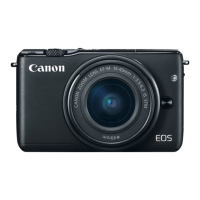
Canon EOS M100
370 pages
Print Icon
To Next Page IconTo Next Page
Loading...
Getting Ready Camera Basics Shooting
Playback Wireless Features Other Settings
IndexIndex
ContentsContents
IntroductionIntroduction
User Manual

Table of Contents

Other manuals for Canon EOS M100

Question and Answer IconNeed help?

Do you have a question about the Canon EOS M100 and is the answer not in the manual?

Summary

Preliminary Notes and Legal Information

Introduction

Manual Navigation and Conventions

Explains how the manual is structured and navigated.

Portal Pages Explained

Describes the function and layout of portal pages.

Topic Pages Explained

Details the purpose and layout of topic pages.

Safety Instructions

Getting Ready

Charging the Battery Pack

Steps for charging the camera battery.

Preparing a Memory Card

Information on compatible memory cards.

Setting the Date and Time

Guide to setting the camera's date and time.

Attaching a Lens

Step-by-step guide to attaching a camera lens.

Camera Basics

Part Names

Identification of camera components and their functions.

Shutter Button Operation

How to use the shutter button for focus and shooting.

Quick Control Screen Navigation

Guide to using the quick control menu for settings.

Using the Menu Screen

Navigating and using the main menu system.

Shooting

Auto Mode and Scene Selection

Using automatic modes and scene-specific settings.

Manual Mode Operations

Gaining full control over shooting parameters.

Focusing Techniques

Achieving sharp and accurate focus.

Flash Photography Guide

Using the camera's flash effectively.

Playback

Viewing and Magnifying Images

How to view and zoom into photos.

Finding Images on the Camera

Methods to locate specific photos on the card.

Managing Images (Protecting, Rating, Erasing)

Operations like protecting, rating, and erasing images.

Editing Photos and Movies

Performing basic edits on images and videos.

Wireless Features

Sending Images via NFC

Transferring photos to smartphones using NFC.

Sending Images via Bluetooth

Connecting and transferring photos using Bluetooth.

Registering Web Services

Connecting to online services like CANON iMAGE GATEWAY.

Other Settings

Formatting Memory Cards

Prepares cards for use or erases data.

Power-Saving Adjustments

Configures automatic power down and screen off timers.

Display Language Selection

Changes the camera's interface language.

Restoring Main Camera Defaults

Resets all camera settings to factory defaults.

Precautions for Wireless Features

Wireless Function Use Restrictions

Notes on country-specific regulations and potential penalties.

Wireless Function Near Medical Equipment

Warnings about using wireless features near sensitive electronics.

Summary

Preliminary Notes and Legal Information

Introduction

Manual Navigation and Conventions

Explains how the manual is structured and navigated.

Portal Pages Explained

Describes the function and layout of portal pages.

Topic Pages Explained

Details the purpose and layout of topic pages.

Safety Instructions

Getting Ready

Charging the Battery Pack

Steps for charging the camera battery.

Preparing a Memory Card

Information on compatible memory cards.

Setting the Date and Time

Guide to setting the camera's date and time.

Attaching a Lens

Step-by-step guide to attaching a camera lens.

Camera Basics

Part Names

Identification of camera components and their functions.

Shutter Button Operation

How to use the shutter button for focus and shooting.

Quick Control Screen Navigation

Guide to using the quick control menu for settings.

Using the Menu Screen

Navigating and using the main menu system.

Shooting

Auto Mode and Scene Selection

Using automatic modes and scene-specific settings.

Manual Mode Operations

Gaining full control over shooting parameters.

Focusing Techniques

Achieving sharp and accurate focus.

Flash Photography Guide

Using the camera's flash effectively.

Playback

Viewing and Magnifying Images

How to view and zoom into photos.

Finding Images on the Camera

Methods to locate specific photos on the card.

Managing Images (Protecting, Rating, Erasing)

Operations like protecting, rating, and erasing images.

Editing Photos and Movies

Performing basic edits on images and videos.

Wireless Features

Sending Images via NFC

Transferring photos to smartphones using NFC.

Sending Images via Bluetooth

Connecting and transferring photos using Bluetooth.

Registering Web Services

Connecting to online services like CANON iMAGE GATEWAY.

Other Settings

Formatting Memory Cards

Prepares cards for use or erases data.

Power-Saving Adjustments

Configures automatic power down and screen off timers.

Display Language Selection

Changes the camera's interface language.

Restoring Main Camera Defaults

Resets all camera settings to factory defaults.

Precautions for Wireless Features

Wireless Function Use Restrictions

Notes on country-specific regulations and potential penalties.

Wireless Function Near Medical Equipment

Warnings about using wireless features near sensitive electronics.

Canon EOS M100 Specifications

General IconGeneral
Sensor24.2 MP APS-C CMOS
Image ProcessorDIGIC 7
Autofocus SystemDual Pixel CMOS AF
Autofocus Points49 points
Continuous Shooting Speed6.1 fps
Video ResolutionFull HD 1080p at 60 fps
ConnectivityWi-Fi, NFC, Bluetooth
Weight302 g (including battery and memory card)
Dimensions108.2 x 67.1 x 35.1 mm
MountCanon EF-M
Image Sensor Size22.3 x 14.9 mm
ISO Range100-25600
LCD Screen3.0-inch tilting touchscreen
Battery LifeApprox. 295 shots

Related product manuals