5
Initial mode is COMP mode.
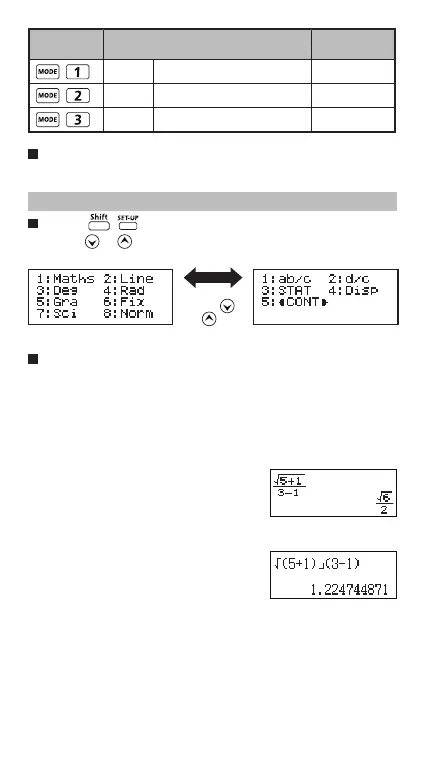
Calculator Set-up Menu
Press to enter the Calculator Set-up Menu;
press / for next / previous page.
To select the calculator input & output format [1] Maths
or [2] Line
[1] Maths – (Mathematics mode): The majority of
calculation input and output (e.g. Fraction, pi, square
root number) are shown in Mathematics textbook
format.
[2] Line – (Line mode): The majority
of calculation input and output are
shown in the lines format. And
“LINE” icon will be shown.
For the STAT mode, the Input &
Display format will switch to Line
mode automatically.
COMP Normal calculation
STAT Statistical calculation STAT
TABLE Function Table calculation
Operation
Mode
LCD
Indicator
Press
or key
Mathematics mode
Line mode
LINE



 To Next Page