9
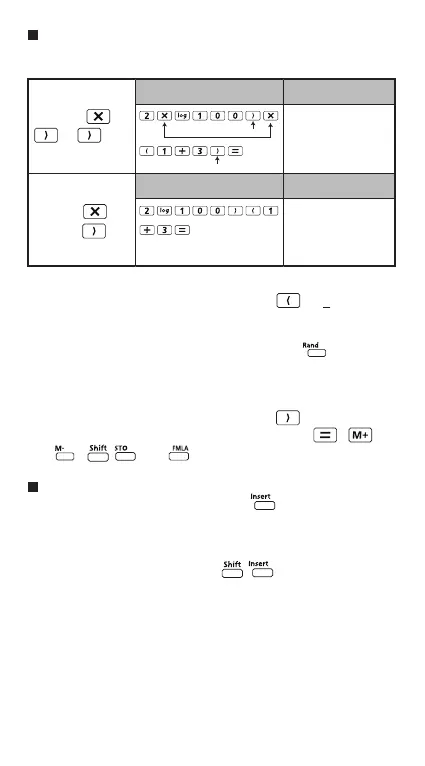
Omit the multiplication sign and final close parenthesis.
*1. Omit multiplication sign (x)
- Input before an open parentheses : 1 x (2+3)
- Input before scientific functions that includes
parenthesis: 2 x cos(30)
- Input before Random number function
- Input before Variable (A, B, C, D, X, Y, M), π, е
*2. Scientific functions come with the open parenthesis.
Example: sin(, cos(, Pol(, LCM(…. You need to input the
argument and the close parenthesis .
*3. Omit the last close parenthesis before the , ,
, and (Only for F-719SG).
Insert and overwrite Input mode
In Line mode, you can use INSERT or overwrite mode
for inputting.
- In Insert mode (Default input mode), the cursor is a
vertical flashing line “ | ” for inserting a new character.
- In overwrite mode, press key to switch the
cursor to a flashing horizontal ( _ ) and replace the
character at the current cursor position.
In Mathematics mode, you can only use the insert mode.
Whenever the display format changes from Line mode to
Mathematics mode, it will automatically switch to the insert
mode.
Example: 2 x log 100 x (1+3) = 16
Including *1,
*2, *3
Omitting *1,
Omitting *3
2xlog(100) x (1+3)
16
*2
*1
2log(100)(1+3
16
Operation 1: Display 1
Operation 2: Display 2
*3



 To Next Page