
 Need help?
Do you have a question about the Canon HG-100TBR and is the answer not in the manual?
Advises users to read safety instructions and other related manuals before operation for accident prevention.
Lists the accessories that come with the Tripod Grip HG-100TBR.
Lists cameras compatible with the HG-100TBR as of October 2019.
Explains icons and symbols used in the manual for better understanding.
Provides essential safety instructions to prevent injury or harm during product operation.
Steps to attach the included wrist strap to the strap mount on the tripod grip.
Detailed steps for securely attaching the Wireless Remote Control BR-E1 to the tripod grip body.
Instructions on how to detach the Wireless Remote Control BR-E1 from the tripod grip.
Explains how to adjust the tilt angle of the camera mount using a lock release button.
Details how to rotate the camera mount left/right using a lock release button.
Steps to attach a camera horizontally onto the tripod grip using the tripod screw.
Instructions for attaching a camera vertically, aligning its monitor with leg R.
Steps to bend and open the tripod legs outward for stable positioning.
Emphasizes placing the tripod on a level surface and checking for wobbling to prevent falls.
Shows how to set the camera mount for vertical shooting when used as a tripod.
Steps to attach an external microphone when shooting horizontally.
Steps to attach an external microphone when shooting vertically.
Details the dimensions and weight of the tripod grip in both grip and tripod configurations.
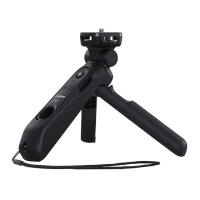
The Canon Tripod Grip HG-100TBR is a versatile handgrip designed to enhance your shooting experience, offering both stability and remote control capabilities. It functions primarily as a handgrip for comfortable camera operation and can also transform into a tripod for stable, hands-free shooting. The device is compatible with a range of Canon cameras, including the PowerShot G5 X Mark II, EOS M200, EOS M6 Mark II, PowerShot G7 X Mark III, and EOS M50, with ongoing compatibility for newer models released after October 2019.
At its core, the HG-100TBR serves as a robust handgrip, allowing users to hold their camera securely while shooting. A key feature is the integrated Wireless Remote Control BR-E1, which enables remote operation of the camera, providing convenience for various shooting scenarios, including self-portraits, group shots, or situations where minimizing camera shake is crucial.
Beyond its handgrip function, the device's legs can be extended from the grip portion, converting it into a stable tripod. This transformation allows for steady shots, long exposures, or time-lapse photography without the need for a separate tripod. The camera mount offers adjustable angles, with a front/back tilt that can be locked every 15 degrees and a left/right rotation that locks every 90 degrees. This flexibility ensures that you can achieve the desired camera orientation for both horizontal and vertical shooting.
A notable feature of the HG-100TBR is its support for external microphones. For cameras without a hot shoe, or when you want to minimize camera or lens operation sounds, the included microphone brackets (L and S) can be used to attach an external microphone. This is particularly useful for videographers looking to capture high-quality audio. The microphone brackets are designed to be attached to the camera mount, allowing the microphone to be positioned effectively for both horizontal and vertical video shooting.
Setting up the HG-100TBR is straightforward. The included wrist strap can be easily attached to the strap mount on the grip's body, providing an extra layer of security during handheld use. The Wireless Remote Control BR-E1 is designed to integrate seamlessly into the grip. To attach it, the BR-E1 is angled and pressed upward into the rubber portion of the grip, then its bottom is swung into the grip's body, securing it in place. Removal is just as simple, by pulling outward on the BR-E1's strap hole.
When attaching a camera, it's important to align the camera monitor with the BR-E1 button panel for horizontal shooting. The camera is then secured by inserting the tripod screw into the camera's tripod socket and turning the attach/detach dial. For vertical shooting, the camera is attached with its monitor facing the same direction as leg R, and the camera mount is then rotated 90 degrees.
Adjusting the camera's angle is intuitive. To tilt the camera mount, you press and hold the front/back lock release button, adjust the angle, and then release the button to lock it in place. Similarly, for turning the camera mount, the left/right lock release button is pressed, the mount is rotated, and the button is released. It's crucial to hold the camera when adjusting its angle to prevent pinching fingers or dropping the camera.
When using the device as a tripod, the legs R/L are bent outward and opened all the way to ensure maximum stability. It's recommended to place the tripod on a level surface to prevent wobbling and potential falls. For vertical shooting in tripod mode, the camera mount is set as shown in the manual, and it's advised to remove the BR-E1 and use it for remote control, especially in windy conditions or areas with vibration, to avoid instability.
Attaching an external microphone involves a few steps. For horizontal shooting, after attaching the camera, microphone bracket L is inserted into the camera mount. The external microphone is then attached to bracket L, and its connector is plugged into the camera's external microphone IN terminal. For vertical shooting, microphone bracket S is first inserted into microphone bracket L, which is then inserted into the camera mount. The external microphone is attached to bracket S, and its connector is plugged into the camera.
The HG-100TBR is designed for durability, but proper handling is essential for its longevity. It can withstand a maximum weight of 1 kg (35.3 oz), and exceeding this limit with the mounted camera, lens, and accessories may lead to product breakage.
For safety, it's important to keep the product out of reach of young children, as small parts could be swallowed, and the wrist strap poses a strangulation risk. The device should not be disassembled or modified, nor should it be exposed to strong shocks or vibration. When cleaning, avoid using organic solvents such as alcohol, benzine, or paint thinner; instead, use appropriate cleaning methods as recommended for electronic devices.
Temperature extremes should also be avoided; do not leave the product in places exposed to extremely high or low temperatures, as it could become very hot or cold and cause burns or injury upon touching. When handling the strap, ensure it's used only on the body and not hung with the product attached on hooks or other objects, as this could damage the device. Avoid shaking the product or exposing it to strong impacts.
During operation, especially when opening or closing the tripod legs, be mindful of your fingers to prevent them from getting caught. When adjusting the camera mount, always hold the camera to prevent accidental drops or pinching. Before changing rotation angles, ensure your fingers are not obstructing the movement.
When removing the BR-E1, avoid placing your finger in the strap hole after it's detached. When removing external microphones, always disconnect the microphone connector first from the bracket. When detaching microphone brackets from the camera mount, ensure you are not pulling them in a direction that could harm nearby persons or objects.
Finally, when the microphone brackets are not in use, they can be stowed together as shown in the manual, ensuring they are kept safe and organized. The descriptions in the manual are current as of August 2019, and users are encouraged to refer to the Canon Web site for the latest version of the instruction manual.
 General
| Purpose | Action camera |
|---|---|
| Material | Polycarbonate |
| Applicability | Universal |
| Leg lock type | Clamp lock |
| Product color | Black |
| Number of legs | 3 leg(s) |
| Number of leg sections | 1 |
| Maximum weight capacity | 1 kg |
| Manual | Yes |
 Weight and Dimensions
| Weight | 179 g |
|---|---|
| Height (max) | 148.5 mm |





 To Next Page