Chapter 7
7-32
7.12.1.8 Removing the
Pre-Exposure Lamp
0007-8347
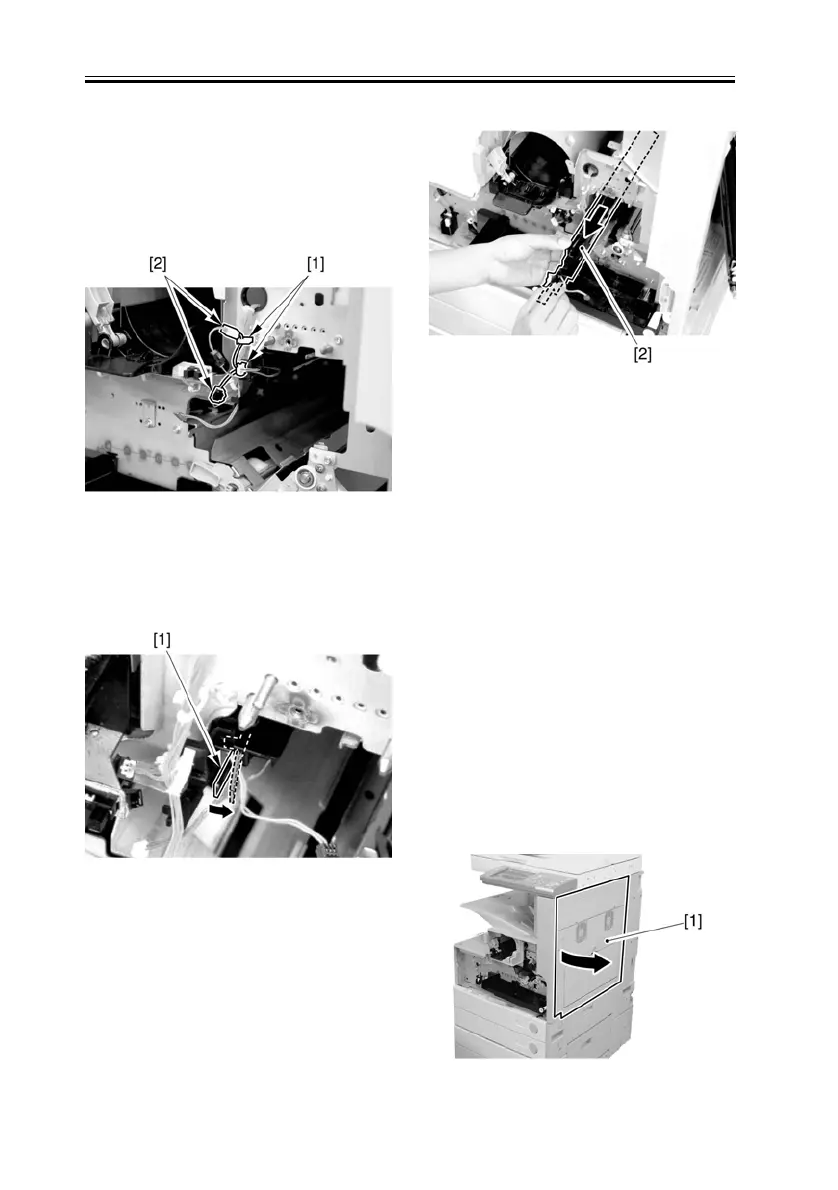
1) Open the 2 wire saddles [1], and
disconnect the 2 relay connectors [2].
F-7-25
2) While freeing the lock [1] toward the
right, detach the pre-exposure lamp [2].
F-7-26
F-7-27
7.12.2 Drum Unit
7.12.2.1 Removing the
Front Cover Unit
0007-8023
Refer to procedure 7.12.1.1
7.12.2.2 Removing the
Waste Toner Case
0007-8030
Refer to procedure 7.12.8
7.12.2.3 Removing the
Drum Unit
0007-8341
1) Open the right door [1].
F-7-28






 To Next Page