A171
My Image Garden Guide > My Image Garden Screens > Main Screen > Folder View
Folder View
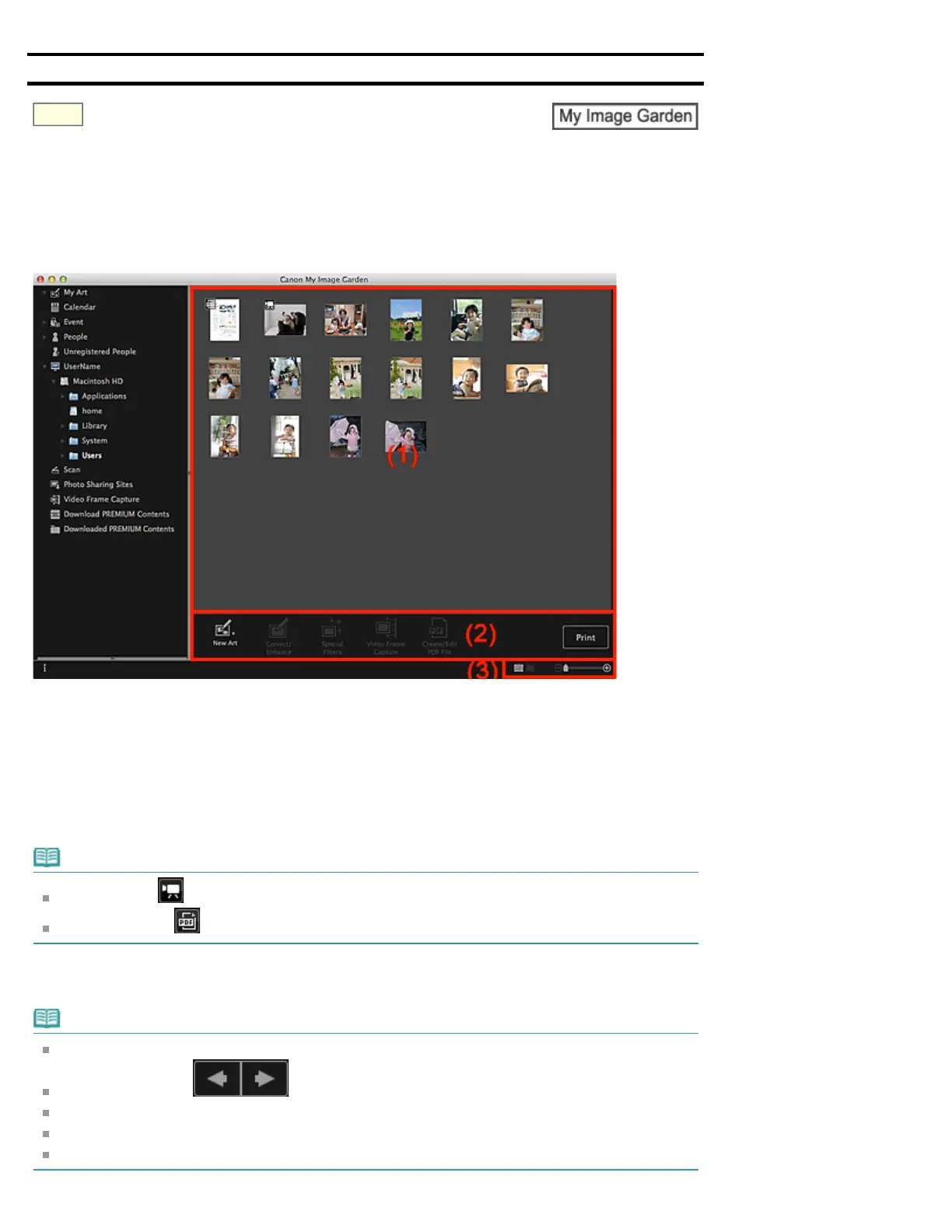
Images, PDF files and videos in the specified folder appear as thumbnails.
Click the folder in the folder tree on the left side of the screen to switch to the folder view.
(1) Thumbnails Area
(2) Operation Buttons
(3) Display Size Setting Bar
(1) Thumbnails Area
Displays the thumbnails of images, PDF files and videos in the selected folder.
Note
For videos, the (Video) mark appears on the upper left of the thumbnails.
For PDF files, the (PDF) mark appears on the upper left of the thumbnails.
(2) Operation Buttons
Note
New Art appears only in the thumbnail view.
Specify Person and (Previous File/Next File) appear only in the details view.
Correct/Enhance and Special Filters can be clicked only when an image is selected.
Create/Edit PDF File can be clicked only when an image or PDF file is selected.
Video Frame Capture can be clicked only when a video is selected.


 To Next Page