4
(D)
(A)
(E)
1
3
FINE 카트리지 설치하기
FINE 카트리지 홀더가 오른쪽으로 이동하면 스캔 유닛(커버)을 닫고 다시 이를 엽니다.
FINE 카트리지 홀더가 가운데로 이동하지 않으면 전원이 꺼져 있는지 확인합니다.
•
•
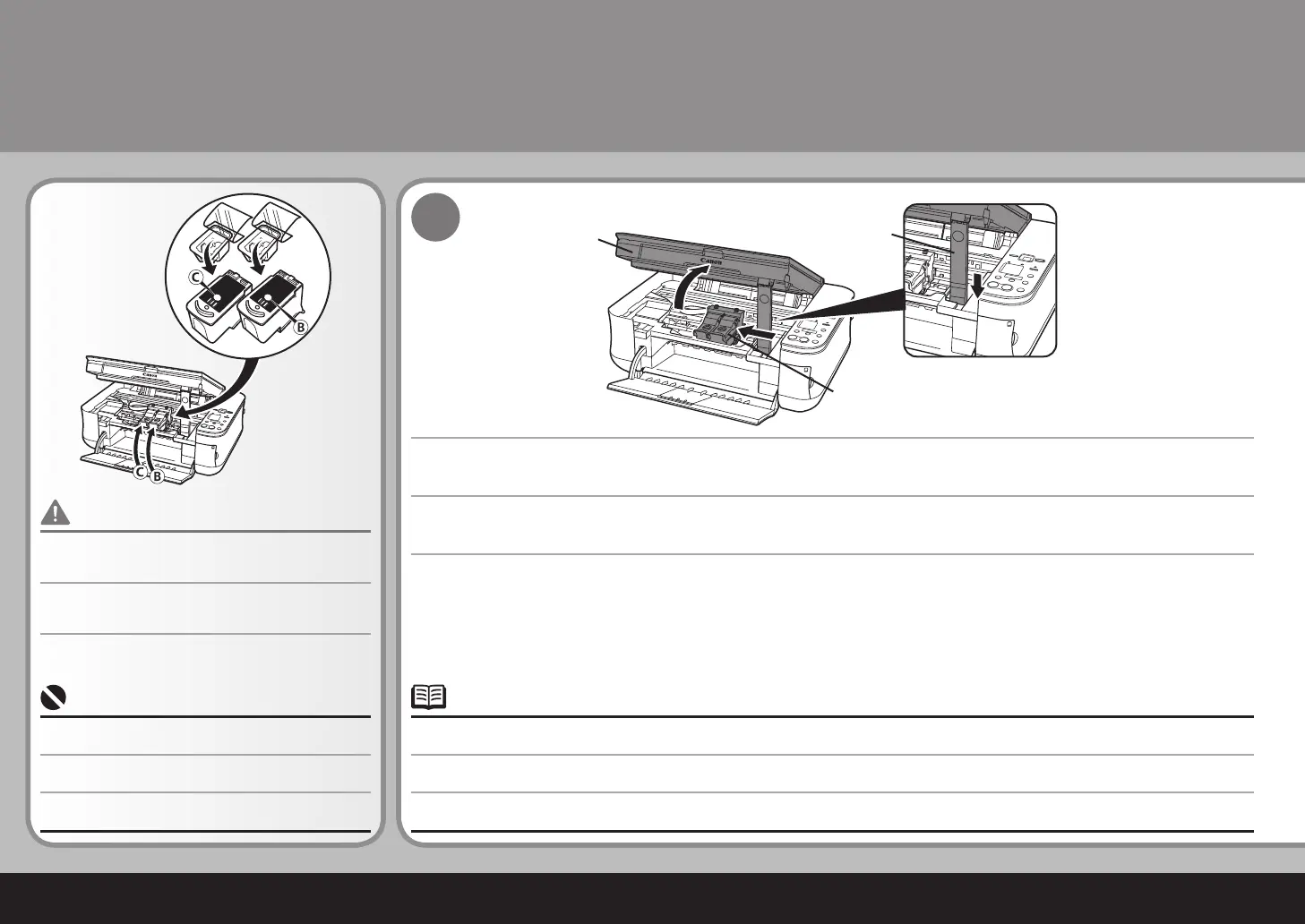
스캔 유닛(커버)(A)을 제자리에 잠길 때까지 듭니다.
스캔 유닛 받침대(D)가 자동으로 고정됩니다. FINE 카트리지 홀더(E)가 가운데로 이동합니다.(이는 카트리지를 설치한 위치입니다.)
제공된 FINE 카트리지를 사용하도록 하십시오.•
FINE 카트리지에 지나친 압력을 가하거나 이를 떨어뜨리
는 것과 같이 거칠게 다루지 마십시오.
•
安裝墨盒 (FINE Cartridge)
如果墨盒 (FINE Cartridge) 固定座返回至右側,關閉掃描單元 ( 機蓋 )並重新開啟。
如果墨盒 (FINE Cartridge) 固定座未移至中央,確保電源已開啟。
•
•
抬起掃描單元 ( 機蓋 )(A) 直至其鎖定到位。
掃描單元支架 (D) 自動地固定。墨盒 (FINE Cartridge) 固定座 (E) 移至中央。( 安裝墨盒的位置。)
務必使用隨附的墨盒 (FINE Cartridge)。
•
請勿粗略處理墨盒 (FINE Cartridge),例如過度用力擠壓
或掉下。
•
Lift the Scanning Unit (Cover) (A) until it locks into place.
Install the FINE Cartridges
If the FINE Cartridge Holder returns to the right, close the Scanning Unit (Cover) and reopen it.
If the FINE Cartridge Holder does not come out to the center, make sure that the power is turned on.
•
•
The Scanning Unit Support (D) is fixed automatically. The FINE Cartridge Holder (E) comes out to the center. (This is where you install the
cartridges.)
Be sure to use the supplied FINE Cartridges.•
Do not handle the FINE Cartridges roughly such as
applying them excessive pressure or dropping them.
•



 To Next Page