1-3. Special Tools
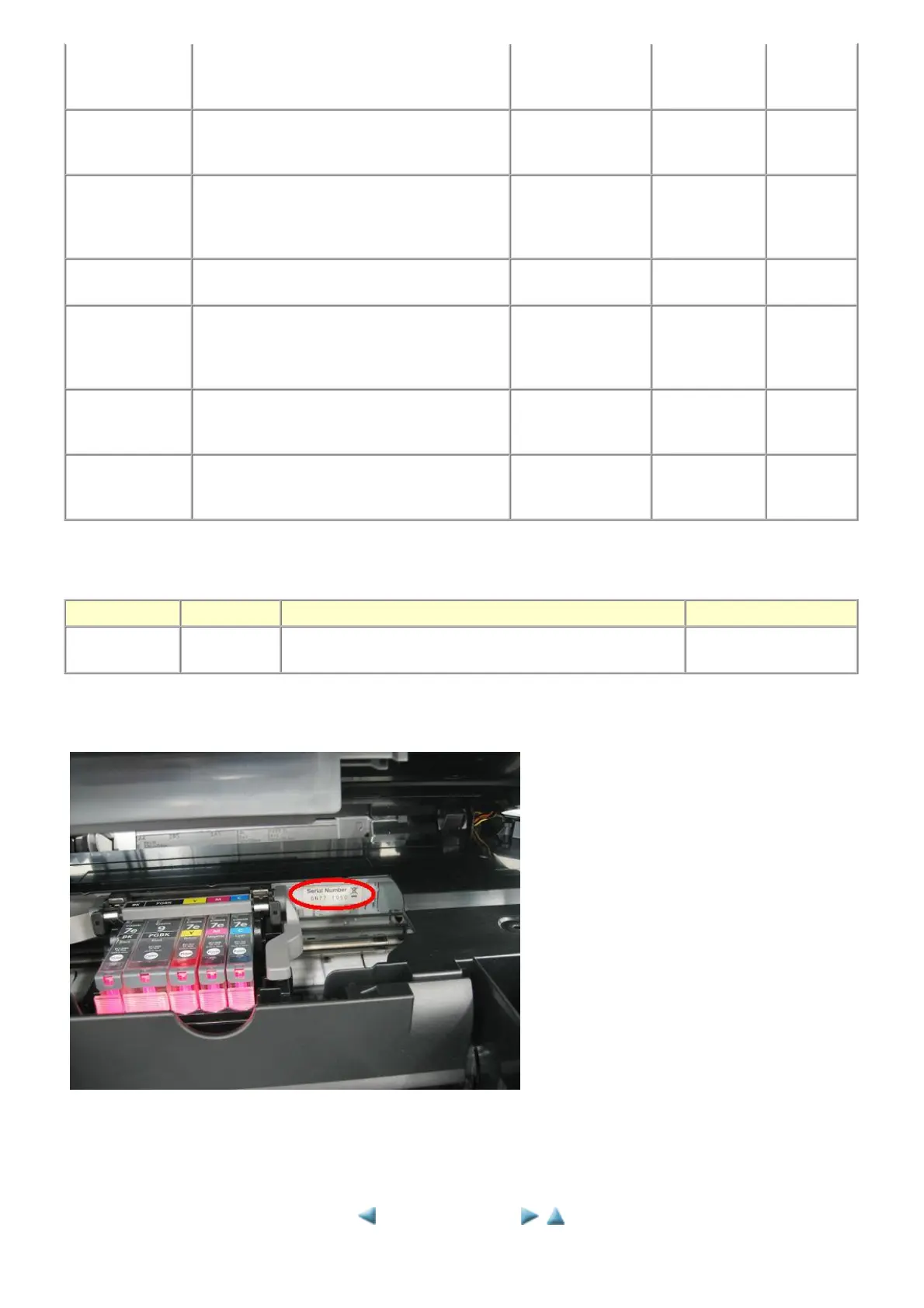
1-4. Serial Number Location
On the carriage flexible cable holder (visible on the right of the carriage after the machine is turned on, the scanning unit is opened, and
the carriage stops at the ink tank replacement position)
cleaning improved by print head cleaning. conditions. buttons
- Computer (MP
driver)
Ink tank
replacement
When an ink tank becomes empty. ("No ink error"
displayed on the monitor or on the machine LCD,
or short flashing of an ink tank LED)
To replace the empty
ink tank.
--- 1 min.
Paper feed roller
cleaning
- When paper does not feed properly.
- When the front side of the paper is smeared.
To clean the paper
feed rollers of the
rear tray.
- Machine
buttons
- Computer (MP
driver)
2 min.
Rear tray sub-
roller cleaning
When the paper fed from the rear tray is smeared
due to ink mist attached to the rear tray sub-rollers.
To clean the rear tray
sub-rollers.
- Machine
buttons
1 min.
Bottom plate
cleaning
When the back side of the paper is smeared. To clean the platen
ribs.
- Machine
buttons
- Computer (MP
driver)
1 min.
Scanning area
cleaning
When the platen glass or document pressure plate
sheet is dirty.
To clean the platen
glass and plate sheet.
Soft, dry, and
clean lint-free
cloth.
1 min.
Exterior cleaning When necessary To clean the machine
exterior
Soft, dry, and
clean lint-free
cloth.
1 min.
Name Tool No. Application Remarks
FLOIL KG-107A QY9-0057-000
To the carriage shaft sliding portions, lift cam bushing, and Easy-
Scroll Wheel base.
In common with the
MP600, etc.
<1. MAINTENANCE>












 To Next Page