
 Need help?
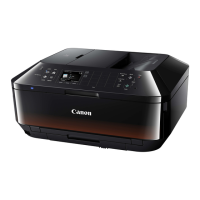
Do you have a question about the Canon PIXMA MX924 Series and is the answer not in the manual?
Unpack the printer and connect power, ink cartridges, and USB cables for initial setup.
Load plain paper into the paper output tray and the lower paper cassette.
Open the scanner unit, load paper into the cassette, and then close the unit.
Select the preferred display language and country or region for printer settings.
Choose to set up wireless LAN or proceed with other connection methods like USB.
Perform head alignment using specified paper to ensure optimal print quality.
Initiate the printer cleaning cycle, which takes approximately 3 minutes to complete.
Select USB or wired/wireless LAN connection for printer use via computer.
 General
| Print Technology | Inkjet |
|---|---|
| Print Resolution | Up to 9600 x 2400 dpi |
| Print Speed (Mono) | 15 ipm |
| Print Speed (Color) | 10 ipm |
| Duplex Printing | Automatic |
| Scanner Type | Flatbed, ADF |
| Fax | Yes |
| Functions | Print, Copy, Scan, Fax |
| Photo Print Speed | Approx. 21 seconds |
| Fax Type | Super G3 |
| Paper Input (Maximum) | 250 sheets |
| Dimensions | 491 x 396 x 231 mm |
| Weight | 11.7 kg |
| Connectivity | USB, Ethernet, Wi-Fi |
| Fax Resolution | 300 x 300 dpi |
| Paper Sizes | Letter, Legal, A4, A5, B5, Envelopes |
| Interface Type - PC / Mac | USB 2.0, Ethernet, Wi-Fi |
| Memory Card Support | Yes |
| Scan Resolution | 2400 x 4800 dpi |
| Paper Handling | 250-sheet input tray |
| Display | 3.0" TFT colour display |










 To Next Page