EasyManua.ls Logo

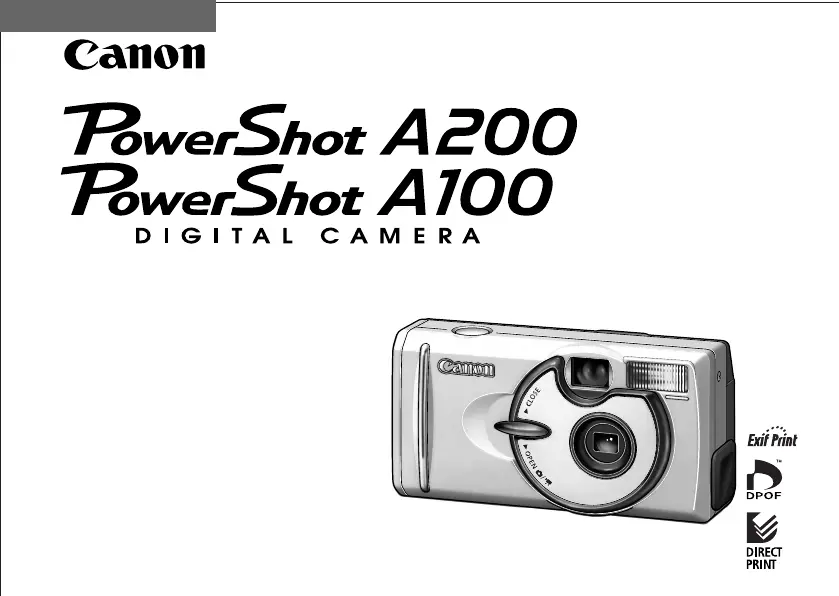
Canon PowerShot A200 - User Manual

Canon PowerShot A200
120 pages
Print Icon
To Next Page IconTo Next Page
Loading...
Camera User Guide
This guide covers both the PowerShot A200 and PowerShot A100 digital cameras.
Please read the "Read this First" section (p.11).
Please refer to the "Software Starter Guide" for
information on installing the software and
downloading images.
Please read the "Quick Start" section on the
following page for a simple explanation of
shooting, replaying and erasing.
Please also read the "Printer User Guide"
included with your Canon printer.
ENGLISH
2002 CANON INC.

Table of Contents

Other manuals for Canon PowerShot A200

Questions and Answers

Summary

Quick Start

Components Guide

Front View

Diagram and labels for the camera's front view.

Back View

Diagram and labels for the camera's back view.

Operation Panel

Explanation of the camera's operation panel buttons and indicators.

About this Camera User Guide

Read this First

Accessories

Information regarding compatible accessories for optimal camera performance.

Camera Body Temperature

Notes on camera body temperature during prolonged use.

About the LCD Monitor

Details about LCD monitor pixel specifications and potential minor defects.

Language Setting

Instructions on how to change the display language for menus and messages.

Test Shots

Recommendation to shoot trial images for confirmation of correct camera operation.

Warning Against Copyright Infringement

Guidelines on personal use and respecting international copyright laws.

Warranty Limitations

Information about the supplied Canon European Warranty System (EWS) booklet.

Safety Precautions

General safety precautions before camera operation to prevent injuries or damage.

WARNINGS

Critical warnings related to eye safety, child safety, and equipment handling.

CAUTIONS

Important cautions regarding environmental factors and handling to prevent damage.

Preventing Malfunctions

Advice on avoiding magnetic fields, condensation, and proper extended storage.

Preparing the Camera

Installing the Battery and CF Card

Step-by-step guide to install batteries and CF card into the camera.

Proper Battery Handling

Guidelines for handling AA-size and NiMH batteries for optimal performance.

Battery Status Indications

How to interpret battery status icons and messages on the LCD.

About CF Cards

Information on handling CF cards and suitable/unsuitable storage locations.

Setting the Date; Time

Procedure to set the camera's date and time for accurate recording.

Setting the Language

Instructions to set the display language for menus and messages on the LCD.

Using the Soft Case (Optional)

Guide on using the optional soft case for storing the camera and accessories.

Basic Functions

Turning the Power ON; OFF

Steps to turn the camera on and off in shooting and replay modes.

Using the LCD Monitor

Using the LCD monitor for shooting, image review, and menu navigation.

Using the Viewfinder

How to use the viewfinder for shooting and reducing power consumption.

Pressing the Shutter Button

How to use the shutter button halfway for focus/exposure and fully to take a picture.

Reviewing an Image Right After Shooting

How to view images immediately after shooting on the LCD.

Using the Digital Zoom

How to adjust digital zoom for enlarging or reducing the subject.

Selecting Menus and Settings

Procedure to navigate and select menu items and settings for camera operation.

Menu Settings and Default Settings

Chart showing menu items, available settings, and default options for camera configuration.

Shooting

Selecting the Shooting Mode

Guide to selecting shooting modes like Auto, Manual, Stitch Assist, and Movie.

Changing the Resolution; Compression

How to adjust image resolution and compression settings for desired quality and file size.

Using the Flash

Explanation of different flash modes (Auto, Red-Eye, On, Off, Slow-Synchro) and their usage.

Macro; Infinity Modes

Using Macro and Infinity modes for close-up shots and landscapes with distant objects.

Continuous Mode

How to use continuous shooting mode for rapid image capture.

Self-Timer

Using the self-timer function for delayed shots.

Stitch Assist Mode

Guide to using Stitch Assist mode for creating panoramic images.

Movie Mode

Instructions for recording video clips with the camera, including resolution settings.

Using the Focus Lock

How to use focus lock for subjects not suited to autofocus photography.

Switching Between Autofocus Modes

How to switch between AiAF (automatic selection) and center AF focus modes.

Adjusting the Exposure

How to adjust exposure compensation for brighter or darker images.

WB Setting the White Balance

How to set white balance to match different light sources for accurate color reproduction.

Switching Between Photo Effect Modes

Using different photo effect modes like Vivid, Neutral, Sepia, and B/W.

Changing the ISO Speed

How to adjust ISO speed for shooting in low light or achieving faster shutter speeds.

Resetting the File Number

How to reset or manage file numbering for images, ensuring unique filenames.

Replaying

Displaying Images Individually

How to view recorded images one at a time on the LCD monitor.

Magnifying Images

How to zoom in on images for closer inspection and detail review.

Viewing Images in Sets of 9

How to view nine images simultaneously on the LCD (Index View) for quick searching.

Changing the Displayed Images

How to change the images displayed in index view using navigation buttons.

Viewing Movies

How to play back recorded movie clips, including pausing and resuming.

Rotating Images in the Display

How to rotate images by 90° or 270° clockwise in the LCD monitor.

Auto Play

How to automatically replay all images from the CF card with a set display interval.

Protecting Images

How to protect important images from accidental erasure or deletion.

Erasing

Erasing Images Individually

Procedure to erase single images from the CF card, with confirmation.

Erasing All Images

How to erase all images from the CF card at once, with confirmation.

Formatting a CF Card

How to format a CF card before use or to resolve card corruption issues.

Printing

About Printing

Overview of printing options via direct connection or DPOF for easy image printing.

Selecting from the Print Order Menu

How to select print settings using the print order menu for direct printing.

Connecting the Camera to a Printer

Steps to connect the camera to a compatible printer using direct interface cables.

Print Settings (Direct Print Function)

How to specify print settings like copies, style, and area for direct printing.

Specifying the Printing Area

How to select the desired printing area for images, applicable with borderless/multiple styles.

DPOF Print Settings

How to select images and set print quantities for DPOF printing at photo labs.

Setting the Print Style

Detailed guide to setting print styles, including date and file number inclusion.

Printing with DPOF Print Settings

How to print using DPOF settings with an optional direct print function compliant printer.

Image Transfer Settings (DPOF Transfer Order)

Setting the Image Transfer

How to specify images for transfer and attachment to emails using DPOF standards.

Downloading Images to a Computer

Downloading Directly from a CF Card

Steps to download images from CF card using a card reader to a computer.

Connecting the Camera to a Computer Via the USB Cable

How to connect the camera to a computer using a USB cable for image transfer.

List of Menu Options and Messages

Rec. Menu (1;2)

List of Recording menu options and their settings with default values.

Rec. Menu (2;2)

List of remaining Recording menu options and their settings.

Play Menu

List of Play menu options and their functions for image review and management.

Set up Menu

List of Set up menu options and their settings for camera configuration.

Resetting the Settings to Default

How to reset all camera settings to their default values, excluding Date/Time and Language.

List of Messages

Explanation of messages that may appear on the LCD monitor and their meanings.

Appendices

Replacing the Date Battery

Step-by-step guide to replace the camera's date battery when it runs down.

Using the Optional Battery Kits

Guide on using rechargeable batteries and the battery charger kit for power.

Using the Household Power Source

How to use the AC adapter kit for continuous power when using the camera.

Camera Care and Maintenance

Methods for cleaning the camera body, lens, viewfinder, and LCD monitor to maintain performance.

Troubleshooting

The camera doesnt function

Solutions for problems when the camera does not function, such as power or battery issues.

The camera doesnt shoot

Solutions for issues preventing the camera from shooting, like card full or charging flash.

The batteries are consumed quickly

Troubleshooting steps for rapid battery depletion, checking battery type and handling.

If using rechargeable batteries: Batteries do not charge

Solutions for problems with rechargeable batteries not charging, checking terminals and connections.

Shots are blurry or unfocused

Solutions for blurry or unfocused images due to camera movement or focus issues.

The subject comes out underexposed (too dark)

Solutions for underexposed subjects caused by insufficient light or background settings.

The subject comes out overexposed (too bright)

Solutions for overexposed subjects caused by bright surroundings or incorrect flash settings.

The flash doesnt fire

Troubleshooting steps when the flash does not fire, checking flash modes and settings.

Specifications

Battery Performance

Estimated number of shots and replay time based on battery type and LCD usage.

CF Cards and Estimated Capacities (Recordable Images)

Table showing CF card capacities for different resolutions and movie lengths.

Approximate File Size for One Image

Table showing approximate file sizes for images at different resolutions and compressions.

Summary

Quick Start

Components Guide

Front View

Diagram and labels for the camera's front view.

Back View

Diagram and labels for the camera's back view.

Operation Panel

Explanation of the camera's operation panel buttons and indicators.

About this Camera User Guide

Read this First

Accessories

Information regarding compatible accessories for optimal camera performance.

Camera Body Temperature

Notes on camera body temperature during prolonged use.

About the LCD Monitor

Details about LCD monitor pixel specifications and potential minor defects.

Language Setting

Instructions on how to change the display language for menus and messages.

Test Shots

Recommendation to shoot trial images for confirmation of correct camera operation.

Warning Against Copyright Infringement

Guidelines on personal use and respecting international copyright laws.

Warranty Limitations

Information about the supplied Canon European Warranty System (EWS) booklet.

Safety Precautions

General safety precautions before camera operation to prevent injuries or damage.

WARNINGS

Critical warnings related to eye safety, child safety, and equipment handling.

CAUTIONS

Important cautions regarding environmental factors and handling to prevent damage.

Preventing Malfunctions

Advice on avoiding magnetic fields, condensation, and proper extended storage.

Preparing the Camera

Installing the Battery and CF Card

Step-by-step guide to install batteries and CF card into the camera.

Proper Battery Handling

Guidelines for handling AA-size and NiMH batteries for optimal performance.

Battery Status Indications

How to interpret battery status icons and messages on the LCD.

About CF Cards

Information on handling CF cards and suitable/unsuitable storage locations.

Setting the Date; Time

Procedure to set the camera's date and time for accurate recording.

Setting the Language

Instructions to set the display language for menus and messages on the LCD.

Using the Soft Case (Optional)

Guide on using the optional soft case for storing the camera and accessories.

Basic Functions

Turning the Power ON; OFF

Steps to turn the camera on and off in shooting and replay modes.

Using the LCD Monitor

Using the LCD monitor for shooting, image review, and menu navigation.

Using the Viewfinder

How to use the viewfinder for shooting and reducing power consumption.

Pressing the Shutter Button

How to use the shutter button halfway for focus/exposure and fully to take a picture.

Reviewing an Image Right After Shooting

How to view images immediately after shooting on the LCD.

Using the Digital Zoom

How to adjust digital zoom for enlarging or reducing the subject.

Selecting Menus and Settings

Procedure to navigate and select menu items and settings for camera operation.

Menu Settings and Default Settings

Chart showing menu items, available settings, and default options for camera configuration.

Shooting

Selecting the Shooting Mode

Guide to selecting shooting modes like Auto, Manual, Stitch Assist, and Movie.

Changing the Resolution; Compression

How to adjust image resolution and compression settings for desired quality and file size.

Using the Flash

Explanation of different flash modes (Auto, Red-Eye, On, Off, Slow-Synchro) and their usage.

Macro; Infinity Modes

Using Macro and Infinity modes for close-up shots and landscapes with distant objects.

Continuous Mode

How to use continuous shooting mode for rapid image capture.

Self-Timer

Using the self-timer function for delayed shots.

Stitch Assist Mode

Guide to using Stitch Assist mode for creating panoramic images.

Movie Mode

Instructions for recording video clips with the camera, including resolution settings.

Using the Focus Lock

How to use focus lock for subjects not suited to autofocus photography.

Switching Between Autofocus Modes

How to switch between AiAF (automatic selection) and center AF focus modes.

Adjusting the Exposure

How to adjust exposure compensation for brighter or darker images.

WB Setting the White Balance

How to set white balance to match different light sources for accurate color reproduction.

Switching Between Photo Effect Modes

Using different photo effect modes like Vivid, Neutral, Sepia, and B/W.

Changing the ISO Speed

How to adjust ISO speed for shooting in low light or achieving faster shutter speeds.

Resetting the File Number

How to reset or manage file numbering for images, ensuring unique filenames.

Replaying

Displaying Images Individually

How to view recorded images one at a time on the LCD monitor.

Magnifying Images

How to zoom in on images for closer inspection and detail review.

Viewing Images in Sets of 9

How to view nine images simultaneously on the LCD (Index View) for quick searching.

Changing the Displayed Images

How to change the images displayed in index view using navigation buttons.

Viewing Movies

How to play back recorded movie clips, including pausing and resuming.

Rotating Images in the Display

How to rotate images by 90° or 270° clockwise in the LCD monitor.

Auto Play

How to automatically replay all images from the CF card with a set display interval.

Protecting Images

How to protect important images from accidental erasure or deletion.

Erasing

Erasing Images Individually

Procedure to erase single images from the CF card, with confirmation.

Erasing All Images

How to erase all images from the CF card at once, with confirmation.

Formatting a CF Card

How to format a CF card before use or to resolve card corruption issues.

Printing

About Printing

Overview of printing options via direct connection or DPOF for easy image printing.

Selecting from the Print Order Menu

How to select print settings using the print order menu for direct printing.

Connecting the Camera to a Printer

Steps to connect the camera to a compatible printer using direct interface cables.

Print Settings (Direct Print Function)

How to specify print settings like copies, style, and area for direct printing.

Specifying the Printing Area

How to select the desired printing area for images, applicable with borderless/multiple styles.

DPOF Print Settings

How to select images and set print quantities for DPOF printing at photo labs.

Setting the Print Style

Detailed guide to setting print styles, including date and file number inclusion.

Printing with DPOF Print Settings

How to print using DPOF settings with an optional direct print function compliant printer.

Image Transfer Settings (DPOF Transfer Order)

Setting the Image Transfer

How to specify images for transfer and attachment to emails using DPOF standards.

Downloading Images to a Computer

Downloading Directly from a CF Card

Steps to download images from CF card using a card reader to a computer.

Connecting the Camera to a Computer Via the USB Cable

How to connect the camera to a computer using a USB cable for image transfer.

List of Menu Options and Messages

Rec. Menu (1;2)

List of Recording menu options and their settings with default values.

Rec. Menu (2;2)

List of remaining Recording menu options and their settings.

Play Menu

List of Play menu options and their functions for image review and management.

Set up Menu

List of Set up menu options and their settings for camera configuration.

Resetting the Settings to Default

How to reset all camera settings to their default values, excluding Date/Time and Language.

List of Messages

Explanation of messages that may appear on the LCD monitor and their meanings.

Appendices

Replacing the Date Battery

Step-by-step guide to replace the camera's date battery when it runs down.

Using the Optional Battery Kits

Guide on using rechargeable batteries and the battery charger kit for power.

Using the Household Power Source

How to use the AC adapter kit for continuous power when using the camera.

Camera Care and Maintenance

Methods for cleaning the camera body, lens, viewfinder, and LCD monitor to maintain performance.

Troubleshooting

The camera doesnt function

Solutions for problems when the camera does not function, such as power or battery issues.

The camera doesnt shoot

Solutions for issues preventing the camera from shooting, like card full or charging flash.

The batteries are consumed quickly

Troubleshooting steps for rapid battery depletion, checking battery type and handling.

If using rechargeable batteries: Batteries do not charge

Solutions for problems with rechargeable batteries not charging, checking terminals and connections.

Shots are blurry or unfocused

Solutions for blurry or unfocused images due to camera movement or focus issues.

The subject comes out underexposed (too dark)

Solutions for underexposed subjects caused by insufficient light or background settings.

The subject comes out overexposed (too bright)

Solutions for overexposed subjects caused by bright surroundings or incorrect flash settings.

The flash doesnt fire

Troubleshooting steps when the flash does not fire, checking flash modes and settings.

Specifications

Battery Performance

Estimated number of shots and replay time based on battery type and LCD usage.

CF Cards and Estimated Capacities (Recordable Images)

Table showing CF card capacities for different resolutions and movie lengths.

Approximate File Size for One Image

Table showing approximate file sizes for images at different resolutions and compressions.

Canon PowerShot A200 Specifications

General IconGeneral
Megapixel2 MP
Digital zoom4 x
Digital SLRNo

Related product manuals