EasyManua.ls Logo

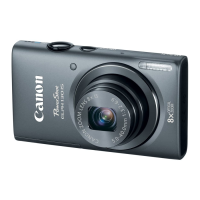
Canon PowerShot ELPH 140 IS - User Manual

Canon PowerShot ELPH 140 IS
119 pages
Print Icon
To Next Page IconTo Next Page
Loading...
1
Before Use
Basic Guide
Advanced Guide
Camera Basics
Auto Mode
Other Shooting
Modes
P Mode
Playback Mode
Setting Menu
Accessories
Appendix
Index
Camera User Guide
ENGLISH
©CANON INC. 2014 CDD-E570-010
• Click the buttons in the lower right to access other pages.
: Next page
: Previous page
: Page before you clicked a link
• To jump to the beginning of a chapter, click the chapter
title at right.
From chapter title pages, you can access topics by
clicking their titles.
• Make sure you read this guide, including the “Safety
Precautions” section (=
7), before using the camera.
• Reading this guide will help you learn to use the camera
properly.
• Store this guide safely so that you can use it in the
future.
Downloaded From camera-usermanual.com Canon Manuals

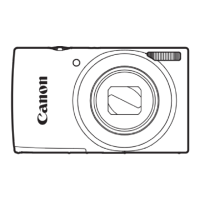
Table of Contents

Questions and Answers

  • D
    David WhiteSep 4, 2025
    Why are subjects in flash shots too bright, highlights washed-out on my Canon Digital Camera?
    • R
      Roger BullockSep 4, 2025
      If subjects in flash shots look too bright with washed-out highlights, try these solutions: * Shoot within flash range. * Set the flash mode to [!].
  • J
    Jared RobinsonSep 18, 2025
    Why is no date stamp added to images on my Canon PowerShot ELPH 140 IS?
    • S
      Stephen BakerSep 18, 2025
      Configure the [Date Stamp] setting. Note that date stamps are not added to images automatically, merely because you have configured the [Date/Time] setting. Date stamps are not added in shooting modes in which this setting cannot be configured.
  • S
    Stephen HillSep 16, 2025
    Why are there white dots or similar image artifacts in flash shots taken with my Canon PowerShot ELPH 140 IS Digital Camera?
    • R
      Rachael PotterSep 16, 2025
      This issue is caused by light from the flash reflecting off dust or airborne particles.
  • P
    Paul RushSep 14, 2025
    Why does my Canon Digital Camera show strange display on the screen when shooting?
    • D
      Danielle ZunigaSep 14, 2025
      The screen may darken under bright light. The screen may flicker under fluorescent or LED lighting. Purplish banding may appear on the screen if you compose a shot that includes a bright light source.
  • H
    hskinnerSep 13, 2025
    Why are shooting settings or FUNC. menu settings not available on my Canon Digital Camera?
    • B
      Brandon SmithSep 13, 2025
      Available setting items vary by shooting mode. Refer to “Functions Available in Each Shooting Mode”, “FUNC. Menu”, and “Shooting Tab Menu”.
  • R
    Regina MartinSep 12, 2025
    Why is the lens not retracted on my Canon PowerShot ELPH 140 IS Digital Camera?
    • B
      barrerateresaSep 12, 2025
      Do not open the memory card/battery cover while the camera is on. Close the cover, turn the camera on, and then turn it off again.
  • P
    Pamela RichardsonSep 9, 2025
    Why is recording to the memory card slow, or continuous shooting slow on my Canon Digital Camera?
    • W
      watsonangelaSep 9, 2025
      If recording to the memory card takes too long, or continuous shooting is slower, use the camera to perform low-level formatting of the memory card.
  • M
    michaelwalkerSep 7, 2025
    What to do if shots look too dark despite the flash firing on my Canon PowerShot ELPH 140 IS Digital Camera?
    • Y
      ykleinSep 7, 2025
      If your shots look too dark even when the flash fires: * Shoot within flash range. * Increase the ISO speed.
  • A
    andrew73Sep 5, 2025
    What to do if no AF frames are displayed and the camera does not focus when the shutter button is pressed halfway on my Canon PowerShot ELPH 140 IS Digital Camera?
    • L
      lhowardSep 5, 2025
      To display AF frames and ensure the camera focuses correctly, compose the shot with higher-contrast subject areas centered before pressing the shutter button halfway. Otherwise, try pressing the shutter button halfway repeatedly.
  • W
    whahnAug 21, 2025
    What to do if shots are out of focus with my Canon PowerShot ELPH 140 IS Digital Camera?
    • S
      Scott FlynnAug 21, 2025
      If your shots are out of focus, try the following: 1. Press the shutter button halfway to focus on subjects before pressing it all the way down to shoot. 2. Ensure subjects are within focusing range. 3. Set [Lamp Setting] to [On]. 4. Deactivate unneeded functions such as macro. 5. Try shooting with focus lock or AF lock.

Canon PowerShot ELPH 140 IS Specifications

General IconGeneral
Sensor TypeCCD
Sensor Size1/2.3 inch
Megapixels16.0 MP
Effective Pixels16.0 MP
Image ProcessorDIGIC 4+
Optical Zoom8x
Digital Zoom4x
ISO Range100 - 1600
LCD Screen Size2.7-inch
Video Frame Rate25 fps
Storage MediaSD/SDHC/SDXC
Shutter Speed1-1/2000 sec
Image StabilizationOptical
LCD Screen Resolution230, 000 dots
Video ResolutionHD 1280 x 720
Focal Length5.0 (W) – 40.0 (T) mm 35mm equivalent: 28 (W) – 224 (T) mm
Aperture Rangef/3.2 (W) - f/6.9 (T)

Related product manuals