To Next Page
M
Michael FoxSep 4, 2025
Why do my Canon Digital Camera shots look grainy?
- Aaaron36Sep 4, 2025
If your Canon Digital Camera shots look grainy, try lowering the ISO speed. High ISO speeds in some shooting modes can cause grainy images.

Why do my Canon Digital Camera shots look grainy?
If your Canon Digital Camera shots look grainy, try lowering the ISO speed. High ISO speeds in some shooting modes can cause grainy images.
Why is playback not possible on my Canon Digital Camera?
Image or movie playback may not be possible on your Canon Digital Camera if a computer is used to rename files or alter the folder structure.
Why does my Canon PowerShot Elph 160 Digital Camera display [ ] and stop shooting?
If your Canon Digital Camera displays [ ] and stops shooting automatically, try using the camera to perform low-level formatting of the memory card. You can also lower the image quality or switch to a memory card that supports high-speed recording.
Why is there no sound during Canon Digital Camera movies?
If there is no sound during movies on your Canon Digital Camera, adjust the volume if you have activated [Mute] or if the sound in the movie is faint.
Why is the elapsed time incorrect or recording interrupted on my Canon PowerShot Elph 160?
If the elapsed time shown is incorrect or recording is interrupted on your Canon Digital Camera, use the camera to format the memory card, or switch to a card that supports high-speed recording.
Why does playback stop or audio skip on my Canon PowerShot Elph 160?
To resolve playback issues like stopping or audio skipping on your Canon Digital Camera, switch to a memory card that you have performed low-level formatting on with the camera. There may be brief interruptions when playing movies copied to memory cards that have slow read speeds. When movies are played on a computer, frames may be dropped and audio may skip if computer performance is inadequate.
How to add a date stamp to Canon PowerShot Elph 160 images?
To add a date stamp to your Canon Digital Camera images, configure the [Date Stamp] setting. Note that date stamps are not added in shooting modes where this setting cannot be configured.
What to do if the lens is not retracted on my Canon Digital Camera?
If the lens on your Canon Digital Camera is not retracting, do not open the memory card/battery cover while the camera is on. Close the cover, turn the camera on, and then turn it off again.
How to reduce red-eye in Canon PowerShot Elph 160 Digital Camera photos?
To reduce red-eye in your Canon Digital Camera photos, set [Lamp Setting] to [On] to activate the red-eye reduction lamp when using the flash. Alternatively, you can edit images later using red-eye correction software.
How to fix a Canon PowerShot Elph 160 Digital Camera that won't turn on?
If your Canon Digital Camera doesn't turn on when you press the power button, make sure the battery pack is charged and inserted correctly. Also, confirm that the memory card/battery cover is fully closed. Dirty battery terminals can also cause this issue; try cleaning them with a cotton swab and reinserting the battery pack a few times.
Guide on capturing portraits and specific scenarios.
Tips for shooting in different environments and conditions.
Enhance images with creative visual effects.
Steps for getting the camera ready for use.
Instructions for the first use and basic shooting.
How to turn the camera on and off.
Explanation of shutter button functions and usage.
Customizing what information is shown on the screen.
Accessing and using the Function menu.
Navigating and configuring camera settings via menus.
Understanding camera status indicators.
 General
| Megapixel | 20 MP |
|---|---|
| Camera type | Compact camera |
| Sensor type | CCD |
| Image stabilizer | No |
| Total megapixels | 20.5 MP |
| Image sensor size | 1/2.3 \ |
| Image formats supported | JPG |
| Supported aspect ratios | 4:3 |
| Maximum image resolution | 5152 x 3864 pixels |
| Still image resolution(s) | 5152 x 3864, 3648 x 2736, 2048 x 1536, 640 x 480, 5152 x 2896, 2560 x 1920 |
| Digital zoom | 4 x |
| Optical zoom | 8 x |
| Combined zoom | 32 x |
| Focal length range | 5 - 40 mm |
| Maximum aperture number | 6.9 |
| Minimum aperture number | 3.2 |
| Maximum focal length (35mm film equiv) | 224 mm |
| Minimum focal length (35mm film equiv) | 28 mm |
| Focus | TTL |
| Focus adjustment | Auto |
| Normal focusing range | 0.05 - ∞ m |
| Auto focusing (AF) modes | - |
| Normal focusing range (tele) | 1.3 - ∞ m |
| Light metering | Centre-weighted, Evaluative (Multi-pattern), Spot |
| ISO sensitivity | 100, 1600, Auto |
| ISO sensitivity (max) | 1600 |
| ISO sensitivity (min) | 100 |
| Auto Exposure (AE) lock | Yes |
| Light exposure correction | ± 2EV (1/3EV step) |
| Fastest camera shutter speed | 1/2000 s |
| Slowest camera shutter speed | 1 s |
| Flash modes | Auto, Slow synchronization, Flash off, Red-eye reduction, Flash on |
| Flash range (tele) | 1.3 - 1.5 m |
| Flash range (wide) | 0.5 - 3 m |
| Flash recharging time | 10 s |
| Video resolutions | 640 x 480, 1280 x 720 pixels |
| Maximum video resolution | 1280 x 720 pixels |
| Internal memory | - MB |
| Compatible memory cards | SD, SDHC, SDXC |
| Field of view | 100 % |
| Display diagonal | 2.7 \ |
| Display resolution (numeric) | 230000 pixels |
| Scene modes | Fireworks, Portrait, Snow |
| Photo effects | Vivid, Black&White |
| White balance | Auto, Cloudy, Custom modes, Daylight, Fluorescent, Fluorescent H, Tungsten |
| Camera playback | Single image, Movie |
| Self-timer delay | 2, 10 s |
| Power source type | AC |
| Battery voltage | 3.6 V |
| Battery capacity | 680 mAh |
| Battery life (max) | 4 h |
| Battery life (CIPA standard) | 230 shots |
| Number of batteries supported | 1 |
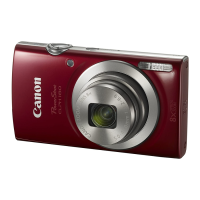
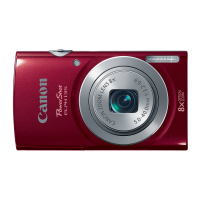
| Product color | Red |
| Operating temperature (T-T) | 0 - 40 °C |
| Operating relative humidity (H-H) | 10 - 90 % |
| Cables included | USB |
| Memory capacity (images) | 230 |
 Weight and Dimensions
| Depth | 22.1 mm |
|---|---|
| Width | 95.2 mm |
| Height | 54.3 mm |
| Weight | 111 g |