EasyManua.ls Logo

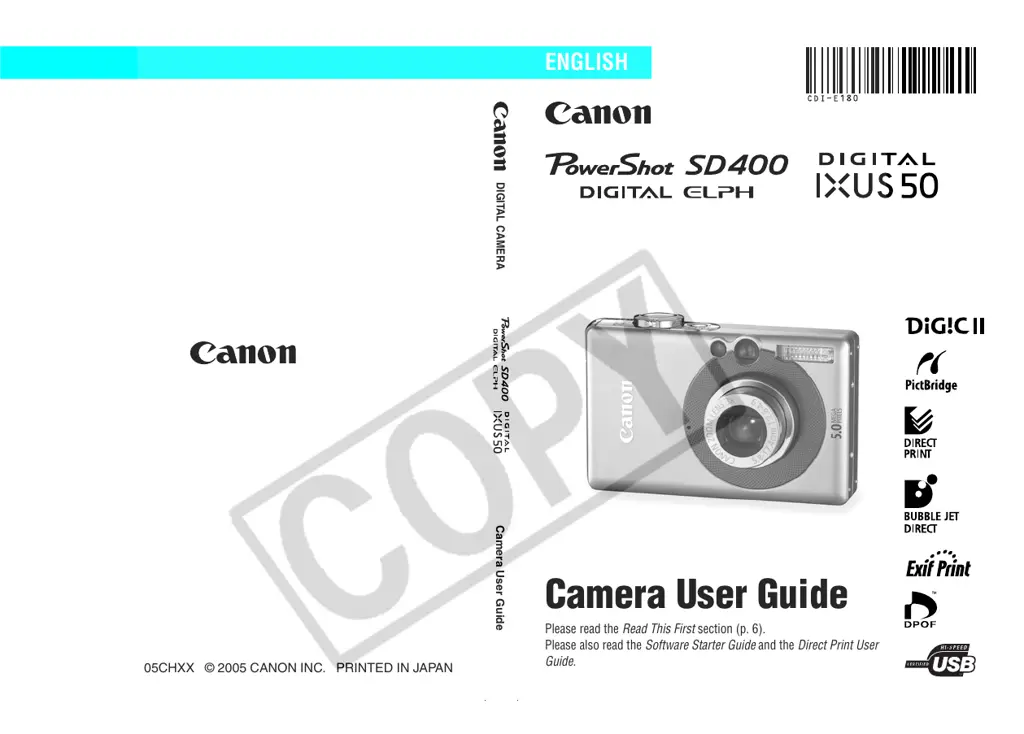
Canon PowerShot SD400 Digital Elph - User Manual

Canon PowerShot SD400 Digital Elph
195 pages
Print Icon
To Next Page IconTo Next Page
Loading...
DIGITAL CAMERA
Camera User Guide
Please read the Read This First section (p. 6).
Please also read the Software Starter Guide and the Direct Print User
Guide.
CDI-E180-010 XX05CHXX © 2005 CANON INC. PRINTED IN JAPAN
Camera User Guide
ENGLISH

Table of Contents

Other manuals for Canon PowerShot SD400 Digital Elph

Questions and Answers

Summary

Flowchart and Reference Guides

Shooting with the Camera

Guide on how to shoot images with the camera.

Installing the Software

Steps for installing the camera's software.

Connecting the Camera to a Computer

Instructions for connecting the camera to a computer.

Downloading Images to a Computer

Process for transferring images from the camera to a computer.

Using the Printer and Printing

Guidance on using printers with the camera.

Read This First

Please Read

General advice and recommendations before using the camera.

Test Shots

Recommendation to take trial images before important shoots.

Warning Against Copyright Infringement

Notes on personal use and copyright law for digital cameras.

Warranty Limitations

Information regarding the camera's warranty effectiveness and claims.

Safety Precautions

Warnings

Important safety warnings related to camera operation and handling.

Storing SD cards

Precautions for storing SD memory cards safely.

Preventing Malfunctions

Avoid Strong Magnetic Fields

Guidance on avoiding magnetic fields to prevent camera issues.

Avoid Condensation Related Problems

Tips for preventing condensation issues when changing temperatures.

If Condensation Forms Inside the Camera

Actions to take if condensation is detected inside the camera.

Extended Storage

Recommendations for storing the camera for extended periods.

Components Guide

Front View

Diagram and labels for the camera's front components.

Terminal Cover

Information about the camera's terminal cover and its function.

Preparing the Camera

Charging the Battery Pack

Procedure for charging the camera battery pack.

Formatting SD Cards

Setting the Date and Time

Setting the Language

Basic Functions

Turning the Power On

Steps to turn the camera on and off, including sound options.

Using the LCD Monitor

Information Displayed on the LCD Monitor

Shooting Information (Shooting Mode)

Explanation of information displayed during shooting.

Histogram Function

Using the Viewfinder

About the Autofocus Function

Explanation of the camera's AiAF autofocus technology.

Using the Zoom

Pressing the Shutter Button

AF-assist Beam

How the AF-assist beam functions and how to turn it on/off.

Selecting Menus and Settings

Selecting Menu Settings with the FUNC.;SET Button (Shooting Mode only)

How to use the FUNC./SET button to access shooting mode menus.

FUNC. Menu

Selecting Menu Settings with the MENU Button

Menu Settings and Factory Defaults

Set up Menu

Power Saving

Settings for Auto Power Down and Display Off options.

Format

Instructions on how to format SD cards for camera use.

File No. Reset

Setting file number assignment preferences for new SD cards.

Auto Rotate

Enabling/disabling automatic image rotation based on camera orientation.

Language

My Camera Menu

Shooting

Shooting in Auto Mode

How to shoot in Auto mode where the camera handles most settings.

Reviewing an Image Right After Shooting

Changing Resolution;Compression Settings

Movies

Using the Flash

Selecting a Shooting Mode

Shooting Close-Ups; Infinity Shots

Magnified Close-Up Shooting (Digital Macro)

Using the Digital Zoom

Continuous Shooting

Postcard Date Imprint Mode

Using the Self-timer

Shooting a Movie

Shooting Panoramic Images (Stitch Assist)

Switching between Focusing Modes

Shooting with the AF Lock

Procedure for locking autofocus on a subject.

Shooting Hard-to-Focus Subjects (Focus Lock, AF Lock)

Shooting with the Focus Lock

Procedure for locking focus on a subject.

Locking the Exposure Setting (AE Lock)

Locking the Flash Exposure Setting (FE Lock)

Switching between Metering Modes

Adjusting the Exposure Compensation

Shooting in Long Shutter Mode

Adjusting the Tone (White Balance)

Setting a Custom White Balance

Changing the Photo Effect

Shooting in a My Colors Mode

Changing the Save Method for the Original Image

Shooting in the Color Accent Mode

Shooting in the Color Swap Mode

Shooting in the Custom Color Mode

Adjusting the ISO Speed

Setting the Auto Rotate Function

Resetting the File Number

About File Numbers and Folder Numbers

Playback

Displaying Images Individually

How to view recorded images one by one.

Magnifying Images

Viewing Images in Sets of Nine (Index Playback)

Switching between Sets of Nine Images

JUMP: Jumping to Images

Viewing Movies

Pausing and Resuming Play

How to pause and resume movie playback.

Operating the Movie Control Panel

Controls available for movie playback, including volume and navigation.

Editing Movies

Rotating Images in the Display

Attaching Sound Memos to Images

Playing;Erasing Sound Memos

Automated Playback (Slide Shows)

Selecting Images for Slide Shows

Adjusting the Play Time and Repeat Settings

Protecting Images

Erasing

Erasing Single Images

Procedure for deleting individual images from the camera.

Erasing All Images

Print Settings

About Printing

Overview of methods for printing images from the camera.

Setting the DPOF Print Settings

Setting the Print Style

Image Transmission Settings (DPOF Transfer Order)

Selecting Images for Transferring

Specifying settings for transferring images to a computer via DPOF.

Connecting the Camera to a Computer

Downloading via a Camera to Computer Connection

Methods for downloading images using a direct camera connection.

Computer System Requirements

Downloading Images by Direct Transfer

Connecting the Camera to the Computer to Download Images Without Installing Software

Downloading from an SD Card

How to download images by directly accessing the SD card.

Viewing Images on a TV set

Viewing Images on a TV set

How to connect the camera to a TV for viewing images.

Customizing the Camera (My Camera Settings)

Changing My Camera Settings

How to customize start-up images and sounds for the camera.

Registering My Camera Settings

List of Messages

List of Messages

Explanations of messages that may appear on the camera's LCD monitor.

Troubleshooting

Camera will not operate

Solutions for when the camera fails to turn on or function.

Camera will not record

Troubleshooting steps for when the camera cannot save images.

Cannot play back

Solutions for issues preventing image playback.

Lens will not retract

Troubleshooting steps for a lens that fails to retract.

Battery pack consumed quickly

Solutions for rapid battery drain issues.

Image is blurred or out of focus

Tips for resolving blurred or out-of-focus images.

Subject in recorded image is too dark

Solutions for images that appear too dark.

Subject in recorded image is too bright

Solutions for images that appear too bright.

Flash does not fire

Troubleshooting steps when the camera's flash fails to operate.

Appendix

Using an AC Adapter Kit (Sold Separately)

Instructions for using the AC adapter kit to power the camera.

Using an Externally Mounted Flash (Sold Separately)

How to attach and use an external flash unit.

Camera Care and Maintenance

Procedures for cleaning and maintaining the camera body, lens, and monitor.

Specifications

Technical specifications of the camera, including dimensions and features.

Photo Tips and Information

Helpful tips and information for improving photography.

ISO Speed

Explanation of ISO speed and its effect on image sensitivity and noise.

Advanced Technique for the Macro mode

Advanced techniques for using macro mode with zoom for creative effects.

Index

Index

Alphabetical listing of topics and their corresponding page numbers.

Disclaimer

Disclaimer

Legal disclaimer regarding the accuracy and use of the manual's content.

Trademark Acknowledgments

List of registered trademarks and acknowledgments for various companies.

FCC Notice

FCC Notice

Regulatory information pertaining to FCC compliance for the digital camera.

Functions Available in Each Shooting Mode

Functions Available in Each Shooting Mode

A comprehensive chart detailing function availability across all shooting modes.

Summary

Flowchart and Reference Guides

Shooting with the Camera

Guide on how to shoot images with the camera.

Installing the Software

Steps for installing the camera's software.

Connecting the Camera to a Computer

Instructions for connecting the camera to a computer.

Downloading Images to a Computer

Process for transferring images from the camera to a computer.

Using the Printer and Printing

Guidance on using printers with the camera.

Read This First

Please Read

General advice and recommendations before using the camera.

Test Shots

Recommendation to take trial images before important shoots.

Warning Against Copyright Infringement

Notes on personal use and copyright law for digital cameras.

Warranty Limitations

Information regarding the camera's warranty effectiveness and claims.

Safety Precautions

Warnings

Important safety warnings related to camera operation and handling.

Storing SD cards

Precautions for storing SD memory cards safely.

Preventing Malfunctions

Avoid Strong Magnetic Fields

Guidance on avoiding magnetic fields to prevent camera issues.

Avoid Condensation Related Problems

Tips for preventing condensation issues when changing temperatures.

If Condensation Forms Inside the Camera

Actions to take if condensation is detected inside the camera.

Extended Storage

Recommendations for storing the camera for extended periods.

Components Guide

Front View

Diagram and labels for the camera's front components.

Terminal Cover

Information about the camera's terminal cover and its function.

Preparing the Camera

Charging the Battery Pack

Procedure for charging the camera battery pack.

Formatting SD Cards

Setting the Date and Time

Setting the Language

Basic Functions

Turning the Power On

Steps to turn the camera on and off, including sound options.

Using the LCD Monitor

Information Displayed on the LCD Monitor

Shooting Information (Shooting Mode)

Explanation of information displayed during shooting.

Histogram Function

Using the Viewfinder

About the Autofocus Function

Explanation of the camera's AiAF autofocus technology.

Using the Zoom

Pressing the Shutter Button

AF-assist Beam

How the AF-assist beam functions and how to turn it on/off.

Selecting Menus and Settings

Selecting Menu Settings with the FUNC.;SET Button (Shooting Mode only)

How to use the FUNC./SET button to access shooting mode menus.

FUNC. Menu

Selecting Menu Settings with the MENU Button

Menu Settings and Factory Defaults

Set up Menu

Power Saving

Settings for Auto Power Down and Display Off options.

Format

Instructions on how to format SD cards for camera use.

File No. Reset

Setting file number assignment preferences for new SD cards.

Auto Rotate

Enabling/disabling automatic image rotation based on camera orientation.

Language

My Camera Menu

Shooting

Shooting in Auto Mode

How to shoot in Auto mode where the camera handles most settings.

Reviewing an Image Right After Shooting

Changing Resolution;Compression Settings

Movies

Using the Flash

Selecting a Shooting Mode

Shooting Close-Ups; Infinity Shots

Magnified Close-Up Shooting (Digital Macro)

Using the Digital Zoom

Continuous Shooting

Postcard Date Imprint Mode

Using the Self-timer

Shooting a Movie

Shooting Panoramic Images (Stitch Assist)

Switching between Focusing Modes

Shooting with the AF Lock

Procedure for locking autofocus on a subject.

Shooting Hard-to-Focus Subjects (Focus Lock, AF Lock)

Shooting with the Focus Lock

Procedure for locking focus on a subject.

Locking the Exposure Setting (AE Lock)

Locking the Flash Exposure Setting (FE Lock)

Switching between Metering Modes

Adjusting the Exposure Compensation

Shooting in Long Shutter Mode

Adjusting the Tone (White Balance)

Setting a Custom White Balance

Changing the Photo Effect

Shooting in a My Colors Mode

Changing the Save Method for the Original Image

Shooting in the Color Accent Mode

Shooting in the Color Swap Mode

Shooting in the Custom Color Mode

Adjusting the ISO Speed

Setting the Auto Rotate Function

Resetting the File Number

About File Numbers and Folder Numbers

Playback

Displaying Images Individually

How to view recorded images one by one.

Magnifying Images

Viewing Images in Sets of Nine (Index Playback)

Switching between Sets of Nine Images

JUMP: Jumping to Images

Viewing Movies

Pausing and Resuming Play

How to pause and resume movie playback.

Operating the Movie Control Panel

Controls available for movie playback, including volume and navigation.

Editing Movies

Rotating Images in the Display

Attaching Sound Memos to Images

Playing;Erasing Sound Memos

Automated Playback (Slide Shows)

Selecting Images for Slide Shows

Adjusting the Play Time and Repeat Settings

Protecting Images

Erasing

Erasing Single Images

Procedure for deleting individual images from the camera.

Erasing All Images

Print Settings

About Printing

Overview of methods for printing images from the camera.

Setting the DPOF Print Settings

Setting the Print Style

Image Transmission Settings (DPOF Transfer Order)

Selecting Images for Transferring

Specifying settings for transferring images to a computer via DPOF.

Connecting the Camera to a Computer

Downloading via a Camera to Computer Connection

Methods for downloading images using a direct camera connection.

Computer System Requirements

Downloading Images by Direct Transfer

Connecting the Camera to the Computer to Download Images Without Installing Software

Downloading from an SD Card

How to download images by directly accessing the SD card.

Viewing Images on a TV set

Viewing Images on a TV set

How to connect the camera to a TV for viewing images.

Customizing the Camera (My Camera Settings)

Changing My Camera Settings

How to customize start-up images and sounds for the camera.

Registering My Camera Settings

List of Messages

List of Messages

Explanations of messages that may appear on the camera's LCD monitor.

Troubleshooting

Camera will not operate

Solutions for when the camera fails to turn on or function.

Camera will not record

Troubleshooting steps for when the camera cannot save images.

Cannot play back

Solutions for issues preventing image playback.

Lens will not retract

Troubleshooting steps for a lens that fails to retract.

Battery pack consumed quickly

Solutions for rapid battery drain issues.

Image is blurred or out of focus

Tips for resolving blurred or out-of-focus images.

Subject in recorded image is too dark

Solutions for images that appear too dark.

Subject in recorded image is too bright

Solutions for images that appear too bright.

Flash does not fire

Troubleshooting steps when the camera's flash fails to operate.

Appendix

Using an AC Adapter Kit (Sold Separately)

Instructions for using the AC adapter kit to power the camera.

Using an Externally Mounted Flash (Sold Separately)

How to attach and use an external flash unit.

Camera Care and Maintenance

Procedures for cleaning and maintaining the camera body, lens, and monitor.

Specifications

Technical specifications of the camera, including dimensions and features.

Photo Tips and Information

Helpful tips and information for improving photography.

ISO Speed

Explanation of ISO speed and its effect on image sensitivity and noise.

Advanced Technique for the Macro mode

Advanced techniques for using macro mode with zoom for creative effects.

Index

Index

Alphabetical listing of topics and their corresponding page numbers.

Disclaimer

Disclaimer

Legal disclaimer regarding the accuracy and use of the manual's content.

Trademark Acknowledgments

List of registered trademarks and acknowledgments for various companies.

FCC Notice

FCC Notice

Regulatory information pertaining to FCC compliance for the digital camera.

Functions Available in Each Shooting Mode

Functions Available in Each Shooting Mode

A comprehensive chart detailing function availability across all shooting modes.

Canon PowerShot SD400 Digital Elph Specifications

General IconGeneral
Sensor Resolution5.0 megapixels
Optical Zoom3x
Image ProcessorDIGIC II
Storage MediaSD card
Weight130g (4.6 oz)
Resolution2592 x 1944 pixels
Image Sensor Size1/2.5 inch
Focal Length5.8 - 17.4 mm (35mm equivalent: 35 - 105 mm)
Aperturef/2.8 - f/4.9
Shutter Speed15 - 1/1500 sec
White BalanceAuto, Daylight, Cloudy, Tungsten, Fluorescent, Fluorescent H, Custom
ISO Sensitivity100, 200, 400
Battery TypeNB-4L Li-ion battery
LCD Screen ResolutionApproximately 118, 000 pixels
Video Resolution640 x 480

Related product manuals