EasyManua.ls Logo

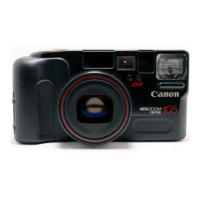
Canon Prima Zoom 105 Caption - User Manual

Canon Prima Zoom 105 Caption
49 pages
Print Icon
To Next Page IconTo Next Page
Loading...
Question and Answer IconNeed help?

Do you have a question about the Canon Prima Zoom 105 Caption and is the answer not in the manual?

Summary

Camera Nomenclature

Camera Control Buttons and Indicators

Details the function of various buttons, lamps, and the LCD panel.

Important Precautions

Shooting Preparations

Loading and Checking the Battery

Steps for inserting and verifying the camera battery for operation.

LCD Panel Information

LCD Panel Symbols and Indicators

Explains the meaning of various symbols displayed on the LCD screen.

LCD Display Errors and Troubleshooting

Addresses potential display issues like error codes and their solutions.

Camera Handling Techniques

Shutter Button Operation

Film Loading and Handling

Loading DX-Coded Film

Instructions for inserting film cartridges and automatic speed setting.

Basic Picture Taking

Taking Pictures in Basic Mode

Step-by-step guide for composing and capturing images in automatic mode.

Red-eye Reduction Mode Operation

How to use the mode to minimize red eyes in flash photos.

Removing the Film

Procedures for rewinding and removing exposed film from the camera.

Indicator Lamps Explained

Flash Shooting Distance Range

Other Operations

Selecting Shooting Modes

Guide to choosing different shooting modes like Auto, Flash-off, Flash-on, and Slow-sync.

Additional Functions

Remote Control Operation

How to use the built-in remote control for shooting from a distance.

Date;Caption Imprinting

Summary

Camera Nomenclature

Camera Control Buttons and Indicators

Details the function of various buttons, lamps, and the LCD panel.

Important Precautions

Shooting Preparations

Loading and Checking the Battery

Steps for inserting and verifying the camera battery for operation.

LCD Panel Information

LCD Panel Symbols and Indicators

Explains the meaning of various symbols displayed on the LCD screen.

LCD Display Errors and Troubleshooting

Addresses potential display issues like error codes and their solutions.

Camera Handling Techniques

Shutter Button Operation

Film Loading and Handling

Loading DX-Coded Film

Instructions for inserting film cartridges and automatic speed setting.

Basic Picture Taking

Taking Pictures in Basic Mode

Step-by-step guide for composing and capturing images in automatic mode.

Red-eye Reduction Mode Operation

How to use the mode to minimize red eyes in flash photos.

Removing the Film

Procedures for rewinding and removing exposed film from the camera.

Indicator Lamps Explained

Flash Shooting Distance Range

Other Operations

Selecting Shooting Modes

Guide to choosing different shooting modes like Auto, Flash-off, Flash-on, and Slow-sync.

Additional Functions

Remote Control Operation

How to use the built-in remote control for shooting from a distance.

Date;Caption Imprinting

Canon Prima Zoom 105 Caption Specifications

General IconGeneral
Film Format35mm
Lens38-105mm zoom lens
FocusAutofocus
ViewfinderReal-image zoom viewfinder
Film Speed SettingAutomatic
FlashBuilt-in flash with red-eye reduction
TypeCompact
Autofocus System3-point AiAF
ShutterElectronic shutter
Exposure ControlProgrammed automatic
Film Speed RangeISO 25-3200
Film TransportAutomatic
BatteryOne 3V CR123A lithium battery

Related product manuals