Using Power Zoom
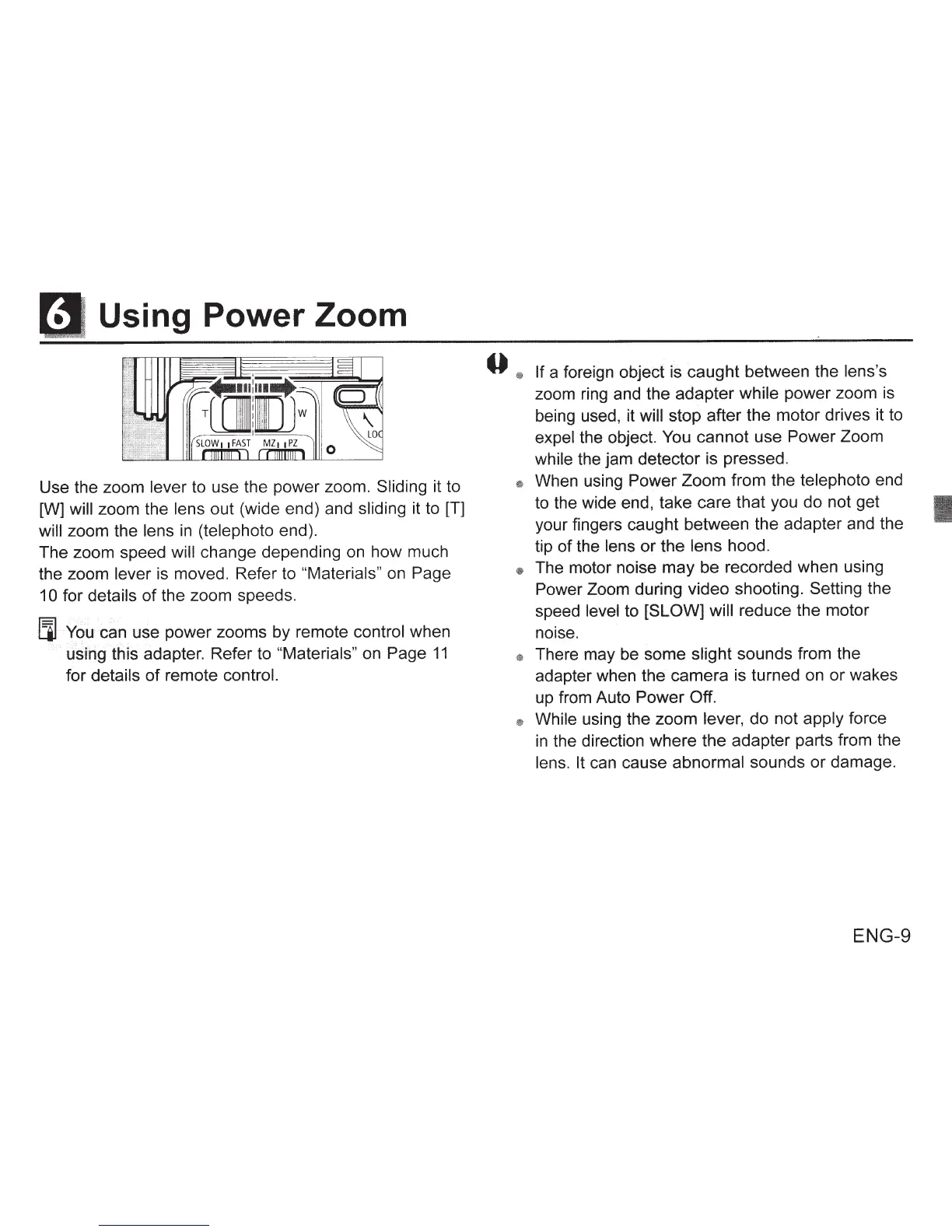
Use the zoom
lever
to use the power zoom.
Sliding
it to
[W]
will zoom the lens out (wide end) and
sliding
it to
(T]
will
zoom the
lens
in
(telephoto
end).
The zoom speed
will
change depending
on
how much
the zoom
lever
is moved. Refer to
"Materials"
on
Page
1 0
for
details
of
the zoom speeds.
llJ
You
can use power zooms by remote control
when
using this adapter. Refer to
"Materials"
on Page
11
for
details
of
remote control.
0
®
If
a foreign object is caught between the
lens's
zoom ring and the adapter
while power zoom is
being used, it
will
stop after the motor drives it to
expel
the object.
You
cannot use Power Zoom
while
the jam detector is pressed.
~
When using
Power
Zoom from the
telephoto end
to the wide end, take care that you do not get
your fingers caught between the adapter and the
tip
of
the lens
or
the
lens
hood.
®
The motor noise may be recorded when using
Power
Zoom during video shooting.
Setting
the
speed
level
to
[SLOW] will reduce the motor
noise.
®
There may be some
slight
sounds from
the
adapter when the camera is turned on or wakes
up from Auto
Power Off.
®
While
using the zoom
lever,
do not
apply
force
in
the direction where the adapter parts from the
lens. It
can cause
abnormal sounds or damage.
ENG-9








 To Next Page