6
Waterproof Seal
• Debris (e.g. sand, dirt or hair) stuck to the
waterproof seal may cause water leakage.
Catching a single strand of hair or a tiny grain of
sand in the seal can cause leaks.
• Be careful not to apply too much grease.
Applying too much grease to the seal may
cause water leakage (about a droplet is
sufficient).
• Do not use paper or cloth to apply the grease to
the seal.
• A damaged or cracked waterproof seal may
cause leaks. Please contact your Canon
Customer Support Help Desk.
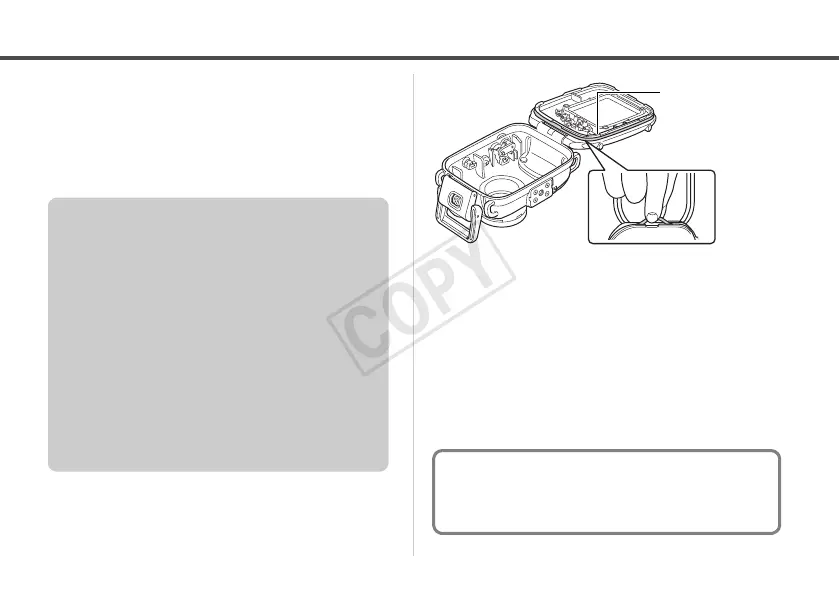
• When removing the seal from your
Waterproof Case, use your fingers so you do
not damage the waterproof seal (as shown in
Fig 1.). Do not dig your fingernails into it or
use pointed or metallic objects to remove it.
• Do not pull the waterproof seal. Pulling the
seal may overstretch it, which may cause the
case to not close properly and cause leaks.
• While mounting the waterproof seal, do not
twist or pull the seal with force. Extreme care
should be taken to ensure the waterproof
seal is level around the mounting groove.
Please check to ensure that the waterproof
seal is working.
To ensure that the Waterproof Case remains
waterproof, it is recommended to replace the
seal once a year. Please contact your Canon
Customer Support Help Desk.



 To Next Page