EasyManua.ls Logo

Canon WP-DC35 - Shooting Procedures; Powering On and Mode Selection; Adjusting Settings

Canon WP-DC35
Print Icon
To Next Page IconTo Next Page
To Previous Page IconTo Previous Page
Loading...
13
Shooting
1
Press the power button to turn on
the power.
2
Turn the mode dial to the desired
mode.
3
Adjust settings as required.
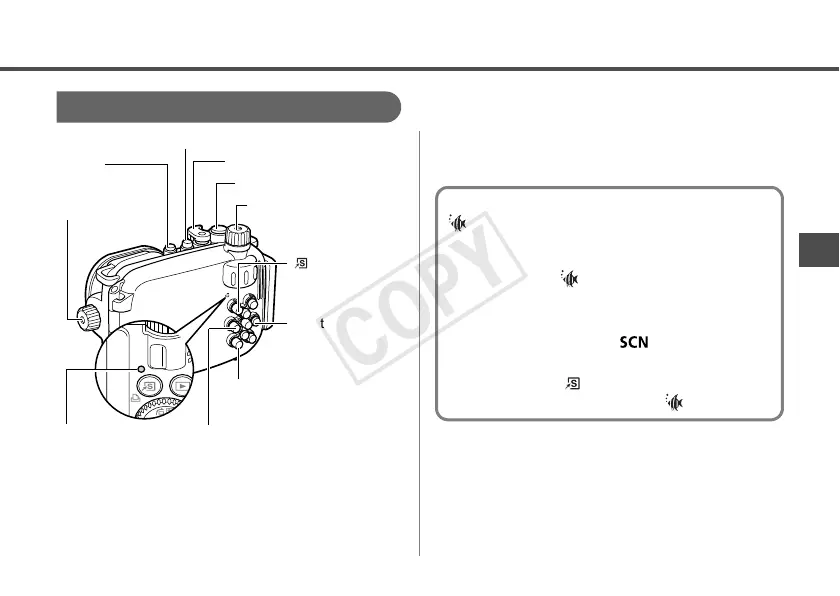
You can adjust the zoom with the zoom
lever.
Power
Button
(Shortcut)
Button
Shutter Button
Zoom Lever
Mode Dial
rButton
DISP. (Display) Button
qButton
Control Ring
Ring Function Selector
Indicator
Setting the shooting mode to
(Underwater)
You can obtain more natural appearing
coloration underwater if you set the Special
Scene mode to (Underwater). This mode
selects the optimal white balance for marine
lighting and tones down the blue colors.
1. Set the mode dial to (Special Scene
mode).
2. Pressing the (Shortcut) button, use
the
q or r button to select .

COPY

Related product manuals