Recording Video and Taking Photos
44
Menus
Table of Contents Index
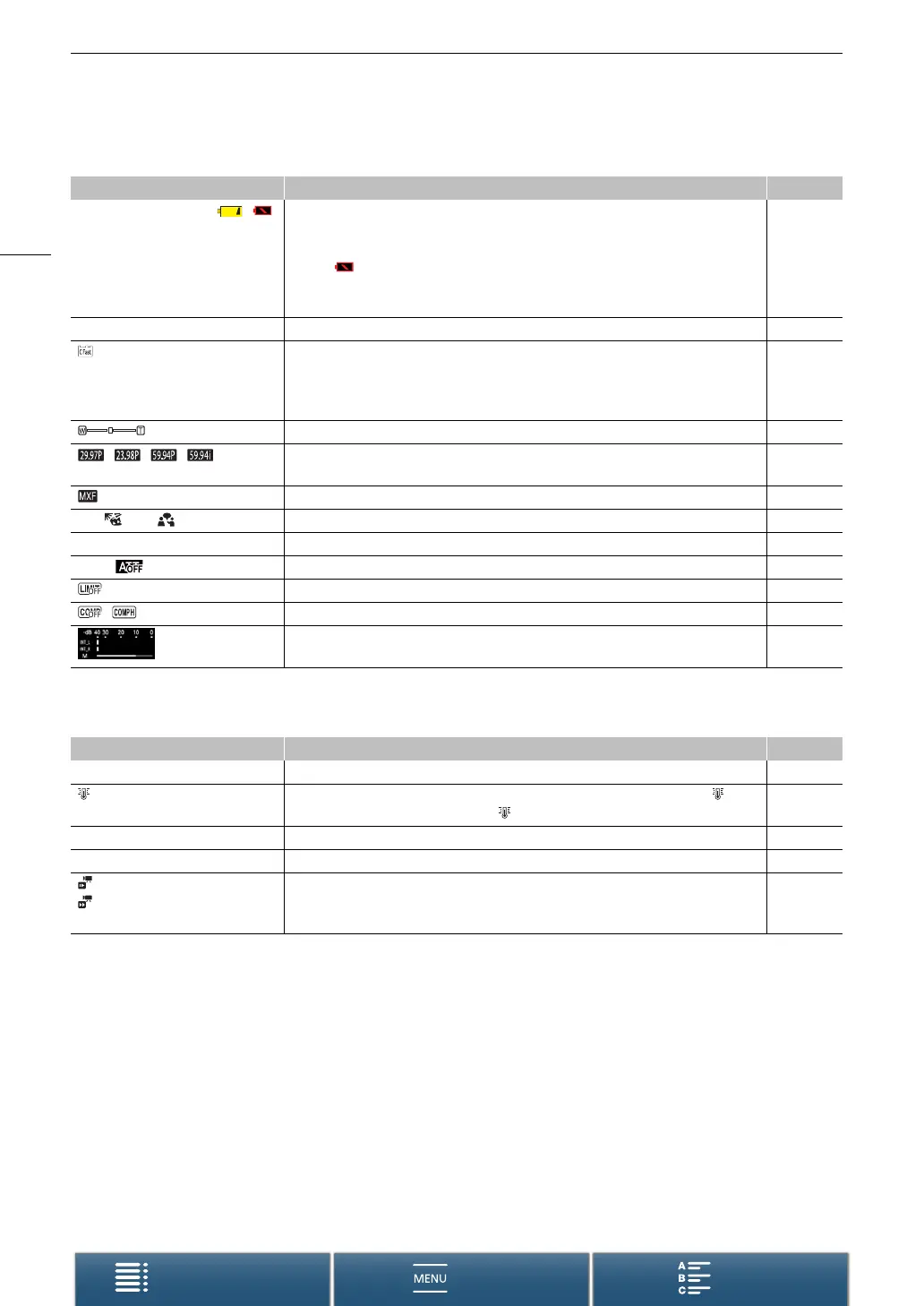
Icons on the right side of the screen
Icons on the bottom of the screen
Icon/Display Description A
è, é, ê, ë, ,
000 min
Remaining battery charge
The icon shows an estimate of the remaining charge. The remaining recording time is
displayed, in minutes, next to the icon.
• When is displayed, replace the battery pack with a fully charged one.
• Depending on the conditions of use, the actual battery charge may not be indicated
accurately.
–
{Ð8 Recording a photo. If an SD card error occurs, 9 will appear instead. 39
0h00m, 8 0h00m Recording media status and available recording time estimate
• The remaining available space is displayed, in minutes, next to the icon.
• When the icon appears in red followed by [END], there is no more available space and
recording will stop.
–
Zoom indicator 65
, , ,
000 Mbps
Frame rate
Bit rate
48
File format 48
’, , ‚, , “, ”, „ Audio scenes 78
ë, à Wind screen 80
å, Built-in/external microphone attenuator 81, 82
Audio limiter 83
, Audio compressor 84
Audio recording level 79
Icon/Display Description A
4K, HD Button to open the [4K/HD] submenu and currently selected recording resolution (4K/HD). 48
When the camcorder’s internal temperature has risen to a predetermined level, will
appear in yellow. If it continues to rise, will appear in red.
142
` Cooling fan operation 47
^ Magnification (focus assistance function) 69
x1/4, x1/2
x2, x4, x10, x20, x60, x120, x1200
Button to open the [Slow & Fast Motion] submenu.
Currently selected slow motion rate.
Currently selected fast motion rate.
88


 To Next Page