
 Need help?
Do you have a question about the Canyon SPECTRAL 2019 and is the answer not in the manual?
Illustrates initial bike box unpacking steps.
Continues unpacking, showing removal of secured parts.
Shows lifting the bike out of the box.
Illustrates removal of wheel packaging.
Final steps of unpacking, showing bike secured.
Shows bike with front fork and handlebars attached.
Depicts a specific type of wheel included.
Depicts another type of wheel included.
Shows the battery being connected to the charger.
Illustrates connecting the charger to the bike's charging port.
Shows the charger indicator light and battery connection.
Depicts the charger plugged into a wall socket.
Shows applying friction paste to the stem for secure handlebar mounting.
Illustrates tightening stem bolts with a torque wrench to specifications.
Shows final alignment and tightening of handlebar clamps.
Shows the main bike frame being carefully removed from its packaging.
Illustrates unpacking of separate bike components.
Shows how to attach the wheel to the bike frame dropouts.
Depicts inserting the wheel into the frame's dropouts.
Illustrates tightening the wheel securing mechanism.
Illustrates the correct installation of left and right pedals with grease.
Shows how to check and adjust tyre pressure for optimal riding.
Illustrates seatpost adjustment using Shimano E7000 and E8000 switches.
Shows adjusting the seatpost height for rider comfort.
Provides a chart and diagram for adjusting seat height based on rider and bike measurements.
Guides on setting fork and shock sag for optimal suspension performance.
Details geometry adjustment options available for the SPECTRAL:ON model.
Illustrates the procedure for turning the e-bike system on and off.
Explains how to switch the USB port on/off and its charging capabilities.
Addresses W011 error code related to the speed sensor.
Addresses W013 error code related to the battery on/off switch.
 General
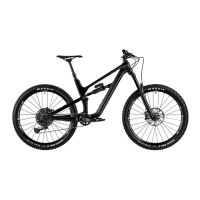
| Frame Material | Carbon |
|---|---|
| Rear Shock | RockShox Deluxe RT |
| Seatpost | RockShox Reverb Stealth |
| Model Year | 2019 |
| Category | Mountain Bike |
| Suspension | Full Suspension |
| Rear Travel | 150mm |
| Front Travel | 150mm |
| Wheel Size | 27.5" |
| Tires | Maxxis Minion DHR II |
| Drivetrain | SRAM GX Eagle |
| Brakes | SRAM Guide |
| Handlebar | Canyon |
| Stem | Canyon |


 To Next Page