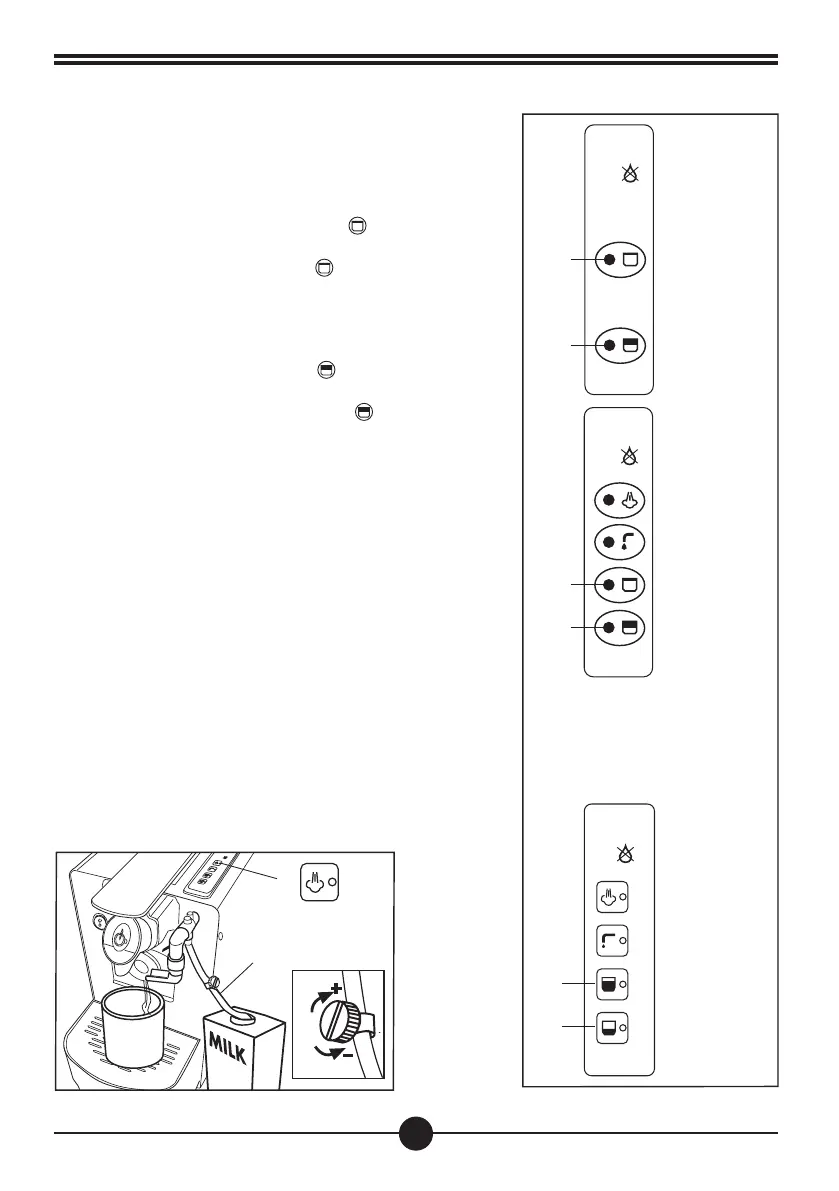
Programming the dispenser buttons
Large cup: press and hold the button (D). The machine
will dispense water. When the desired water quantity has
been reached, release the button
(D). The machine will
stop delivering water and will store the quantity of water to
be dispensed from now on. (Fig.11)
Small cup: Use the same procedure as for large cups. Press
and hold the corresponding button
(E).
The machine will start dispensing water. When the desired
level of water is reached, release button
(E). The machine
will stop delivering water and will store the quantity of water
to be dispensed from now on.
(Fig.11)
Mod. OFFICE PLUS
Mod. OFFICE PLUS VAP
Mod. OFFICE PLUS VAP CAPPUCCINATORE
26
Mod. OFFICE PLUS VAP
CAPPUCCINATORE
Mod.
OFFICE
PLUS
Mod.
OFFICE
PLUS VAP
D
E
D
E
D
E
Preparing the foamed milk (OPTIONAL)
Mod.
OFFICE PLUS VAP CAPPUCCINATORE
• Insert the hose of the cappuccino attachment (21) in the
milk container.
•
After having placed a cup on the grid under the outlet of
the cappuccino attachment (21), start dispensing by pressing
button (B). The dose dispensed is predefined, if you want to
change the dose, follow these instructions: press and hold
down button (B), release the button when the desired dose is
reached. Dispensing can be interrupted at any time by pressing
button (B).(Fig. 12)
NOTE The temperature of the foamed milk can be regulated
by turning the handwheel (22) on the hose (21) of the
cappuccino attachment Fig. 12). It is advisable to use full-
cream milk.
Fig. 11
Fig. 12


 To Next Page