24
GB
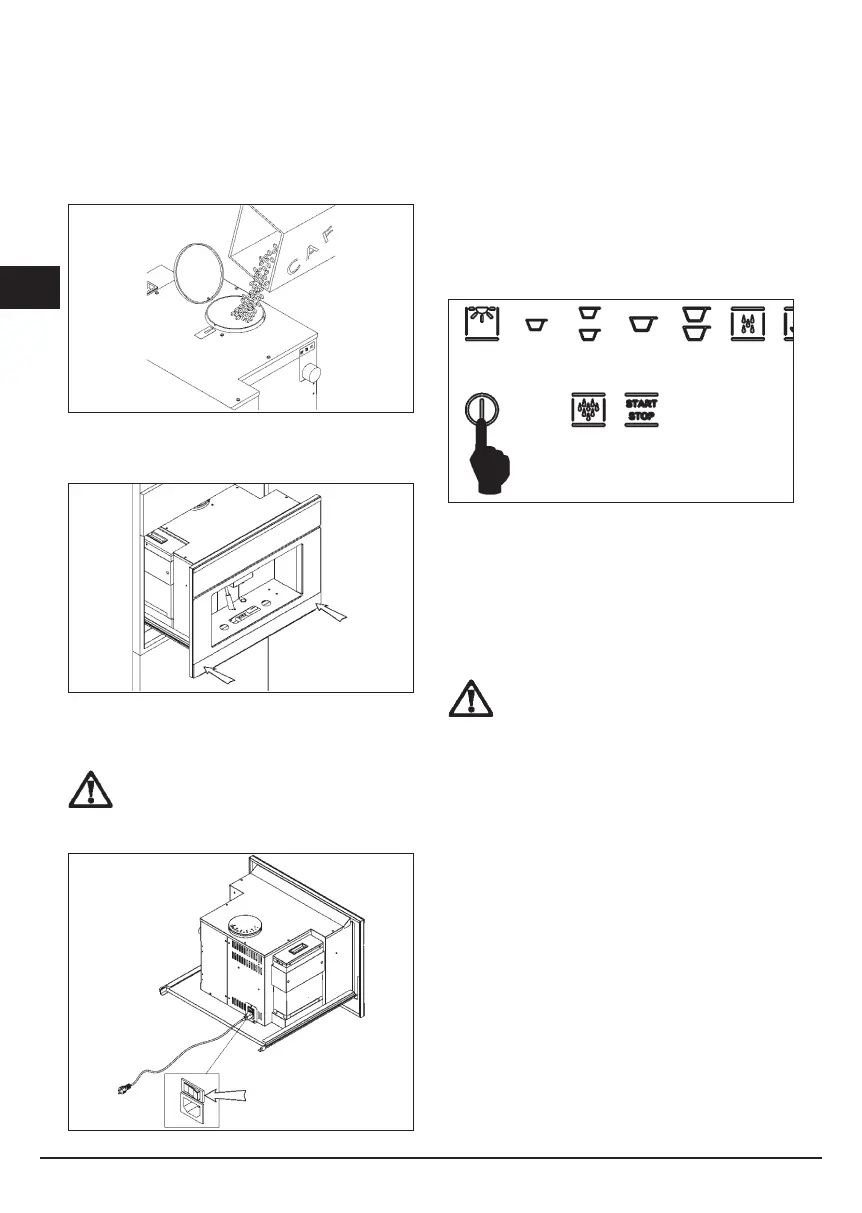
Fill the container with coffee beans
Fig. 7.7 Pour about 200 g of coffee beans in the coffee
container.
Fig. 7.8 Push the machine back into the compartment
until you hear a “CLICK!”, which means it’s locked into
place.
ATTENTION: before pouring beans into the
grinder, make sure that there are no foreign
bodies in the coffee.
Turning on the machine in standby mode
Fig. 7.9 Pull out the machine.
Turn the main switch, located on the back of the
machine, to position “1”.
After you push the machine back into the furniture, it is
ready to use.
Fig. 7.10
To exit standby mode, you must press the on/off button,
as shown in Fig. 8.10. The LED will begin to ash until
the machine is “ready”. At this point, all the LEDs for the
various services will be lit.
NOTE: If the machine is not used for 45 minutes, it
returns to standby mode.
REGULATION OF THE GROUND COFFEE
ATTENTION: The neness of the coffee grind is
calibrated at the factory.
This neness has a strong inuence on producing good
coffee. Too “coarse” a grind produces coffee that ows
quickly without creaminess and body. On the other
hand, too ne a grind produces coffee that “drips” with
a very intense taste and a “burned” smell. Keep in mind
that producing a cup of espresso coffee takes from 20
to 30 seconds.
To regulate the grind, you must pull out the machine as
shown in gures 8.1 to 8.3. Turn the regulation knob on
the right side, as shown in Fig. 8.11.



 To Next Page