12 Instruction manual Wi6142 & Wi6143 Please keep this instruction manual for future reference
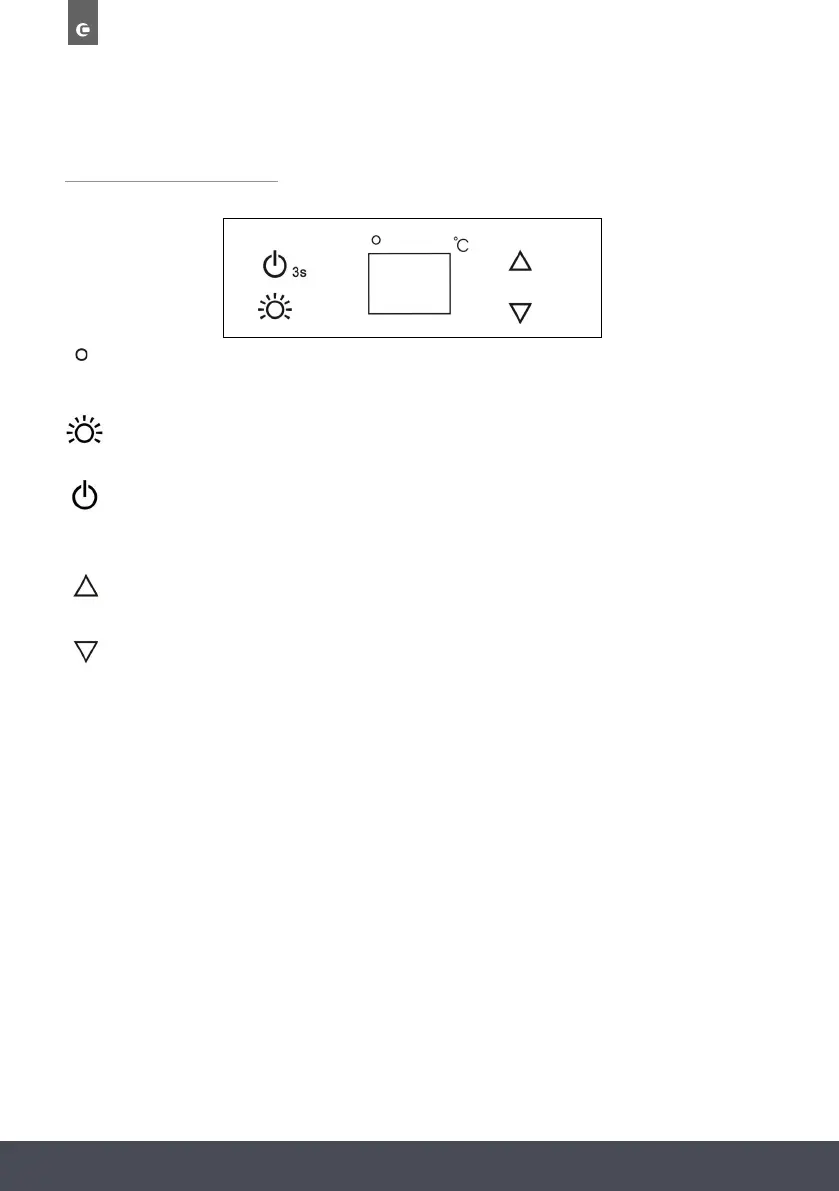
CONTROL PANEL
Indicator light illuminates to signify the cooling mode is currently in operation
TOUCH CONTROL KEYS
Switches the interior light ON/OFF
To switch the appliance ON/OFF
(press and hold this buttons for approximately 3 seconds)
Used to raise the temperature in 1ºC increments
Used to lower the temperature in 1ºC increments
TEMPERATURE ALARM
If inner temperature is higher than 23°C, “HI” is shown in the display panel, and the alarm
sounds after one hour continuously. It warns you that the inner temperature is too high.
If inner temperature is lower than 0°C, “LO” is shown in the display panel, the alarm sounds
and the malfunction indicator lights at the same time.
To set the temperature, connect the power cord to a properly grounded outlet. In the event of
a power interruption, the previous temperature setting is automatically erased and it will default
to a preset temperature setting of 12°C
Set the desired cooling temperature by pressing the buttons adjacent to the “ / "
indicators. Each press of the buttons will scroll through the available temperature settings in
increments of 1°C.
The temperature setting can be adjusted from 5°C to 18°C
To view the actual temperature at anytime press and hold the temperature adjustment button
(up or down) for approximately 5 seconds, the actual temperature will temporarily flash in the
LED display for 5 Seconds. After this it will revert back to the set temperature.
Flashing LED = Cabinet temperature
Steady LED = Set temperature
To set the temperature, connect the power cord to a properly grounded outlet. In the event of
a power interruption, the previous temperature setting is automatically erased and it will default
to a preset temperature setting of 12°C
Set the desired cooling temperature by pressing the buttons adjacent to the “ / "
indicators. Each press of the buttons will scroll through the available temperature settings in
increments of 1°C.
The temperature setting can be adjusted from 5°C to 18°C
To view the actual temperature at anytime press and hold the temperature adjustment button
(up or down) for approximately 5 seconds, the actual temperature will temporarily flash in the
LED display for 5 Seconds. After this it will revert back to the set temperature.
Flashing LED = Cabinet temperature
Steady LED = Set temperature
To set the temperature, connect the power cord to a properly grounded outlet. In the event of
a power interruption, the previous temperature setting is automatically erased and it will default
to a preset temperature setting of 12°C
Set the desired cooling temperature by pressing the buttons adjacent to the “ / "
indicators. Each press of the buttons will scroll through the available temperature settings in
increments of 1°C.
The temperature setting can be adjusted from 5°C to 18°C
To view the actual temperature at anytime press and hold the temperature adjustment button
(up or down) for approximately 5 seconds, the actual temperature will temporarily flash in the
LED display for 5 Seconds. After this it will revert back to the set temperature.
Flashing LED = Cabinet temperature
Steady LED = Set temperature
To set the temperature, connect the power cord to a properly grounded outlet. In the event of
a power interruption, the previous temperature setting is automatically erased and it will default
to a preset temperature setting of 12°C
Set the desired cooling temperature by pressing the buttons adjacent to the “ / "
indicators. Each press of the buttons will scroll through the available temperature settings in
increments of 1°C.
The temperature setting can be adjusted from 5°C to 18°C
To view the actual temperature at anytime press and hold the temperature adjustment button
(up or down) for approximately 5 seconds, the actual temperature will temporarily flash in the
LED display for 5 Seconds. After this it will revert back to the set temperature.
Flashing LED = Cabinet temperature
Steady LED = Set temperature
“ ”
To set the temperature, connect the power cord to a properly grounded outlet. In the event of
a power interruption, the previous temperature setting is automatically erased and it will default
to a preset temperature setting of 12°C
Set the desired cooling temperature by pressing the buttons adjacent to the “ / "
indicators. Each press of the buttons will scroll through the available temperature settings in
increments of 1°C.
The temperature setting can be adjusted from 5°C to 18°C
To view the actual temperature at anytime press and hold the temperature adjustment button
(up or down) for approximately 5 seconds, the actual temperature will temporarily flash in the
LED display for 5 Seconds. After this it will revert back to the set temperature.
Flashing LED = Cabinet temperature
Steady LED = Set temperature
the
warns you that is sounds
t o o .
the
sounds s time.


 To Next Page