Need help?
Do you have a question about the Carbine 55CSR and is the answer not in the manual?
Welcome message and overview of the remote start and security system.
Details on contacting Carbine for support, including website and phone number.
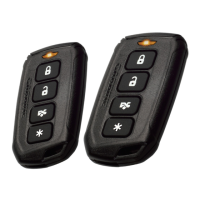
Mapping of remote buttons to system functions like arming, disarming, and panic.
Explanation of icons displayed on the LCD remote for system status.
Procedure to lock doors and arm the security system using the remote button.
Procedure to unlock doors and disarm the security system using the remote button.
How to arm or disarm the system without audible chirps.
Override procedure to disarm the system using the ignition and valet switch.
Automatic arming and locking of the vehicle after a set time.
How to activate the panic alarm for immediate attention.
Using the remote to open the vehicle's trunk or hatch.
Locating the vehicle by flashing parking lights.
Enabling and disabling Valet Mode for service or guest use.
How the system reacts and functions when triggered by an event.
System behavior when a door is opened while armed, prior to full alarm.
Understanding tamper warnings and trigger sources indicated by LED flashes.
Automatic arming of the system one hour after exiting the vehicle.
System feature to prevent false alarms from faulty sensors.
Instructions and safety precautions for starting the vehicle remotely.
Seamlessly transferring control from remote start to manual driving.
Keeping the engine running during short trips away from the vehicle.
Automatically starting the engine at set intervals to maintain warmth.
Cooling down the turbo system by keeping the engine running post-operation.
Entering and exiting programming mode for LCD remote settings.
Adjusting the daily clock, alarm time, and on/off status.
Setting and controlling the countdown timer feature.
Adjusting the brightness level of the LCD screen backlight.
Managing features like power save, melody/vibrate, car selection, and button lock.
Procedure for programming replacement or additional remote controls.
Instructions for replacing the battery in the LCD 2-way remote controller.
Instructions for replacing the battery in the 4-button remote controller.
FCC compliance statements and operational conditions.
Measures to resolve radio or television interference issues.
Caution against unauthorized changes to the device.
Copyright information, trademarks, and warranty details.
 General
| Operating Range | Up to 1, 500 feet |
|---|---|
| Confirmation | Audible and visual |
| Remote Start Runtime | 5, 10, or 15 minutes |
| Compatibility | Most vehicles |
| Battery Life | Approximately 1 year |


 To Next Page