EasyManua.ls Logo

Carbon Zapp CRU.2R - User Manual

Default Icon
61 pages
Print Icon
To Next Page IconTo Next Page
Loading...
Operation Manual
For CRU, GDU, DS, GD, UIP, HUI, TBCR, DCD, ECMR Units “R” version
v201902

Questions and Answers

  • M
    Marissa NewmanAug 9, 2025
    What to do if pressure on Carbon Zapp CRU.2R screen gauge is erratic?
    • R
      Richard HooverAug 9, 2025
      If the pressure on the screen gauge is erratic and no actual pressure is present, it could be due to the software being in DEMO mode. Try reconnecting power to the machine. Also, check the USB connection.
  • T
    Tiffany HernandezAug 14, 2025
    What to do if Carbon Zapp CRU.2R shows Short Circuit / Open Circuit / Short to Ground?
    • N
      Natalie NorrisAug 14, 2025
      If the Carbon Zapp Industrial Equipment indicates a Short Circuit, Open Circuit, or Short to Ground, it could be due to a wrong injector profile selected. Ensure the correct component is selected. Another possible cause is a damaged cable, which would need replacement. It could also be due to a damaged injector.
  • E
    Eric PattersonAug 20, 2025
    What to do if Carbon Zapp Industrial Equipment cannot reach TP pressure?
    • P
      Peter BurnsAug 21, 2025
      If the Carbon Zapp Industrial Equipment cannot reach the required TP pressure, ensure there is enough liquid in the tanks and that enough compressed air is going into the machine. Also, make sure the hydraulic system is free of air. As a next step, use the provided plug to eliminate a failing injector as a factor. If the pressure issue persists, contact your service provider.
  • L
    laurierichmondAug 27, 2025
    What to do if Carbon Zapp Industrial Equipment is not booting?
    • J
      Jenna YoungAug 27, 2025
      If the Carbon Zapp Industrial Equipment is not booting, ensure the machine is plugged into a power source and turned on. If it still doesn't boot, try switching the unit on and off.
  • E
    eellisSep 1, 2025
    What to do if Carbon Zapp CRU.2R touch is not working?
    • B
      Brittany BrownSep 2, 2025
      If the touch function on your Carbon Zapp Industrial Equipment is not working, reboot the system by powering it off and then on again.

Summary

Warranty

2-Year Limited Warranty

Details the terms and conditions of the limited warranty for the equipment.

General Information

Warning and Safety Symbols

Explains common warning and safety symbols used throughout the manual.

Product Description

CRU.4 R

Tests up to 4 Common Rail Injectors simultaneously, supports EUI/HEUI, uses Dynamic Mass Metering, and does Coding.

CRU.2 R

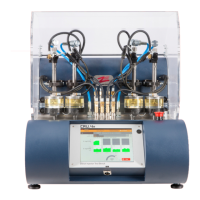
Tests and Cleans up to 1 Common Rail Injector, supports EUI/HEUI, uses Dynamic Mass Metering, and does Coding.

GDU.4 R

Tests up to 4 HP Gasoline Direct Injectors, uses Dynamic Mass Metering, and fits SPR/RSP adapters.

GDU.2 R

Tests and Cleans up to 1 HP Gasoline Direct Injector, uses Dynamic Mass Metering, and fits SPR/RSP adapters.

DS-R

Tests/Cleans 1 Common Rail Injector, supports EUI/HEUI, uses Electronic Volumetric Measuring Unit or Tubes.

DSF-R

Cleans/Flushes up to 4 Common Rail Injectors, supports EUI/HEUI, and has 2 tanks for cleaning/flushing.

GD-R

Tests/Cleans 1 HP Gasoline Direct Injector, uses Electronic Volumetric Measuring Unit or Tubes.

UIP-R

Tests/Cleans EUI Injectors and Pumps, attaches to CRU/DS or operates standalone.

HUI-R

Tests/Cleans HEUI Injectors, attaches to CRU/DS or operates standalone.

TBCR

Conventional Test Bench Electronic Control & Measurement Unit / Test Bench Simulator for Diesel Specialists.

DCD

CRDi Injector Control Module, Electronic Measurement & Coding device for Standalone Test Benches.

Commissioning

Degassing the system

SETTINGS

INJECTOR;COMPONENT SELECTION

COMPONENT DATA

EUI

CRP

SELECT TESTS

MACC

TEST (###)

IVM (EM) Conditioning

IVM (EM) Performing Volume Test

REPORTS

Operation

Cleaning and Testing the Injector(s)

Procedure for cleaning and testing injectors using the control panel.

Testing Procedure

Step-by-step guide for performing tests on components.

Results and Reports

Result Colors

Explains the meaning of different colors used for test results.

Maintenance

Troubleshooting

Technical Specifications

Carbon Zapp CRU.2R Specifications

General IconGeneral
BrandCarbon Zapp
ModelCRU.2R
CategoryIndustrial Equipment
LanguageEnglish

Related product manuals