Battery Operation
Unplugging the pump from the AC line will automatically put the pump on battery power.
To recharge the battery, plug the pump into an AC wall outlet. The pump will automatically begin
charging.
General Instructions
1. Fill or spike feeding container prior to setting up pump.
2. Turn pump on - Press Power button in lower right-hand corner.
3. In order to achieve proper accuracy, the uid line in the feeding set bag must be 10 inches above the
top of the feeding pump, when initiating the feeding cycle.
4. Select u "Keep Settings" or u "Clear Settings" (for day to day use with the same feeding regimen
the u "Keep Settings” option should be selected).
5. Load the cassette portion of the feeding set into the pump, following the animated instructions
on the screen. Insert from the bottom and snap into place.
Priming the Pump
1. Press u "Prime Pump" to access the pump priming options.
2. Press u "Auto Prime" to automatically prime the pump set. The pump will quickly prime the feed line
and stop the formula before reaching the end of the feeding line.
3. Press the u "Hold To Prime" menu selections to manually top o the line. If using ENFit
TM
*, stop prime
before the end of the line. This will prevent formula building up in the moat.
4. Press u "Done".
Setting Dose Feeding
1. Access “BIOTECH MODE” by turning o the pump; turning on the pump; and while the animation of
the kangaroo is moving, press and release the uupper left button.
2. The screen will change to purple, with the title “BIOTECH MODE”.
3. Select u“View Options”. Select u“Dose”. Select u“Back”. Select u“Restart Pump”.
4. To return to normal pump operation, restart the pump in the normal manner.
If “Dose” is not available in “More Options”, contact your Medical Provider for further information.
Pump sets should not be reused after 24 hours of initial usage.
Troubleshooting Guide
Symptom Probable Cause Corrections
Feed
Complete
Dose feeding meets the
specied amount.
Press u DONE to clear the notication.
Feed
Incomplete
Dose feeding is interrupted.
Press u Resume Dose to continue feeding from the
current pump state or press u Restart Dose if you are
beginning a new, full feeding regimen.
Pump
Inactive
This will appear if the pump
has been without input for
more than 10 minutes.
Press u Continue to return to the previous screen. If the
error cannot be resolved, press and HOLD the u Power
Button for 3 seconds to stop operation of the pump
and put a dierent pump into service.
Rotor
Stuck
There is an unusual amount
of resistance to the rotation
of the rotor.
If cleaning of the rotor and rotor shaft does not resolve
this error, press and HOLD the u Power Button for
3 seconds to stop operation of the pump and put a
dierent pump into service.
Cassette
Dislodged Or
Cassette Error
Appears if the cassette is not
properly loaded in the pump
set loading area.
Reload the cassette to ensure the correct positioning.
If the error cannot be resolved, load a new pump set,
prime it, and press u Continue to restart the feeding. If
the error cannot be resolved, press and HOLD
the u Power Button for 3 seconds to stop operation of
the pump and put a dierent pump into service.
Supply Tube
Blocked
Appears if there is a blockage,
obstruction, or kinked tubing
between the feeding bag and
the pump.
Check the tubing between the bag and the pump. If the
tube cannot be cleared, remove the blocked pump set
and load a new pump set onto the pump. If the error still
cannot be resolved, press and HOLD the u Power Button
for 3 seconds to stop operation of the pump and put a
dierent pump into service.
Feed Bag
Empty
Appears when the bag is empty or
large amounts of foam or bubbles
are in the feeding solution
If the bag is empty, re-ll the bag as required. If the bag still
contains feeding solution, remove cassette and check the
bag side tubing for excessive foam or bubbles. Clear bubbles
from line and reload the feeding set or replace with a new
feeding set. If the error still cannot be resolved, press and
HOLD the u Power Button for 3 seconds to stop operation of
the pump and put a dierent pump into service.
“Dose Feeding” Directions For Use
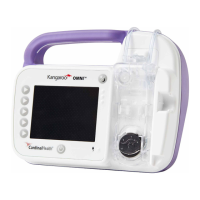
Kangaroo
™
Connect Enteral Feeding Pump
Dose Feeding
15 Hampshire Street Manseld, MA 02048
ENFit
TM
* is a federally registered trademark in multiple jurisdictions through the world. Used with permission.
© 2019 Cardinal Health Canada. All Rights Reserved. CARDINAL HEALTH, the Cardinal Health LOGO, Kangaroo, and ESSENTIAL TO CARE are trademarks or registered
trademarks of Cardinal Health. All other marks are the property of their respective owners. CA Lit. No. CA-PMR-0010, 18-123-D (2/2019)
Pump Status
Red=Warning Alarm
Yellow=Notice or Caution Alarm
Green=Standby or Feeding
Power Button
Press ONCE to power on.
Press and HOLD to power o
Power Source
Shines a green light when pump
is connected to AC power
Soft Keys
Press a key to select the
option that appears next
to it on the screens


 To Next Page
 Need help?
 General