Charging Procedure
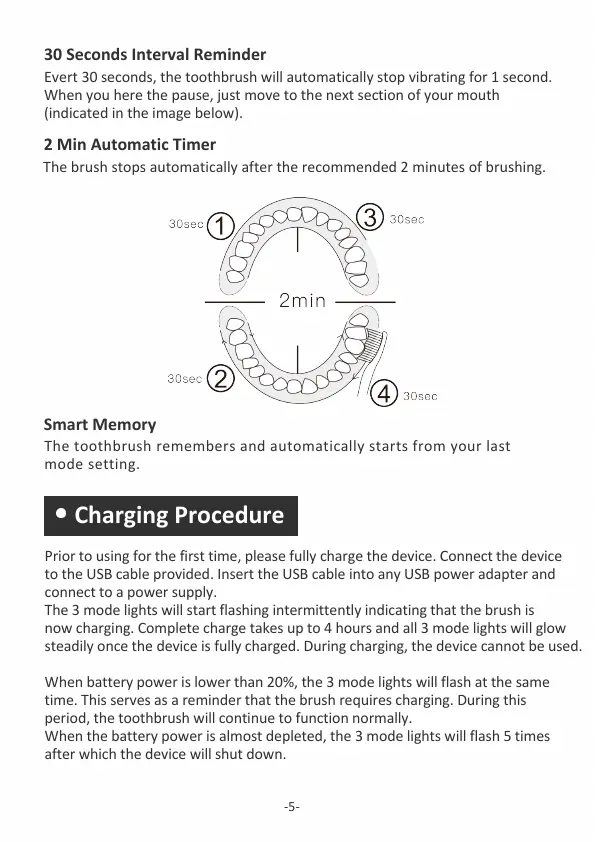
30 Seconds Interval Reminder
2 Min Automatic Timer
-5-
The brush stops automatically after the recommended 2 minutes of brushing.
Smart Memory
The toothbrush remembers and automatically starts from your last
mode setting.
Prior to using for the first time, please fully charge the device. Connect the device
to the USB cable provided. Insert the USB cable into any USB power adapter and
connect to a power supply.
The 3 mode lights will start flashing intermittently indicating that the brush is
now charging. Complete charge takes up to 4 hours and all 3 mode lights will glow
steadily once the device is fully charged. During charging, the device cannot be used.
When battery power is lower than 20%, the 3 mode lights will flash at the same
time. This serves as a reminder that the brush requires charging. During this
period, the toothbrush will continue to function normally.
When the battery power is almost depleted, the 3 mode lights will flash 5 times
after which the device will shut down.
Evert 30 seconds, the toothbrush will automatically stop vibrating for 1 second.
When you here the pause, just move to the next section of your mouth
(indicated in the image below).



 To Next Page