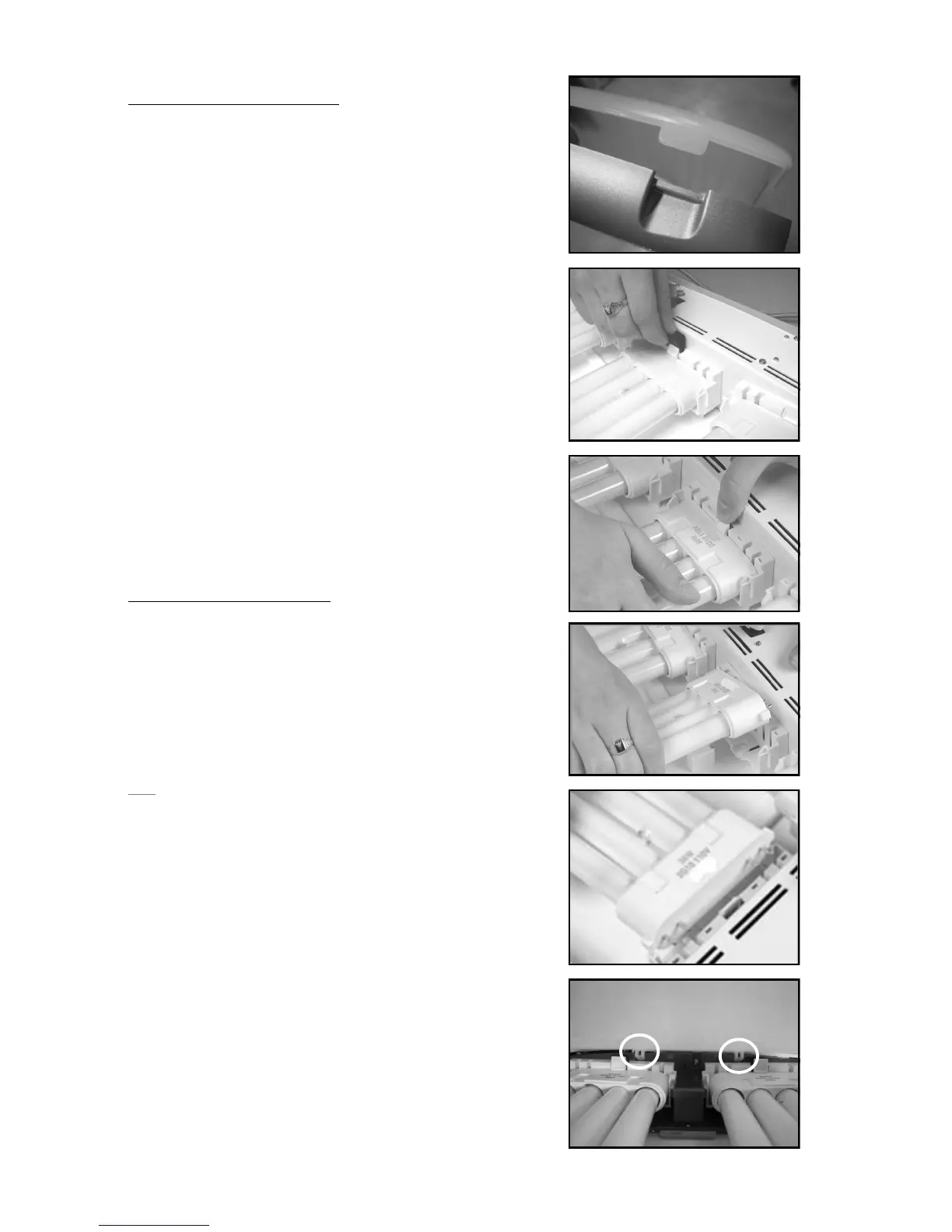
Removing Light Tubes
1. Unplug the SunLite and lift the lens snaps
on the top of the lens to remove it.
2. Remove and discard the shipping elastics
on the metal retainer clip.
3. Remove and discard the black rubber
shipping insert. You may need to use
needle nose pliers.
4. Depress the white clip in the middle of
the light tube housing while grasping the
light tube near the plastic base. Gently
wiggle and raise it above the white clip.
5. Gently twist the light tube until one side
of the base is out of the socket. The
other side should now slide out.
6. Slip out the light tube from the metal
retainer clip at the other end.
Installing Light Tubes
1. Hold the light tube horizontally and slip
the top into the retainer clip.
2. Gently slide the light tube prongs into the
light socket until you hear a ‘click’
indicating they are correctly seated and
held in place by the white clip.
3. Plug in the SunLite to check that the
lights illuminate. If working correctly,
unplug and continue to the next step.
(If not, reinstall the light tubes).
4. Replace the plastic lens by setting the
hooks on the bottom of the lens in the
matching receptacles on the SunLite
body. Push the two top lens snaps into
place to securely fasten the lens.



 To Next Page