Need help?
Do you have a question about the Carl Valentin PICA II and is the answer not in the manual?
Explains designations for dangers, warnings, cautions, and notices.
Defines the intended use of the label printer and user responsibilities.
Outlines disposal obligations for old equipment according to WEEE directive.
Details pin assignments for the printer's rear connectors, including Ethernet, USB, and Serial ports.
Defines the signal words DANGER, WARNING, and CAUTION for different danger levels.
Specifies conditions for safe operation, including shipment, storage, and operator training.
Details power supply installation according to international rules and grounding requirements.
Provides power supply specs, tolerances, and measures against net interference.
Lists standards for emitted interference and immunity from disturbance.
Guidelines for connecting lines to external machines, including shielding and routing.
Details data line installation, including cable protection and maximum lengths.
Specifies limit values for operating temperature, humidity, and protection (IP).
Lists conditions under which the manufacturer disclaims responsibility for damage.
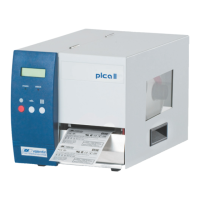
Details print resolution, maximum print speed, and print/passage widths for Pica II models.
Lists printhead type, label material specs, and label dimension limits.
Covers maximum roll diameter, physical dimensions, weight, processor, and RAM.
Lists available interfaces and power supply requirements including operating temperature and humidity.
Describes the control panel components and font features like types, character sets, and attributes.
Lists supported bar code types and outlines software components like drivers and design tools.
Lists the standard features and optional accessories available for the printer.
Illustrates the internal circuitry, showing power connections and port configurations.
Details D-Sub socket pinout and assigns functions to ports 1-16 for the 'Std_Label' profile.
Explains reference potentials (COM/VDC, GND-PE) for input and output signals.
Details the 5V and 24V DC outputs for external use, including current limits and precautions.
Specifies connector details and technical specifications for ports 1-16 and optocouplers.
Shows Plug & Play capability across Windows OS for LPT and USB interfaces.
Details printer recognition methods for specific Windows versions via startup or hardware wizard.
Provides notes on driver installation and compatibility for Windows NT 4.0.
Outlines steps for unpacking, checking delivery, and lists included items.
Provides instructions for printer setup, including placement and initial checks.
Guides on connecting the printer to power and to a computer or network.
Explains the procedure for switching on the printer after connections are made.
Describes initial startup, inserting media, and performing label length measurement.
Details loading a label roll in standard mode, including opening the cover and guiding material.
Explains loading labels for rewinding mode, guiding material, and fixing to the rewinding roll.
Provides instructions for loading a label roll when the cutter mode is active.
Describes loading a label roll for peel-off mode, guiding material and using the stopper surface.
Continues peel-off mode loading, including unlocking the dispense roll and placing backing material.
Details the process of loading fan-fold labels, including guiding material and adjusting the shaft.
Explains loading a transfer ribbon for thermal transfer, including printhead cleaning.
Continues transfer ribbon loading, covering printhead movement and closing the cover.
Explains control panel functions for printer operations and basic settings.
Describes printer states (Ready, Not ready, Printing) indicated by LEDs and display.
Details printer states like Pause, Waiting, and Error with their descriptions.
Lists key functions available on the control panel based on the current printer state.
Continues key function descriptions for states like Not ready, Printing, Pause, and Error.
Warns about printhead damage from improper handling and lists precautions.
Explains processing print orders, including interrupting, continuing, and cancelling.
Describes printing current settings and a sample label for status checks.
Explains label feeding and how data is saved via internal memory or software.
Describes tear-off mode and synchronizing label feed for dispenser/cutter modes.
Describes the dispenser unit and its operating modes (Off, I/O, Photocell).
Details the 'Guillotine' cutter function and its operating modes (Off, Backfeed, Intervals, Single Cut).
Guides on adjusting label and dispenser photocell sensitivity and signal threshold.
Explains adjusting heater resistance for print quality, especially after printhead replacement.
Details selecting printer language and switching between CVPL and ZPL II® emulation.
Describes Y-direction zero point adjustment for print position correction after printhead replacement.
Details X-direction zero point adjustment for print position correction across the print path.
Guides on selecting printer type and indicates the installed printhead type.
Warns of electric shock risk and recommends PPE for maintenance.
Provides a schedule of maintenance tasks and their recommended frequency.
Outlines general cleaning for printer surfaces and printing areas.
Details cleaning the print roller to maintain print quality and material transport.
Explains printhead cleaning to remove dirt and ensure optimal print quality.
Provides instructions for cleaning the label photocell affected by paper dust.
Details general printhead replacement, including static electricity precautions.
Guides on removing and installing the printhead, including checks and resistance.
Describes printhead adjustment for optimal print image, focusing on alignment and parallelism.
Details printhead parallelism adjustment relative to the pressure roll for quality.
Explains how adjusting pressure improves print density and ribbon feed.
Lists common error messages, causes, and remedies for troubleshooting printer issues.
Continues listing common error messages, causes, and remedies for printer issues.
Continues listing error messages, causes, and remedies, including clock, CF card, and file errors.
Continues error listing, covering file errors, scanner issues, and printhead problems.
Continues error listing for bar codes, XML, RFID, and directory issues.
Continues error listing for RFID, scanners, and print data parameters.
 General
| Print Resolution | 203 dpi |
|---|---|
| Print Speed | Up to 100 mm/sec |
| Resolution | 203 dpi |
| Print Method | Thermal transfer |
| Interfaces | USB, Serial |
| Print Technology | Thermal Transfer |
| Paper Handling | Roll |

 To Next Page