4
Pressing the
E
button again will leave the setting as is and
move to the next option –
To Change a Setting: Scroll to the desired Setting Mode
option using the
E
button (as described in table on page
5), then press the or
H
button to scroll through the avail-
able Settings. When the desired setting is displayed on the
screen press the
E
/ ENTER button. The display will briefly
indicate that the new setting has been “Entered” and the new
setting will replace the previous setting on the second line of
the screen. Continue pressing the
E
button to view the cur-
rent setting for all options or
H
button to make any desired
changes.
To Exit the Setup Menu: Press the
F
/ ESCAPE button for 3
seconds. NOTE: The control will automatically exit the Setup
menu after 30 seconds of inactivity or by a call for heat.
Initial Start-up/Power-up
When powered-up for the first time, the control will display
a scrolling message “Does Burner Have A Solenoid Valve?”.
Press
G
for Yes or
H
for No. This information is needed for
proper operation of the control. NOTE: The control will not
operate until this question is answered.
“Does Burner Have Solenoid Valve” will scroll on screen.
NOTE: This selection can be changed in the Settings Mode
(see below for how to change settings)
View or Change Control Settings
NOTE: The settings mode cannot be accessed during a run
cycle, the burner must be in standby mode (or lockout) to
enter setup.
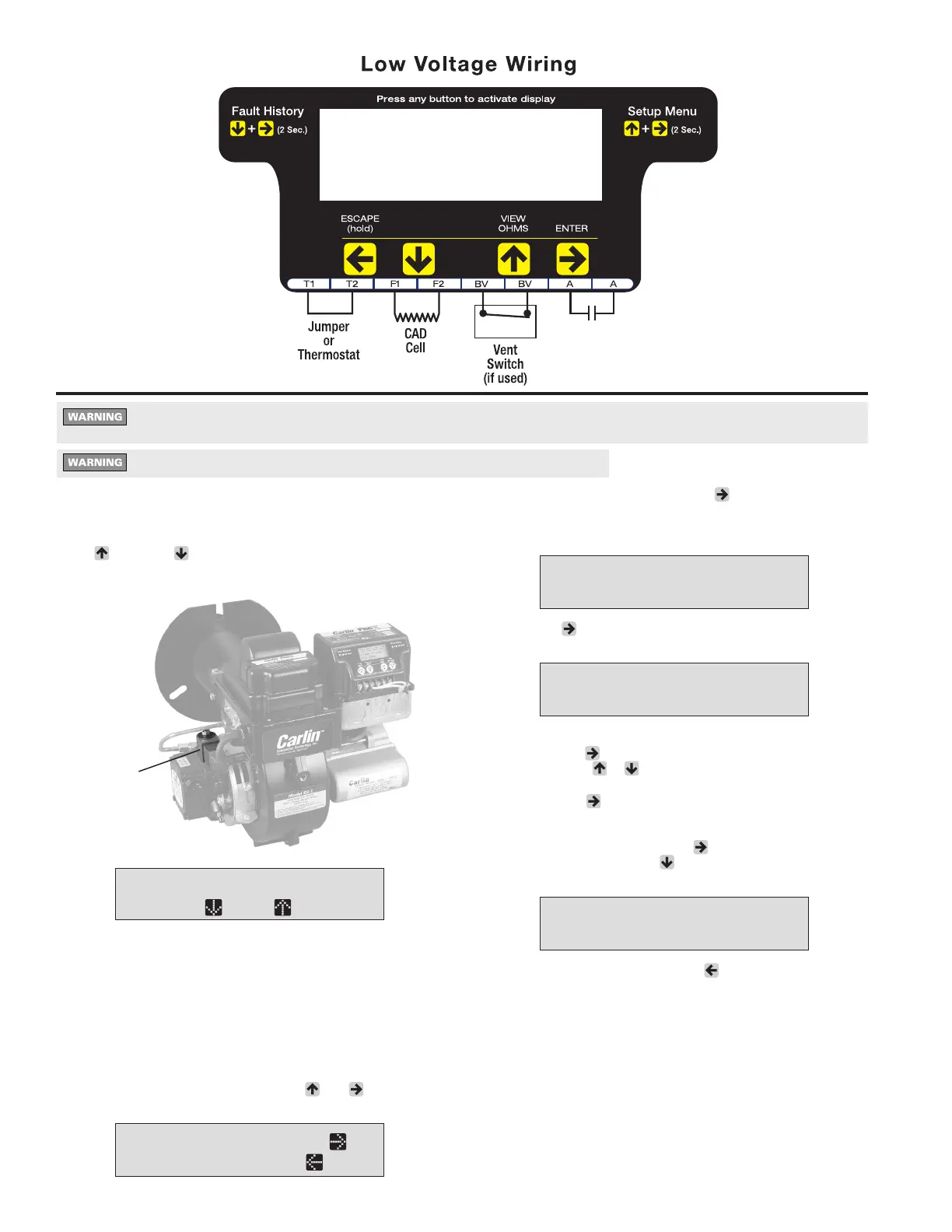
To enter the Settings Mode: Press the
G
and
E
buttons
simultaneously for 2 seconds. The display will show –
Carlin Combustion Technology
MN70200B 101323
Trial for Ign
15 Seconds
Programmable*
Dry
Contacts
*See page 5 for
programming details.
Do not start the burner if the combustion chamber contains oil or oil vapor.
Trial for Ign
30 Seconds
Does Burner...
Press =No =Yes
Settings Press
To Exit Hold
To View Current Settings: Press the
E
button to scroll
through all Setting Modes (see table at the top of page 5 for
Setting Mode options). The second line of the screen will
display the current setting for each Setting Mode –
Pre-Purge
30 Seconds
SOLENOID
T-T terminals are designed to accept a jumper or dry thermostat contacts only. Applying a 24 VAC source directly to
the T-T terminals will cause permanent damage to the control.


 To Next Page
 Loading...