EasyManua.ls Logo

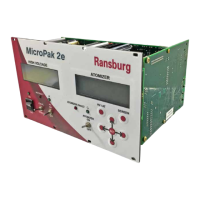
Carlisle Ransburg MicroPak 2e - User Manual

Carlisle Ransburg MicroPak 2e
74 pages
Print Icon
To Next Page IconTo Next Page
Loading...
IMPORTANT: Before using this equipment, carefully read SAFETY PRECAUTIONS, starting
on page 5, and all instructions in this manual. Keep this Service Manual for future reference.
Model: A13338
MicroPak 2e Controls
LN-9624-00-R3 (05/2018) 1 / 74 www.carlisleft.com
EN
SERVICE MANUAL

Table of Contents

Questions and Answers

  • P
    Pamela ByrdSep 23, 2025
    What does 'KV High Limit' mean on my Carlisle Ransburg MicroPak 2e Controller?
    • N
      nicolerobinsonSep 23, 2025
      The Carlisle Controller might display 'KV High Limit' if the voltage level (kV) is within 10% of kV Maximum, i.e. 110 kV.
  • D
    David MontoyaAug 23, 2025
    Why does my Carlisle Ransburg MicroPak 2e Controller show a 'Communications' error?
    • F
      Frank MaynardAug 25, 2025
      The 'Communications' error on the Carlisle Controller may be caused by: receipt of a reset command when no fault was active; receipt of an invalid high voltage controller parameter value; or receipt of an invalid atomizer parameter value. The Atomizer Fault LED will also be lit.
  • P
    Peggy BurnettAug 25, 2025
    What causes the 'Remote Stop' error on a Carlisle Ransburg MicroPak 2e Controller?
    • H
      Hannah PrestonAug 26, 2025
      The 'Remote Stop' error on the Carlisle Controller indicates that the Remote Stop input circuit has been opened.
  • K
    Kimberly FloresAug 27, 2025
    What does 'MAX KV' mean on my Carlisle Ransburg MicroPak 2e?
    • S
      Steven FloresAug 27, 2025
      The 'MAX KV' error on the Carlisle Controller means that the system has raised the Variable Voltage Output to the system maximum, but could not reach the setpoint.
  • T
    Tina HillAug 27, 2025
    What does 'Voltage Cable' mean on a Carlisle Ransburg MicroPak 2e Controller?
    • A
      Andrea BrownAug 27, 2025
      The 'Voltage Cable' error on the Carlisle Controller indicates that the system has detected a loss of the High Voltage Feedback signal from a Consolidated cascade.
  • J
    Jeffrey TaylorSep 16, 2025
    What does 'Over Voltage' mean on my Carlisle Ransburg MicroPak 2e Controller?
    • B
      ballardchristopherSep 16, 2025
      The Carlisle Controller might display an 'Over Voltage' error if the voltage level is within 10% of KV High Limit (current mode only).
  • D
    davisnicholasSep 13, 2025
    What does 'Min Output' mean on my Carlisle Ransburg MicroPak 2e Controller?
    • C
      christina06Sep 13, 2025
      The 'Min Output' error on the Carlisle Controller means that the system has lowered the Variable Voltage Output to zero and still is above the setpoint.
  • M
    Maria HuffmanSep 14, 2025
    What does 'Over Current' mean on my Carlisle Controller?
    • D
      Dalton WalkerSep 15, 2025
      The Carlisle Controller might display an 'Over Current' error if the current level is within 10% of Max µA Limit.
  • S
    Sarah YatesSep 5, 2025
    What does 'DVDT' mean on my Carlisle Ransburg MicroPak 2e Controller?
    • K
      Kimberly AlvaradoSep 6, 2025
      The Carlisle Controller displays 'DVDT' when the system has detected a dv/dt event.
  • C
    Crystal YoungSep 3, 2025
    What does 'KV Low' mean on my Carlisle Ransburg MicroPak 2e Controller?
    • S
      Stephanie SanchezSep 3, 2025
      The Carlisle Controller displays 'KV Low' when the system has fallen below kV Lo Limit while operating in Current Mode.

Summary

Safety

Safety Precautions

Details essential safety measures and warnings for operating Ransburg electrostatic coating systems.

HV Controller Introduction and Specifications

General Description, Safety Features, and Displays

Overview of the MicroPak 2e controller's features, safety protections, and front panel displays.

Specifications

Technical specifications including environmental, physical, power, and electrical requirements.

Password Protection

Explains the password system for Config, System, and User levels to prevent unauthorized access.

Operator Interface, Controls, and Buttons

Details the front panel layout, including LEDs, switches, buttons, and their functions.

HV Controller Installation

General Information, Location, and Mounting

Provides guidance on general installation, product placement, and physical mounting procedures.

Power, Ethernet, and Output Connections

Details input power supply requirements, Ethernet connectivity, and output connections to cascades.

Electrical Noise and Interlock Connections

Addresses electrical noise considerations and the setup of interlock connections for system integration.

HV Controller Operation

Start-Up, Software Mismatch, and Menus

Covers initial start-up procedures, software version checks, and menu navigation basics.

Configuration and Diagnostic Menus

Details various configuration options and diagnostic screens available on the controller.

HV Controller: Operating Parameters & Control Conditions

Operating Parameters (kVSet, µASet, Limits, Sensitivity)

Explains key operating parameters like voltage/current setpoints, limits, and sensitivity settings.

Control Conditions, Status, and Fault Behavior

Describes system status, control conditions, and how faults affect operation.

Ethernet;IP Interface and Data Elements

Details the Ethernet/IP interface, including input/output definitions and data mapping.

Atomizer Controller: Introduction and Operation

Introduction: Description, Specifications, Controls, Speed

Overview of the Atomizer Controller's capabilities, specifications, I/O, and speed control.

Operation: Modes, Configuration, Shutdown, Interfacing, Ethernet;IP

Covers operational modes, configuration, automatic shutdown, interfacing, and Ethernet/IP details.

Discrete IO Controller: Introduction and Operation

Introduction: Description, Specifications, Controls

Overview of the Discrete IO Controller's purpose, specifications, and control capabilities.

Operation: Modes, Scaling, Hardware, Logic

Details operational modes, input scaling, hardware signals, and I/O logic for the Discrete IO Controller.

Integration Notes

Guidelines and Recommendations

Provides guidelines for DIP switch settings, controller connections, and general integration advice.

Maintenance and Parts

Troubleshooting Guide

Offers guidance for diagnosing and resolving faults and warnings encountered during operation.

Parts Identification

Lists part numbers and descriptions for the MicroPak 2e High Voltage Controller components.

Appendix and Documentation

Initialization Screens

Details the sequence of screens and parameter settings required during initial unit setup.

Manual Change Summary

Summarizes the changes and updates made in this revision of the manual.

Warranty Policy

Carlisle Ransburg MicroPak 2e Specifications

General IconGeneral
Voltage100-240 VAC
Frequency50/60 Hz
Output Voltage0-100 kV
Output Current0-100 μA
Control Signal0-10 VDC
Operating Temperature0-40°C
Storage Temperature-20 to 60 °C
Weight1.4 kg (3 lbs)

Related product manuals