front and rear slot of the compartment and fix it.
(4) To take out the remote controller, place four AA-sized batteries, return all
the rockers of the remote controllers to the origin and turn on the remote
controller switch. The power indicator of the remote controller will be
on.
(5) Close the left and right bottom compartment plate of the middle
compartment and put the bait in. When the middle compartment door is
remotely opened, the warning indicator will flicker.
(6) After turning on the boat switch, the front and rear lamps of the boat will
flicker for three times. And then, test the functions of the remote
controller. If it is normal, place the boat into the water and start to use it.
(7) After use, please close the switch of remote controller and boat switch.
2. Operation instruction of remote controller
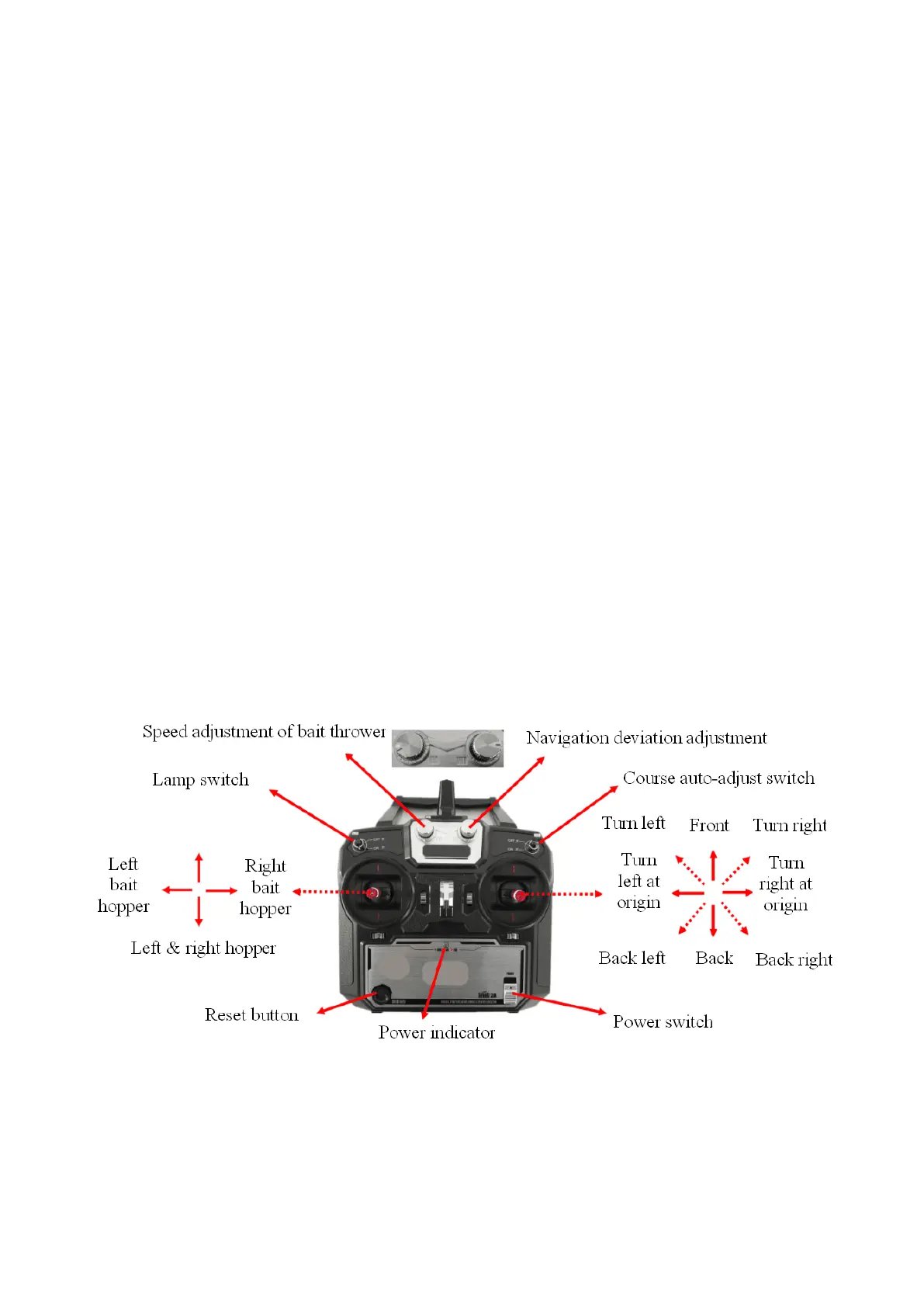
The standard remote controller is operated as follows:
Operation instruction of standard remote controller:
(1) Control opening of the bait hopper by using the left rocker of the remote
controller. Dial left to open the left bait hopper, dial right to open the right
bait hopper, dial down to open the both left and right bait hoppers at the


 To Next Page