Need help?
Do you have a question about the Carson POCKETMICRO MM-450 and is the answer not in the manual?
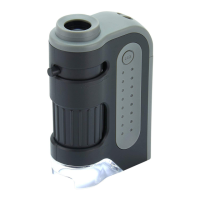
The Carson PocketMicro MM-450 is a versatile and portable zoom pocket microscope designed for on-the-go observation. This compact device offers a magnification range of 20x to 60x, allowing users to examine small objects with significant detail. Its intuitive design makes it suitable for a wide range of users, from hobbyists and students to professionals requiring quick inspections in the field.
The primary function of the PocketMicro MM-450 is to magnify small objects, revealing intricate details that are invisible to the naked eye. It achieves this through a combination of an objective lens and an eyepiece, allowing for adjustable magnification within its 20x-60x range. An integrated LED illumination system ensures that the viewing subject is brightly lit, enhancing clarity and contrast, which is crucial for detailed observation, especially in low-light conditions. The device is powered by a single AA battery, making it energy-efficient and easy to power with commonly available batteries. Its pocket-sized form factor emphasizes portability, enabling users to carry it effortlessly for various applications, whether for educational purposes, scientific exploration, or casual curiosity. The zoom functionality allows users to adjust the magnification level to suit the specific object being viewed, providing flexibility in observation. The focusing mechanism ensures that the image remains sharp and clear across different magnifications and viewing distances.
Operating the PocketMicro MM-450 is straightforward, designed for ease of use. To begin observation, the user first places the viewing subject directly beneath the objective lens. This ensures that the object is within the microscope's field of view and ready for magnification. Next, the integrated LED light needs to be activated. This is done by pressing the LED button, which illuminates the subject, providing the necessary light for clear viewing. Once the subject is illuminated, the user can adjust the magnification level using the zooming ring. This ring allows for a smooth transition between 20x and 60x magnification, enabling the user to find the optimal level of detail for their specific needs. After setting the desired magnification, the focusing ring is used to bring the image into sharp focus. This step is critical for achieving a clear and crisp view of the magnified object. The focusing ring allows for fine adjustments, ensuring that even the most intricate details are visible. When observation is complete, the LED light can be turned off by pressing the LED button again, conserving battery life. The compact size and simple controls make this microscope an excellent tool for quick examinations, field studies, and educational demonstrations. Its portability means it can be used virtually anywhere, from a classroom to an outdoor environment, without the need for complex setup or external power sources beyond its single AA battery.
Proper maintenance of the PocketMicro MM-450 is essential to ensure its longevity and continued optimal performance. One of the most important maintenance aspects involves battery management. The device is powered by one AA battery, and it is crucial to install it correctly, paying attention to the polarity indicated within the battery compartment. Incorrect battery installation can prevent the device from functioning or potentially damage its internal components. For extended storage periods, it is strongly recommended to remove the battery from the microscope. This prevents potential battery leakage or corrosion, which can severely damage the device's electronics and mechanical parts. Regular inspection of the battery compartment and the battery itself for any signs of corrosion or leakage is also advised. If any such signs are observed, the battery should be replaced immediately, and any residue cleaned carefully. When replacing batteries, it is recommended to use alkaline batteries, as rechargeable batteries are generally not recommended for this device. Additionally, users should avoid exposing the microscope to extreme conditions, such as fire or excessive heat, as these can damage the internal components and the plastic casing. Proper handling and storage, away from dust and moisture, will also contribute significantly to maintaining the microscope's optical clarity and mechanical integrity over time. After the battery has been exhausted, it should be removed from the device and disposed of properly according to local regulations. Adhering to these simple maintenance guidelines will help ensure that the Carson PocketMicro MM-450 remains a reliable and effective tool for magnification for many years.
 General
| Magnification | 20x-60x |
|---|---|
| Type | Pocket Microscope |
| Light Source | LED |
| LED Illumination | Yes |
| Focus Range | Adjustable |


 To Next Page