Need help?
Do you have a question about the Carson zOrb and is the answer not in the manual?
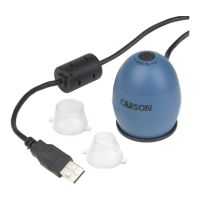
Overview of the zOrb 53x Digital Microscope, including its magnification and capture capabilities.
Specifies compatible operating systems, CPU speed, RAM, and USB for Windows.
Specifies compatible operating systems, CPU speed, RAM, and USB for Mac OS.
Button on top of the device for capturing images.
Adjusts the clarity of the magnified image.
The optical component responsible for magnification.
Provides light for viewing specimens.
Location for attaching different microscope adapters.
Cable used to connect the microscope to a computer.
Details magnification, image sensor format, and resolution.
Specifies the power consumption of the digital microscope.
Includes net weight and approximate dimensions of the device.
Steps for connecting the microscope via USB and driver installation.
Procedures for launching the software on Windows and Mac OS.
Accesses the menu for configuring device and software settings.
Function to take a snapshot of the current view.
Activates/deactivates automatic image capture at intervals.
Activates/deactivates video recording of the magnified view.
Displays copyright and version details of the application.
Closes the Digital Viewer application.
Configures the connected device and image resolution.
Sets the frequency and duration for automatic image capture.
Configures video resolution and maximum file size.
Defines the default location for saving captured files.
Changes the software's display language.
Manually adjust image settings like brightness, contrast, and gamma.
Locate saved files via the 'More...' button in the software.
Activate/exit full screen mode using the software interface or Esc key.
Keep dry, avoid extreme temperatures, wet hands, dust, and harsh chemicals.
Do not place lighted microscope on eye; do not attempt to open or dismantle.
Covers defects in material/workmanship for one year; excludes misuse, abuse, accidents.
 General
| Brand | Carson |
|---|---|
| Model | zOrb |
| Category | Microscope |
| Language | English |

 To Next Page