EasyManua.ls Logo

Carson zPix 300 - User Manual

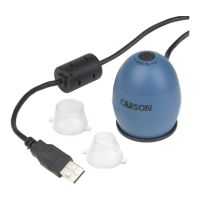
Carson zPix 300
19 pages
Print Icon
To Next Page IconTo Next Page
Loading...
MM-940
TM
zPix 300
86
x - 457x
Zoom
Digital Microscope
User Guide
PDF: www.carson.com/MM940guide
English / Français / Español / Deutsch /
日本語
Question and Answer IconNeed help?

Do you have a question about the Carson zPix 300 and is the answer not in the manual?

Summary

Important Information

Product Description

Computer Requirements & Software Installation

Package Contents

Product Overview

Product Specification

Getting Started

Assembling the Product

Guide to assembling the digital microscope and placing a specimen slide onto the stage.

Connecting the Device

Steps for connecting the microscope to a computer via USB, including driver installation.

Starting the xploview Software

Instructions for launching the xploview software on Windows and Mac OS platforms.

Microscope Operations

Focusing the Image

Manual adjustment of image focus using the microscope's focusing ring.

Zooming the Image

Manual adjustment of image magnification using the microscope's zooming ring.

Using the xploview Software

System Settings Menu Overview

Software Configuration Settings

Device, Timed Shot, and Movie Setup

Configure device selection, resolution, timed shots, and movie recording parameters.

Save and Language Options

Set default save paths for captured media and select the user interface language.

Advanced Settings and File Management

Advanced Image Adjustments

Fine-tune image properties like brightness, contrast, and white balance.

Locating Saved Files

Instructions on how to find the folder containing captured images and videos.

Display Modes and Device Care

Full Screen Mode

Steps to activate and exit the full-screen display mode for the application.

Device Care and Maintenance

Guidelines for keeping the microscope clean, dry, and protected from damage.

Safety Warnings and Warranty

Safety Precautions

Critical safety advice to prevent eye damage and improper product use.

Limited Warranty Overview

Details of the one-year limited warranty, including coverage and exclusions.

Warranty Claim Procedure

Summary

Important Information

Product Description

Computer Requirements & Software Installation

Package Contents

Product Overview

Product Specification

Getting Started

Assembling the Product

Guide to assembling the digital microscope and placing a specimen slide onto the stage.

Connecting the Device

Steps for connecting the microscope to a computer via USB, including driver installation.

Starting the xploview Software

Instructions for launching the xploview software on Windows and Mac OS platforms.

Microscope Operations

Focusing the Image

Manual adjustment of image focus using the microscope's focusing ring.

Zooming the Image

Manual adjustment of image magnification using the microscope's zooming ring.

Using the xploview Software

System Settings Menu Overview

Software Configuration Settings

Device, Timed Shot, and Movie Setup

Configure device selection, resolution, timed shots, and movie recording parameters.

Save and Language Options

Set default save paths for captured media and select the user interface language.

Advanced Settings and File Management

Advanced Image Adjustments

Fine-tune image properties like brightness, contrast, and white balance.

Locating Saved Files

Instructions on how to find the folder containing captured images and videos.

Display Modes and Device Care

Full Screen Mode

Steps to activate and exit the full-screen display mode for the application.

Device Care and Maintenance

Guidelines for keeping the microscope clean, dry, and protected from damage.

Safety Warnings and Warranty

Safety Precautions

Critical safety advice to prevent eye damage and improper product use.

Limited Warranty Overview

Details of the one-year limited warranty, including coverage and exclusions.

Warranty Claim Procedure

Carson zPix 300 Specifications

General IconGeneral
BrandCarson
ModelzPix 300
CategoryMicroscope
LanguageEnglish

Related product manuals