EasyManua.ls Logo

Carson Reflex Wheel Pro 3 BEC - User Manual

Carson Reflex Wheel Pro 3 BEC
44 pages
Go to English
Print Icon
To Next Page IconTo Next Page
Loading...
500500052-56 // Stand: Juni 2015
D
Betriebsanleitung Seite 2 - 19
G
Instruction Manual Page 20 - 37
F
Avertissement de sécuri Page 38 - 40
I
Avvertenze di sicurezza Pagina 41 - 43
2.4 GHz FHSS Digital
Proportional Radio Control System

Table of Contents

Question and Answer IconNeed help?

Do you have a question about the Carson Reflex Wheel Pro 3 BEC and is the answer not in the manual?

Summary

Limited Warranty

Declaration of Conformity

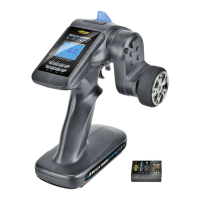
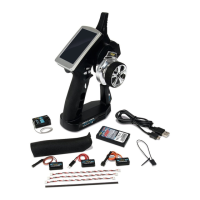
Included Items Overview

2.4 GHz Remote Control Features

Key Advantages of 2.4 GHz Technology

Highlights benefits like interference reduction and ease of use.

Operational Considerations

Discusses factors affecting signal transmission and antenna placement.

Safety Instructions and Precautions

General Safety Warnings

Essential safety advice for operating RC models and avoiding injury.

Operational Cautionary Notes

Warnings about low voltage, BEC systems, and proper operation.

Operating Procedure Guidelines

Recommended sequence for turning the system on and off.

BEC System Receiver Connections

Standard Receiver Connections

Equipment for Combustion Engines

Transmitter Battery and Charging

Inserting Transmitter Batteries

Guide to installing batteries or power pack correctly.

Rechargeable Battery Charging

Procedure for charging Li-Ion and NiMh batteries.

Adjusting Steering Wheel Position

Instructions for customizing steering wheel placement.

Reflex Wheel Pro3 LCD Transmitter Functions

LCD Transmitter: Version without BEC

Details the interface and setup for the non-BEC LCD model.

LCD Transmitter: Version with BEC

Details the interface and setup for the BEC LCD model.

Transmitter Control Operations

Throttle Trigger and Steering Wheel Use

How to operate the main control inputs.

Trim Adjustments and Settings

Fine-tuning servo neutral positions using trim controls.

Factory Settings Reset

Procedure to restore transmitter to default settings.

Advanced Transmitter Settings

Model Selection and Naming

Managing model memory and assigning names.

Servo Direction and Travel Limits (REV;EPA)

Configuring servo direction and maximum travel.

Exponential and Dual Rate Settings (EXP;D;R)

Adjusting servo response curves and travel sensitivity.

Trim and ABS Settings

Fine-tuning trims and enabling the ABS system.

Reflex Wheel Pro3 Non-LCD Transmitter Functions

Non-LCD Transmitter: Version without BEC

Details the interface and setup for the non-BEC non-LCD model.

Non-LCD Transmitter: Version with BEC

Details the interface and setup for the BEC non-LCD model.

Failsafe and Binding Procedures

Configuring the Failsafe Function

Setting up the failsafe for loss of signal.

Binding Transmitter and Receiver

Steps to establish communication between transmitter and receiver.

Product Specifications

Battery Usage Safety Guidelines

Optional Additional Items

Summary

Limited Warranty

Declaration of Conformity

Included Items Overview

2.4 GHz Remote Control Features

Key Advantages of 2.4 GHz Technology

Highlights benefits like interference reduction and ease of use.

Operational Considerations

Discusses factors affecting signal transmission and antenna placement.

Safety Instructions and Precautions

General Safety Warnings

Essential safety advice for operating RC models and avoiding injury.

Operational Cautionary Notes

Warnings about low voltage, BEC systems, and proper operation.

Operating Procedure Guidelines

Recommended sequence for turning the system on and off.

BEC System Receiver Connections

Standard Receiver Connections

Equipment for Combustion Engines

Transmitter Battery and Charging

Inserting Transmitter Batteries

Guide to installing batteries or power pack correctly.

Rechargeable Battery Charging

Procedure for charging Li-Ion and NiMh batteries.

Adjusting Steering Wheel Position

Instructions for customizing steering wheel placement.

Reflex Wheel Pro3 LCD Transmitter Functions

LCD Transmitter: Version without BEC

Details the interface and setup for the non-BEC LCD model.

LCD Transmitter: Version with BEC

Details the interface and setup for the BEC LCD model.

Transmitter Control Operations

Throttle Trigger and Steering Wheel Use

How to operate the main control inputs.

Trim Adjustments and Settings

Fine-tuning servo neutral positions using trim controls.

Factory Settings Reset

Procedure to restore transmitter to default settings.

Advanced Transmitter Settings

Model Selection and Naming

Managing model memory and assigning names.

Servo Direction and Travel Limits (REV;EPA)

Configuring servo direction and maximum travel.

Exponential and Dual Rate Settings (EXP;D;R)

Adjusting servo response curves and travel sensitivity.

Trim and ABS Settings

Fine-tuning trims and enabling the ABS system.

Reflex Wheel Pro3 Non-LCD Transmitter Functions

Non-LCD Transmitter: Version without BEC

Details the interface and setup for the non-BEC non-LCD model.

Non-LCD Transmitter: Version with BEC

Details the interface and setup for the BEC non-LCD model.

Failsafe and Binding Procedures

Configuring the Failsafe Function

Setting up the failsafe for loss of signal.

Binding Transmitter and Receiver

Steps to establish communication between transmitter and receiver.

Product Specifications

Battery Usage Safety Guidelines

Optional Additional Items

Carson Reflex Wheel Pro 3 BEC Specifications

General IconGeneral
BrandCarson
ModelReflex Wheel Pro 3 BEC
CategoryRemote Control
LanguageEnglish

Related product manuals