1-24
• Adjust the 9 Band Graphic EQ's to their center position.
• Turn the amp on and slowly raise the level control to the desired setting.
5) THE LED "CLIP" INDICATOR
The "CLIP" LED indicates when the amp is starting to distort. Occasional flashing of this LED is all right. However, heavy
flashing is not recommended especially because of damage that "square wave" power can do to speakers and horn drivers.
6) The "PROTECT" LED
• The "PROTECT" LED has three protect functions. It's important that these functions be understood should the LED come on and
the amp go in a "Protect Mode".
a) The first protection mode is against shorted speaker outputs. If the speaker outputs should ever short while a signal is present
at the output, the "Protect" relay will politely disengage the speakers from the output section of the power amp protecting the
amp from any damage.
b) The second protection mode detects any excess load (current) that may be drawn from the speaker outputs. The FET401 is
designed to give its full rated power into 2Ω
without the Protect Relay engaging. Even 1Ω loads can be used safely at less than full power . However, the Protect Relay will
engage when the amp is driven to its full power and loaded less than its 2Ω rating.
c) The third protection mode is temperature related. The "Protect" LED will come on if the amp approaches its maximum
operating temperature. This protect mode may be caused by blocked fan vents, excessively warm air going into the fan vents
(if rack mount be sure the rack is properly vented with cool air), or the amp is driven hard below its rated speaker impedance.
7) RESETTING THE PROTECT LED
a) If the FET401 does go into the protect mode because of an excessive load (current), simply turn the amp off—wait for 3
seconds—and than turn the amp on. The Protect LED will go off and the amp is ready to function.
b) If the amp goes into the protect mode because of higher than normal operation temperature, turn the amp off—wait for to 3
seconds and if the Protect LED does not go off than you know that it's protecting from higher than normal operating
temperatures. If this is the cause, leave the amp on and wait for the fan to cool the amp down. This generally takes about 3 to
5 minutes. At that time turn the amp off—wait for 3 seconds and turn it back on and the amp is ready to function. It's important
to know that if your amp should ever go into a "Protect Mode" it does not harm your amp in any way. In fact, your amp was
checked in the "Protect Mode" several times before its was shipped as part of Carvin's quality assurance program.
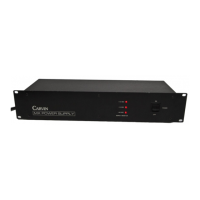
Front Panel Features
1. POWER SWITCH
Push to turn the amplifier ON.
2. POWER LED
The Power LED Indicates when the FET401 is on.
3. PROTECT— LED
See "Quick Start Up"
4. LEVEL CONTROL
The Level Control should be turned up at least 1/3 for the FET401 to reach its full rated output. If not, your input
source may start to distort (clip) by trying to drive the FET401 to its full output. If your signal is strong, it is not
necessary to turn the FET401 full on.


 To Next Page
 Loading...