11
10
INSTALLATION
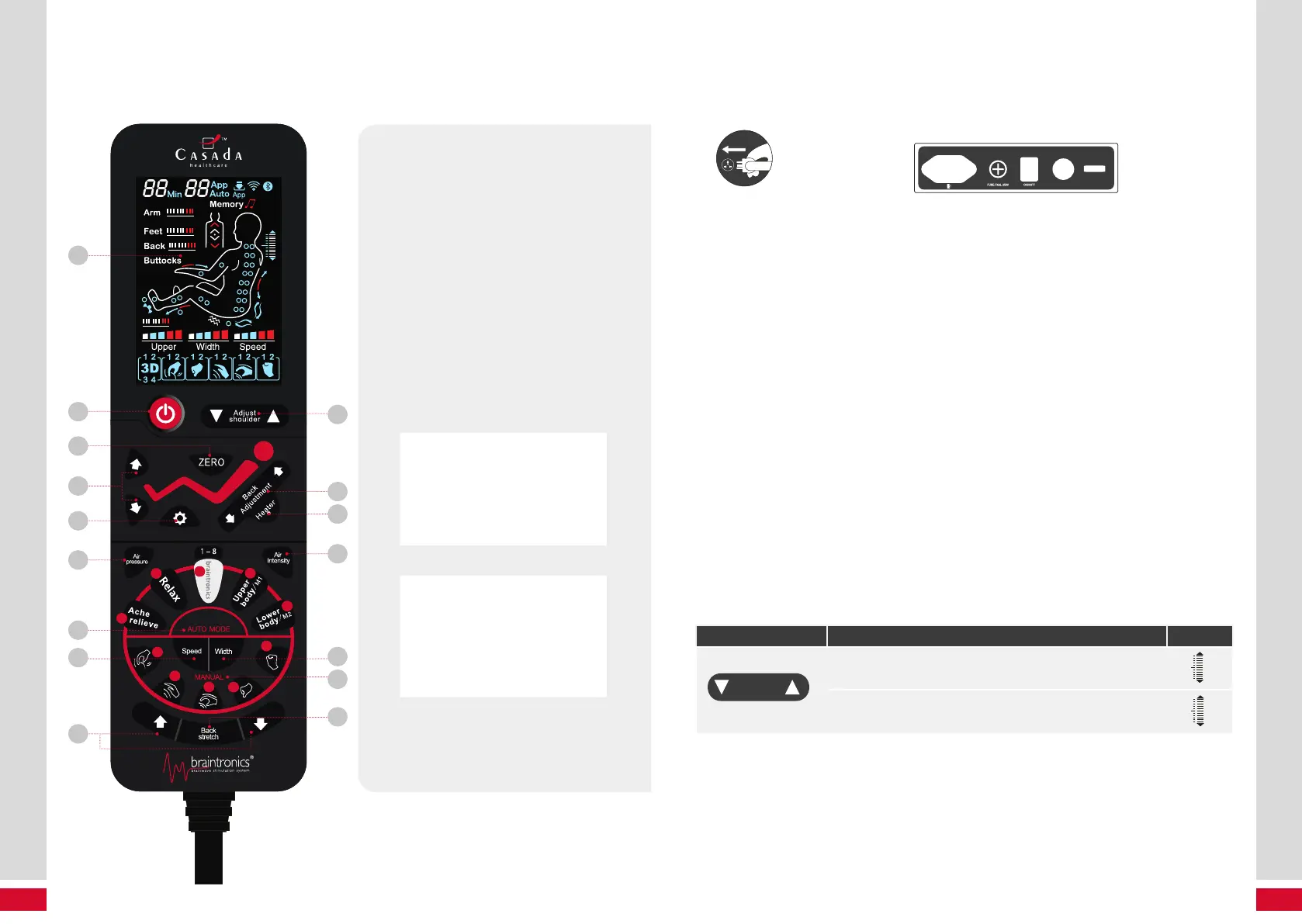
Remote control
REMOTE CONTROL
V+V–
6
10
5
15
9
7
3
11
1
8
2
12
13
16
c
c
a
a
e
e
b
b
d
d
14
4
1 Display
2 ON/OFF
3 Adjust Shoulder
During Braintronics mode:
Adjust Volume
4 Zero Gravity
5 Movement of massage arms
UP/DOWN
6 Sole Roller
7 Backrest Position Adjustment
8 Footrest Postition Adjustment
9 Heating Element ON/OFF
10 Air Pressure
11 Air Intensity
12 Auto Programs
a
Ache relieve
b
Relax
c
8 braintronics programs
d
Memory massage, upper body/M1
e
Memory massage, lower body/M2
13 Manual Programs
a
Kneading
b
Tapping
c
Knead & Tap
d
Shiatsu
e
Knocking
14 Speed – 3 Levels
15 Width 3 Levels
(rolling, tapping, knocking only)
16 Back Stretch
Installation
1 – SWITCH POWER SUPPLY ON
Diagram
of plug in
Diagram of the switch position of power supply
To begin, attach the power cable You will note the power is indicated by symbols “l” and “O”. “I” is the Po-
wer ON setting and “O” is the Power OFF setting. We recommend you turn the power to the off position
when the chair is not in use.
NOTE: In order to avoid damage caused by power surges that can damage the chair’s electrical and elec-
tronic components and can void your warranty, we strongly recommend the use of a high quality surge
protector (not a simple power strip) that you would use with any computer or home theatre system.
2 – START TO MASSAGE
1. Press power button on Remote Control, massage chair automatically reclines, and proceed with the
detection of your shoulders and Acupressure points. For an accurate scanning, ensure you have the
back of your head and shoulders firmly against the hedrest cushion, and be careful not to lean forward,
especially with your head.
2. Upon completion of the scan a beeping sound will begin emitting from the controller.
3. If at any time during your massage session you would like to fine tune the location of your shoulders,
you can use teh Shoulder Adjust up and down buttons to a suitable position.
4. If after 10 seconds no massage function has been selected the chair will automatically initiate a massage
sequence.
BUTTON DESCRIPTION DISPLAY
Adjust
shoulder
Move the massage heads upward to a suitable position.
Move the massage heads downward to a suitable position.



 To Next Page