17
+
-
5
10
1 2
3 4
1 2
3 4
English
12 EN
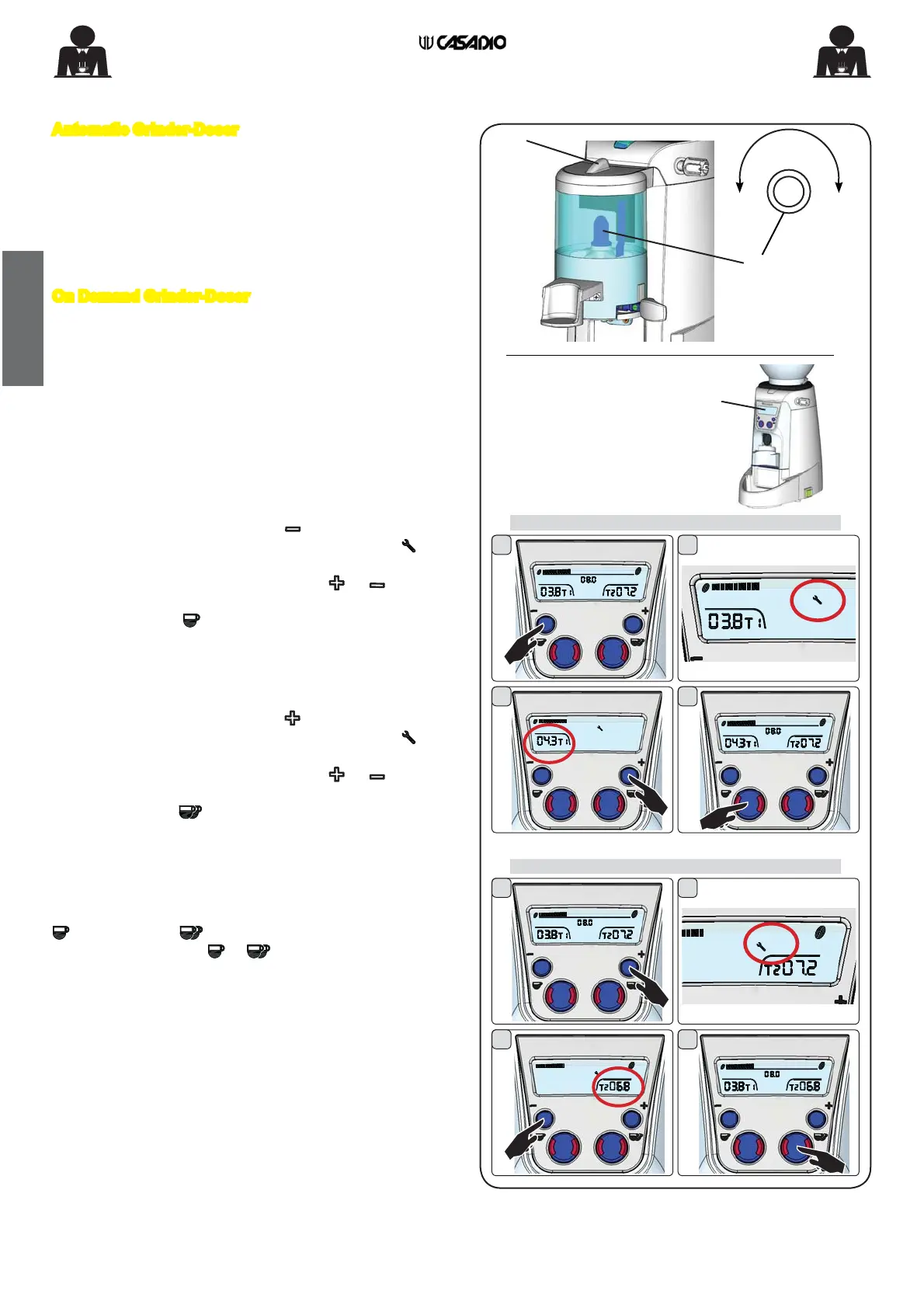
Automatic Grinder-Doser
To regulate the ground coffee doses for each withdrawal,
after lifting the lid (5) of the coffee distributor, turn the dose
regulating screw (17).
To increase the amount of ground coffee turn anti-clockwise.
To decrease the amount of ground coffee turn clockwise.
On Demand Grinder-Doser
Automatic Dose Adjustment
This function is set in the factory and allows doses to be
adjusted automatically.
A different adjustment cannot be applied to each key but
will be universal with a value between 0.1% and 10%. The
default value will be 3.5%.
Manual Dose Adjustment
Follow these steps to increase or decrease the ground
coffee dose:
Single Dose
1. Press and hold down the key
;
2. After a few seconds, the programming icon
will
appear on the display (10).
3. Change the grinding time using the
or keys (in
the range 1.0”–30.0”);
4. Press the key
WRFRQ¿UPWKHQHZWLPH
Double Dose
Follow these steps to increase or decrease the double
coffee dose:
1. Press and hold down the key
;
2. After a few seconds, the programming icon will
appear on the display (10).
3. Change the grinding time using the
or keys (in
the range 1.0”–30.0”);
4. Press the key WRFRQ¿UPWKHQHZWLPH
Manual operation
The grinder can also work in continuous or manual mode.
For this purpose, press and hold down one of the keys
(single
or double dose ); The grinder will start grinding and
continue until the key ( or ) is pressed again.
12. Regulation of the ground coffee dose
ON DEMAND VERSION
single dose
double dose


 To Next Page
 Loading...