2296-4
Example Operation Display
2 × 12 = 24 12 2 #K
24.
5 × 12 = 60 5 #K
60.
45 ÷ 9 = 5 9 45 $K
5.
72 ÷ 9 = 8 72 $K
8.
17 + 17 + 17 + 17 = 68 17
!K
68.
(2.3)
4
= 27.9841 2 3 #K
27.9841
To perform the above (2.3
2
)
2
2 3
27.9841
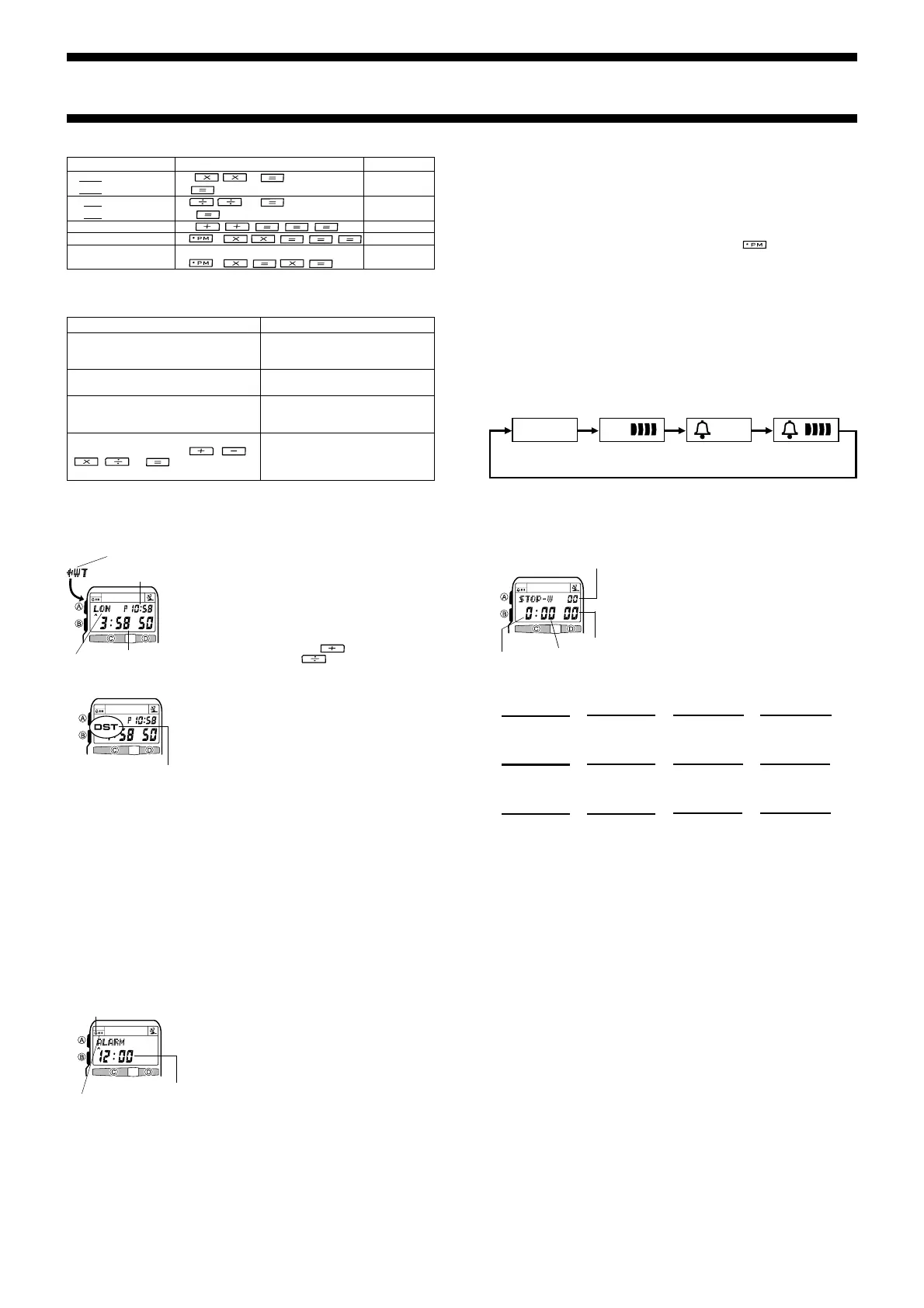
WORLD TIME
The World Time Mode shows the current time in 27 cities
(29 time zones) around the world.
• For full information on city codes, see “CITY CODE
TABLE” at the back of this manual.
• All of the operations in this section can be performed in
the World Time Mode, which you can enter by pressing
B.
To view the time in another city
In the World Time Mode, press to scroll forward
through the city codes and
to scroll back.
City code
Displayed city
standard time
Current Time
Mode indicator
To correct input errors and clear the calculator
The following table describes how to correct input errors and how to clear the
calculator after you finish using it.
When you need to do this:
Correct or change the value you are
currently inputting, without deleting the
rest of the calculation you have input
Correct or change the arithmetic operator
(+, –, ×,
÷
) you have just input
Clear the calculation you are inputting
Clear a displayed calculation result
(produced by pressing the
, ,
, or key) and its
calculation
Perform this key operation:
Press C to clear the displayed value
and return to the 0 display. Next,
input the value you want.
Without pressing C, press the key
for the correct arithmetic operator.
Press C to clear the displayed value
and return to the 0 display. Next,
press C again.
Press C.
To toggle a World Time city between DST and standard time
1. In the World Time Mode, display the city code whose
DST/Standard Time setting you want to change.
• You can make separate settings for each city code.
2. Hold down C for about two seconds to toggle between
DST (DST displayed) and standard time (DST not
displayed).
• The DST indicator appears on the display to indicate
that daylight saving time is turned on.
• Note that the DST/Standard Time setting affects only
the currently displayed city code. Other city codes are
not affected.
Note
• The DST setting of the World Time Mode and Timekeeping Mode are linked. This
means that using the World Time Mode to change the DST setting of the city that
you have selected as your current time zone in the Timekeeping Mode also changes
the setting of your current time zone.
• If you have a North American time zone (LAX, DEN, CHI, NYC) selected in the
Timekeeping Mode and DST AUTO turned on for the DST setting, changing the
DST setting in the World Time Mode for your time zone also turns DST AUTO off
and changes the time zone to the DST setting (DST ON or DST OFF) you select. If
you wish to continue automatic switching between DST and Standard Time, you
must change the DST setting back to DST AUTO.
DST indicator
To set the alarm time
1. In the Alarm Mode, hold down A until the left hour digit of the alarm time starts to
flash, which indicates the setting screen.
• This operation automatically turns on the Daily Alarm.
2. Use the keypad to input the alarm time.
• The flashing selection automatically advances to the right each time you input a
number. You can also use C and D to move the flashing digit between the left
hour, right hour, left minute’s, and right minute’s settings.
• If you are using the 12-hour timekeeping format, press
to toggle between
AM and PM.
• When setting the alarm time using the 12-hour format, take care to set the time
correctly as a.m. (A indicator) or p.m. (P indicator).
3. Press A to exit the setting screen.
ALARM
You can set a Daily Alarm that sounds at the same time
each day, while it is turned on. You can also turn on an
Hourly Time Signal that causes the watch to beep twice
every hour on the hour.
• Alarm settings (and Hourly Time Signal settings) are
available in the Alarm Mode, which you can enter using
B.
Important!
Setting an alarm time in period from midnight to 0:15AM,
2:00AM to 2:15AM, or 4:00AM to 4:15AM causes the
automatic calibration signal receive operation during that
period to be skipped.
Hourly time signal
on indicator
Alarm on indicator
Hour : Minutes
STOPWATCH
The stopwatch lets you measure elapsed time, split times,
and two finishes.
• The display range of the stopwatch is 23 hours, 59
minutes, 59.99 seconds.
• The stopwatch continues to run, restarting from zero
after it reaches its limit, until you stop it.
• The stopwatch measurement operation continues even
if you exit the Stopwatch Mode.
• All of the operations in this section are performed in the
Stopwatch Mode, which you can enter by pressing B.
Hours
Daily Alarm Operation
The alarm sounds at the preset time each day for about 10 seconds, or until you stop
it by pressing any button.
To test the alarm
In the Alarm Mode, hold down C to sound the alarm.
To turn the daily alarm and hourly time signal on and off
In the Alarm Mode, press C to cycle through the on and off settings as shown below.
Daily Alarm Only Alarm On
Signal On
Alarm Off
Signal Off
Hourly Time
Signal Only
Seconds
1/100 second
Minutes
C
Start Stop
Elapsed Time
➤
Re-start Clear
C
➤
Stop
C
➤
C
➤
A
Split Time
C
Start Split
➤
Split release
Clear
A
➤
Stop
A
➤
C
➤
A
Two Finishes
C
Start Split
➤
Stop
Clear
A
➤
Split release
C
➤
A ➤
A
First runner
finishes.
Display time of
first runner.
Second runner
finishes.
Display time of
second runner.
To measure times with the stopwatch
REFERENCE
This section contains more detailed and technical information about watch operation.
It also contains important precautions and notes about the various features and
functions of this watch.
To turn the input tone on and off
1. Enter the Calculator Mode.
2. Hold down A for about two seconds to toggle the input tone on and off.
• The input tone on/off setting you make in the Calculator Mode is applied to all
other modes, except the Stopwatch Mode.
Auto Return Features
• After you perform an operation in any mode, pressing B returns to the Timekeeping
Mode.
• If you leave a screen with flashing a digit or a cursor on the display for two or three
minutes without performing any operation, the watch automatically saves anything
you have input up to that point and exits the setting screen.
• If you leave the watch in the Telememo or Alarm Mode for about two minutes without
performing any operation, it automatically changes to the Timekeeping Mode. The
watch also reverts to the Timekeeping Mode if you leave it in the Calculator Mode
for about six or seven minutes without performing any operation.


 To Next Page
 Loading...