USER’S GUIDE 2713
3
To measure times with the stopwatch
Elapsed Time
Start
Stop Re-start Stop Clear
Start
Split Split release Stop Clear
Start
Split Stop Split release Clear
Split Time
Two Finishes
First runner
finishes.
Display time of
first runner.
Second runner
finishes.
Display time of
second runner.
SPLIT indicator
displayed
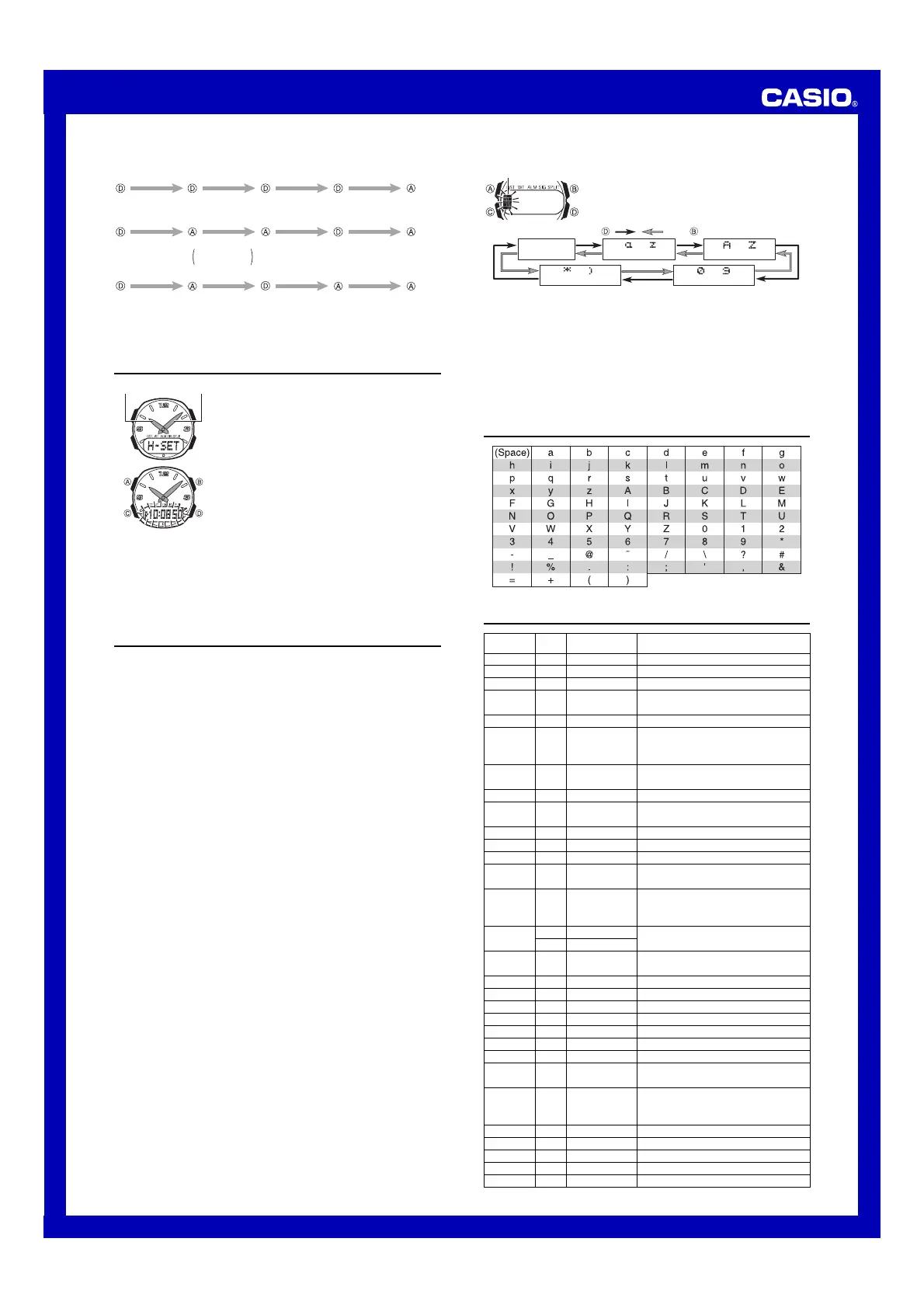
Hand Setting
When the analog setting does not match the time shown
on the digital display, use this mode to correct the analog
setting.
• This watch features separate digital and analog
timekeeping. Note that the digital time and analog time
are independent of each other, and must be set
separately.
To set the analog time
1. Hold down A while in the Hand Setting Mode until the
time in the digital display (Timekeeping Mode time)
starts to flash.
2. Use B and D to set the analog time.
• Each press of D advances the hands 20 seconds.
• Pressing B while holding down D causes the hand
setting to change at high speed, even if you release
the buttons. Press any button to stop.
• The analog time setting does not stop automatically when it reaches the current
time. You must stop the hands manually.
• Note that the hands can be advanced only and cannot be moved back. Take care
so you do not go past the setting you want to make.
3. After you set the analog time, press A to exit the setting screen.
• Depending on your timing when you operate the D button, the above operation can
cause the minute hand timing to become late. If this happens, repeat the above
operation to correct the minute hand timing.
Reference
This section contains more detailed and technical information about watch operation.
It also contains important precautions and notes about the various features and
functions of this watch.
Auto return features
• If you leave the watch in the e-DATA MEMORY Mode for two or three minutes without
performing any operation, it automatically changes to the Timekeeping Mode.
• If you leave a screen with a flashing setting for two or three minutes without
performing any operation, the watch automatically saves any settings you have
made up to that point and exits the setting screen.
Data and Setting Scrolling
The B and D buttons are used in various setting screens to scroll through data on
the display. In most cases, holding down these buttons during a scroll operation scrolls
through the data at high speed.
Initial Screens
When you enter the Alarm Mode, the data you were viewing when you last exited the
mode appears first.
Timekeeping
• The day of the week is automatically displayed in accordance with the date (year,
month, and day) settings.
• The year can be set in the range of 2000 to 2039.
• The watch’s built-in full automatic calendar automatically makes allowances for
different month lengths and leap years. Once you set the date, there should be no
reason to change it except after you have the watch’s battery replaced.
12-hour/24-hour Timekeeping Formats
The 12-hour/24-hour timekeeping format you select in the Timekeeping Mode is also
applied in all other modes.
• With the 12-hour format, the P (PM) indicator appears on the display for times in the
range of noon to 11:59 p.m. and the A (AM) indicator appears for times in the range
of midnight to 11:59 a.m.
• With the 24-hour format, times are displayed in the range of 0:00 to 23:59, without
any indicator.
World Time
• The current time in all World Time Mode cities is calculated in accordance with the
Greenwich Mean Time (GMT) differential for each city, based on the current Home
City time setting in the Timekeeping Mode.
• The GMT differential is the time difference of the time zone where the city is located
from Greenwich Mean Time.
• GMT differential is calculated by this watch based on Universal Time Coordinated
(UTC) data.
e-DATA MEMORY Management
e-DATA MEMORY can hold up to 315 characters total, while each record can contain
up to 63 characters. The maximum number of records depends on the number of
characters per record, as shown below.
• 63 characters per record: 5 records
• 7 characters per record: 40 records
When you purchase the watch, e-DATA MEMORY contains one record, with the text:
http://world.casio.com. This text is also stored automatically whenever memory
contents are cleared by battery replacement.
Inputting Text
The following describes how to input text in the e-DATA MEMORY Mode.
Minutes hand Hour hand
To input characters
1. When the cursor is on the display, use D and B to
cycle through the available letters, numbers and
symbols, in the sequence shown below.
Cursor
to
(upper-case)
(space)
to
(symbol)
to
(number)
Press . Press .
to
(lower-case)
2. When the character you want is at the cursor position, press C to move the cursor
to the right.
3. Repeat steps 1 and 2 to input the rest of the characters you want.
• See the “Character List” for information about the characters you can input.
Neon Illuminator
The Neon Illuminator uses LED (light-emitting diode) blacklight in combination with
fluorescent paint, which reflects blacklight to produce figures that are easy to read in
the dark. Press B to illuminate the display for about two seconds.
• Illumination may be hard to see when viewed under direct sunlight.
• Illumination turns off automatically whenever an alarm sounds.
• Frequent use of illumination shortens battery life.
Character List
City Code Table
–11 –11
–10 HNL HONOLULU PAPEETE
–9 ANC ANCHORAGE NOME
–8 LAX LOS ANGELES
SAN FRANCISCO
,
LAS VEGAS,
VANCOUVER, SEATTLE, DAWSON CITY
–7 DEN DENVER EL PASO, EDMONTON
HOUSTON, DALLAS/FORT WORTH,
–6
CHI CHICAGO NEW ORLEANS, MEXICO CITY,
WINNIPEG
–5 NYC NEW YORK
MONTREAL, DETROIT, MIAMI, BOSTON,
PANAMA CITY, HAVANA, LIMA, BOGOTA
–4 CCS CARACAS LA PAZ, SANTIAGO, PORT OF SPAIN
–3 RIO
RIO DE JANEIRO
SAO PAULO, BUENOS AIRES, BRASILIA,
MONTEVIDEO
–2 –2
–1 –1
0 GMT
0 LON LONDON
DUBLIN, LISBON, CASABLANCA,
DAKAR, ABIDJAN
MILAN, ROME, MADRID, AMSTERDAM,
+1 PAR PARIS
ALGIERS, HAMBURG, FRANKFURT,
VIENNA, STOCKHOLM, BERLIN
+2
CAI CAIRO ATHENS, HELSINKI, ISTANBUL,
JRS JERUSALEM BEIRUT, DAMASCUS, CAPE TOWN
+3 JED JEDDAH
MOSCOW, KUWAIT, RIYADH, ADEN,
ADDIS ABABA, NAIROBI
+3.5 THR TEHRAN SHIRAZ
+4 DXB DUBAI ABU DHABI, MUSCAT
+4.5 KBL KABUL
+5 KHI KARACHI MALE
+5.5 DEL DELHI MUMBAI, KOLKATA
+6 DAC DHAKA COLOMBO
+6.5 RGN YANGON
+7 BKK BANGKOK
JAKARTA, PHNOM PENH, HANOI,
VIENTIANE
SINGAPORE, KUALA LUMPUR,
+8 HKG HONG KONG BEIJING, TAIPEI,MANILA, PERTH,
ULAANBAATAR
+9 TYO TOKYO SEOUL, PYONGYANG
+9.5 ADL ADELAIDE DARWIN
+10 SYD SYDNEY MELBOURNE, GUAM, RABAUL
+11 NOU NOUMEA PORT VILA
+12 WLG WELLINGTON CHRISTCHURCH, NADI, NAURU ISLAND
*Based on data as of December 2001.
GMT City
City Other major cities in same time zone
differential Code


 To Previous Page
 Loading...