EasyManua.ls Logo

Casio Ana-Digi AMW-710-1AVEF - User Manual

Casio Ana-Digi AMW-710-1AVEF
4 pages
Print Icon
To Next Page IconTo Next Page
Loading...
1
Operation Guide 3796
Digital Time and Date
Use the Timekeeping Mode to set and view a digital display of the current time and date.
When setting the digital time, you can also configure settings for summer time
(Daylight Saving Time or DST).
To set the digital time and date
1. In the Timekeeping Mode, hold down A until the
seconds start to flash, which indicates the setting
screen.
2. Press C to move the flashing in the sequence shown
below to select the other settings.
Getting Acquainted
Congratulations upon your selection of this CASIO watch. To get the most out of your
purchase, be sure to read this manual carefully and keep it on hand for later reference
when necessary.
Warning!
The longitude, lunitidal interval, Moon phase indicator and tide graph data that
appear on the display of this watch are not intended for navigation purposes.
Always use proper instruments and resources to obtain data for navigation
purposes.
This watch is not an instrument for calculating low tide and high tide times. The
tide graph of this watch is intended to provide a reasonable approximation of
tidal movements only.
CASIO COMPUTER CO., LTD. assumes no responsibility for any loss, or any
claims by third parties that may arise through the use of this watch.
About This Manual
Button operations are indicated using the letters shown
in the illustration.
For the sake of simplicity, the sample displays in this
manual do not show the analog hands of the watch.
Each section of this manual provides you with the
information you need to perform operations in each
mode. Further details and technical information can be
found in the “Reference” section.
General Guide
Press C to change from mode to mode.
In any mode (except when a setting screen is on the display), press B to illuminate
the face of the watch.
Timekeeping
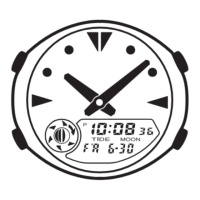
This watch features separate digital and analog
timekeeping. The procedures for setting the digital time
and analog time are different.
The Moon phase indicator shows the current Moon
phase in accordance with the current date as kept in the
Timekeeping Mode.
The tide graph shows tidal movements for the current
date in accordance with the current time as kept in the
Timekeeping Mode.
Important!
Be sure to configure the current time and date, and your
Home Site data (data for the site where you use the
watch) correctly before using the functions of this watch.
See “Home Site Data” for more information.
4. Press A twice to exit the setting screen.
The first press of A displays the UTC differential setting screen. Pressing A again
exits the setting screen.
Resetting the seconds only (without changing the DST, hour, or minute setting)
causes the analog minute hand setting to be adjusted automatically.
See “Digital Time Daylight Saving Time (DST) Setting” below for details about the
DST setting.
The day of the week is displayed automatically in accordance with the date (year,
month, and day) settings.
Digital Time Daylight Saving Time (DST) Setting
Daylight Saving Time (summer time) advances the digital time setting by one hour
from Standard Time. Remember that not all countries or even local areas use Daylight
Saving Time.
To toggle the Timekeeping Mode digital time between DST and Standard Time
1. In the Timekeeping Mode, hold down A until the seconds
start to flash, which indicates the setting screen.
2. Press C once to display the DST setting screen.
3. Press D to toggle between Daylight Saving Time (
ON
displayed) and Standard Time (
OF
displayed).
4. Press A twice to exit the setting screen.
The DST indicator appears on the Timekeeping, Moon/
Tide Data, Alarm, and Hand Setting Mode screens to
indicate that Daylight Saving Time is turned on. In the
case of the Moon/Tide Data Mode, the DST indicator
appears on the tide data screen only.
Seconds DST Hour Minutes
Day Month Year
3. When the setting you want to change is flashing, use B and D to change it as
described below.
Home Site Data
Moon phase, tide graph data, and Moon/Tide Data Mode data will not be displayed
properly unless Home Site data (UTC differential, longitude, and lunitidal interval) is
configured correctly.
The UTC differential is a value that indicates the time difference between a
reference point in Greenwich, England and the time zone where a city is located.
The letters UTC is the abbreviation for Universal Time Coordinated, which is the
world-wide scientific standard of timekeeping. It is based upon carefully maintained
atomic (cesium) clocks that keep time accurately to within microseconds. Leap
seconds are added or subtracted as necessary to keep UTC in sync with the Earths
rotation.
The lunitidal interval is the time elapsing between the Moons transit over a meridian
and the next high tide at that meridian. See Lunitidal Interval for more information.
This watch displays lunitidal intervals in terms of hours and minutes.
The Site/Lunitidal Interval Data List provides UTC differential and longitude
information around the world.
The following is the initial factory default Home Site data (Tokyo, Japan) when you
first purchase the watch, and whenever you have the battery replaced. Change
these settings to match the area where you normally use the watch.
UTC differential (+9.0); Longitude (East 140 degrees); Lunitidal interval (5 hours,
20 minutes)
To configure Home Site data
1. In the Timekeeping Mode, hold down A until the
seconds start to flash, which indicates the setting
screen.
2. Press A again to display the UTC differential setting
screen.
3. Press C to move the flashing in the sequence shown
below to select other settings.
UTC
Differential
Longitude
Value
East Longitude/
West Longitude
Lunitidal Interval
Hours
Lunitidal Interval
Minutes
MA0508-EA
Timekeeping
Mode
Moon/Tide Data
Mode
Stopwatch
Mode
Countdown Timer
Mode
Alarm
Mode
Dual Time
Mode
Hand Setting
Mode
Press .
Tide graph
Day of week
Month – Day
Moon phase indicator
Hour : Minutes
Seconds
PM indicator
Screen
36
DST
OF
P
10:08
2006
6
-
30
To do this:
Reset the seconds to
00
Toggle between Daylight Saving Time (
ON
) and
Standard Time (
OF
)
Change the hour or minutes
Change the year
Change the month or day
Do this:
Press D.
Press D.
Use D (+) and B ().
DST indicator
On/Off status
UTC differential

Question and Answer IconNeed help?

Do you have a question about the Casio Ana-Digi AMW-710-1AVEF and is the answer not in the manual?

Summary

Getting Acquainted

Safety Warnings

Safety warnings regarding navigation and tide calculation accuracy.

Manual Overview

Explanation of the manual's structure and sample display conventions.

General Guide

Overview of button functions and mode switching.

Timekeeping Features

Digital Time and Date Setting

Procedures for setting the digital time and date.

Daylight Saving Time (DST) Setting

How to toggle Daylight Saving Time on or off.

Home Site Data Configuration

Setting up location-specific data for accurate tide and moon phase readings.

Stopwatch Mode

Measuring Times with Stopwatch

Instructions for measuring elapsed time, split times, and two finishes.

Countdown Timer

Using the Countdown Timer

How to start, pause, resume, and stop the countdown timer.

Setting Up the Countdown Timer

Procedures for setting the countdown start time and auto-repeat.

Moon and Tide Data

Viewing Moon and Tide Data

How to view current Moon age, phase, and tidal movements for a specific date.

Specifying a Date for Data

Procedures to set a specific year, month, and day to view data.

Analog Time Adjustment

Adjusting the Analog Time

Steps to synchronize the analog hands with the digital time.

Alarm Functions

Alarm Types and Settings

Details on setting daily, date, 1-month, and monthly alarms.

Alarm Operation and Testing

How alarms sound, snooze function, and how to test alarms.

Managing Alarms and Signals

Turning on/off alarms 2, 3, and the Hourly Time Signal.

Dual Time Mode

Setting the Dual Time

How to set the time for a second time zone, including DST.

Illumination Feature

Illuminating the Watch Face

How to activate the watch illumination and set its duration.

Reference Information

Moon Phase Indicator Details

Explanation of the Moon phase indicator and its displayed phases.

Moon Phases and Age Explained

Explains the Moon cycle, age calculation, and potential error margin.

Tide Graph Functionality

Understanding Tidal Movements

Explains the cause of tides and how the tide graph represents them.

Lunitidal Interval Importance

Definition and use of lunitidal interval for accurate tide graph readings.

Reference Data and Features

Site and Lunitidal Interval List

A list of locations with UTC differential, longitude, and lunitidal intervals.

Button Operation Tone Control

How to turn the button operation sound on or off.

Auto Return and Scrolling

Watch behavior on inactivity and how to scroll through data.

Illumination Precautions

Precautions regarding illumination usage and battery life.

Summary

Getting Acquainted

Safety Warnings

Safety warnings regarding navigation and tide calculation accuracy.

Manual Overview

Explanation of the manual's structure and sample display conventions.

General Guide

Overview of button functions and mode switching.

Timekeeping Features

Digital Time and Date Setting

Procedures for setting the digital time and date.

Daylight Saving Time (DST) Setting

How to toggle Daylight Saving Time on or off.

Home Site Data Configuration

Setting up location-specific data for accurate tide and moon phase readings.

Stopwatch Mode

Measuring Times with Stopwatch

Instructions for measuring elapsed time, split times, and two finishes.

Countdown Timer

Using the Countdown Timer

How to start, pause, resume, and stop the countdown timer.

Setting Up the Countdown Timer

Procedures for setting the countdown start time and auto-repeat.

Moon and Tide Data

Viewing Moon and Tide Data

How to view current Moon age, phase, and tidal movements for a specific date.

Specifying a Date for Data

Procedures to set a specific year, month, and day to view data.

Analog Time Adjustment

Adjusting the Analog Time

Steps to synchronize the analog hands with the digital time.

Alarm Functions

Alarm Types and Settings

Details on setting daily, date, 1-month, and monthly alarms.

Alarm Operation and Testing

How alarms sound, snooze function, and how to test alarms.

Managing Alarms and Signals

Turning on/off alarms 2, 3, and the Hourly Time Signal.

Dual Time Mode

Setting the Dual Time

How to set the time for a second time zone, including DST.

Illumination Feature

Illuminating the Watch Face

How to activate the watch illumination and set its duration.

Reference Information

Moon Phase Indicator Details

Explanation of the Moon phase indicator and its displayed phases.

Moon Phases and Age Explained

Explains the Moon cycle, age calculation, and potential error margin.

Tide Graph Functionality

Understanding Tidal Movements

Explains the cause of tides and how the tide graph represents them.

Lunitidal Interval Importance

Definition and use of lunitidal interval for accurate tide graph readings.

Reference Data and Features

Site and Lunitidal Interval List

A list of locations with UTC differential, longitude, and lunitidal intervals.

Button Operation Tone Control

How to turn the button operation sound on or off.

Auto Return and Scrolling

Watch behavior on inactivity and how to scroll through data.

Illumination Precautions

Precautions regarding illumination usage and battery life.

Overview

This document describes the CASIO Operation Guide 3796, a watch with various timekeeping, environmental data, and utility functions.

Function Description

The CASIO Operation Guide 3796 watch offers a comprehensive suite of features, including:

  • Timekeeping Mode: Displays the current time (hour, minutes, seconds), date (month, day, year), and day of the week. It also features a tide graph and a Moon phase indicator. The watch supports both 12-hour and 24-hour timekeeping formats and allows for Daylight Saving Time (DST) settings. Analog hands are also present, and their time can be adjusted independently.
  • Moon/Tide Data Mode: Provides Moon age, Moon phase, and tidal movement data for a specified date and time at the user's Home Site. The tide graph shows tidal movements, and the Moon phase indicator displays the current Moon phase.
  • Stopwatch Mode: Measures elapsed time, split times, and two finishes. It has a display range of 23 hours, 59 minutes, 59.99 seconds and can restart from zero after reaching its limit.
  • Countdown Timer Mode: A timer that can be set from one minute to 24 hours. An alarm sounds when the countdown reaches zero, and an auto-repeat function can be enabled to automatically restart the countdown.
  • Alarm Mode: Allows setting up to three independent multi-function alarms (daily, date, 1-month, or monthly) and an Hourly Time Signal. One alarm can be configured as a snooze alarm or a one-time alarm, while the other two are one-time alarms only.
  • Dual Time Mode: Tracks time in a different time zone, with support for Standard Time or Daylight Saving Time. The seconds count in Dual Time Mode is synchronized with the current digital time.
  • Hand Setting Mode: Used to adjust the analog time to match the digital display.
  • Illumination: Features two LEDs and a light guide panel to illuminate the watch face for easy reading in the dark. The illumination duration can be set to either 1.5 seconds or 3 seconds.

Important Technical Specifications

  • Timekeeping: Digital time display includes hour, minutes, seconds, PM indicator, month, day, day of week, and Moon phase indicator. Analog time display includes hour and minutes.
  • Moon Phase Indicator: Shows the Moon as viewed at noon from a position in the Northern Hemisphere looking south. It performs a rough calculation of the current Moon age, with a margin of error of ±1 day.
  • Tide Graph: Indicates tidal movement based on the Moon's transit over a meridian and the lunitidal interval. The accuracy of the tide graph is dependent on the correctness of the Moon age calculation.
  • Stopwatch: Display range is 23 hours, 59 minutes, 59.99 seconds.
  • Countdown Timer: Settable range from one minute to 24 hours.
  • Alarms: Three multi-function alarms (one snooze/one-time, two one-time) and an Hourly Time Signal.
  • Calendar: Built-in full automatic calendar makes allowances for different month lengths and leap years, settable from year 2000 to 2099.
  • Home Site Data: Requires configuration of UTC differential (range -12.0 to +14.0 in 0.5-hour units, or -11.0 to +15.0 with DST), Longitude (range 0° to 180° in 1-degree units, East/West), and Lunitidal Interval (hours, minutes).
  • UTC (Universal Time Coordinated): World-wide scientific standard of timekeeping.
  • Lunitidal Interval: Time elapsing between the Moon's transit over a meridian and the next high tide at that meridian.
  • Battery: Replacement of the battery requires re-setting of the date and Home Site data.

Usage Features

  • Mode Navigation: Pressing the "C" button changes between modes.
  • Illumination Activation: Pressing the "B" button illuminates the watch face in any mode (except when a setting screen is on).
  • Setting Screens: Holding down the "A" button typically enters a setting screen, indicated by flashing digits. The "D" button is often used to move the flashing selection, and "B" and "D" buttons (or "+" and "-" indications) are used to change values.
  • High-Speed Scrolling: Holding down "B" or "D" buttons during a scroll operation scrolls through data at high speed.
  • Auto Return Features: The watch automatically exits setting screens after two or three minutes of inactivity. It also returns to the Timekeeping Mode from Moon/Tide Data, Alarm, or Hand Setting Mode after two or three minutes of inactivity.
  • Button Operation Tone: Can be toggled on or off. Even when off, alarms and the countdown timer alarm will still operate normally.
  • DST Setting: Digital time can be toggled between DST and Standard Time. The DST indicator appears on relevant mode screens when turned on.
  • Analog Hand Adjustment: The analog hands can be advanced by 20-second increments using the "D" button in Hand Setting Mode. Holding "D" advances them at high speed, and pressing "B" locks high-speed movement.
  • Countdown Timer Control: Pressing "D" starts or pauses the timer. Pressing "A" after pausing completely stops the timer and resets it to its starting value.
  • Alarm Testing: Holding down "D" in Alarm Mode sounds the alarm for testing.
  • Alarm Operation: Alarm tones sound for 10 seconds. Snooze alarms repeat seven times every five minutes. Any button press stops the alarm tone. Displaying the Timekeeping Mode setting screen or the alarm setting screen cancels a snooze alarm.

Maintenance Features

  • Battery Replacement: The manual notes that the date and Home Site data must be re-set after battery replacement.
  • Full Automatic Calendar: The watch's calendar automatically adjusts for different month lengths and leap years, requiring no manual date changes once initially set (unless the battery is replaced).
  • Illumination Precautions: Illumination may be difficult to see under direct sunlight. It automatically turns off when an alarm sounds. Frequent use of illumination can run down the battery.
  • Data Accuracy: The manual warns that longitude, lunitidal interval, Moon phase indicator, and tide graph data are not intended for navigation purposes and should not be relied upon for critical applications. It also states that CASIO COMPUTER CO., LTD. assumes no responsibility for any loss or claims arising from the use of this watch.
  • Home Site Data Configuration: Proper configuration of UTC differential, longitude, and lunitidal interval is crucial for accurate Moon phase, tide graph, and Moon/Tide Data Mode data.

Casio Ana-Digi AMW-710-1AVEF Specifications

General IconGeneral
BrandCasio
ModelAna-Digi AMW-710-1AVEF
CategoryWatch
LanguageEnglish

Related product manuals