EasyManua.ls Logo

Casio CFX-9800G - Page 103

Casio CFX-9800G
206 pages
Print Icon
To Next Page IconTo Next Page
To Previous Page IconTo Previous Page
Loading...
*The
following
shows
the
parametets
that
the
unit
uses
for
the
probability
distribution
graph.
Ymin
_
Ymax
—0.1~
0:45
Xmin
_
Xmax
-3.2°
3.2
8-8
Single-Variable
Statistical
Graphs
To
draw
single-variable
statistical
graphs,
you
must.use
the
SD
Mode
and
the
Statistical
graph
DRAW
Mode.
The
unit
lets
you
draw
bar
graphs,
line
graphs
and
normal
distribu-
tion
curves
using
data
you
input.
*
ER(SET)
(or
EIEM)
@BVWOAW)
|
ae
as
|
aS
‘eTo
draw
a
bar
graph:
¥
a
ere
Example
“To
draw
a
bar
graph
of
the
following
data:
\
Rank
|
Value
|
Frequency
|
it
1
2
10
3
3
20
2
4
30
2
5
40
3
6
50
5
1
7
60
6
8
70
8
9
80
15
i0.|
90
9
5
i
100
2
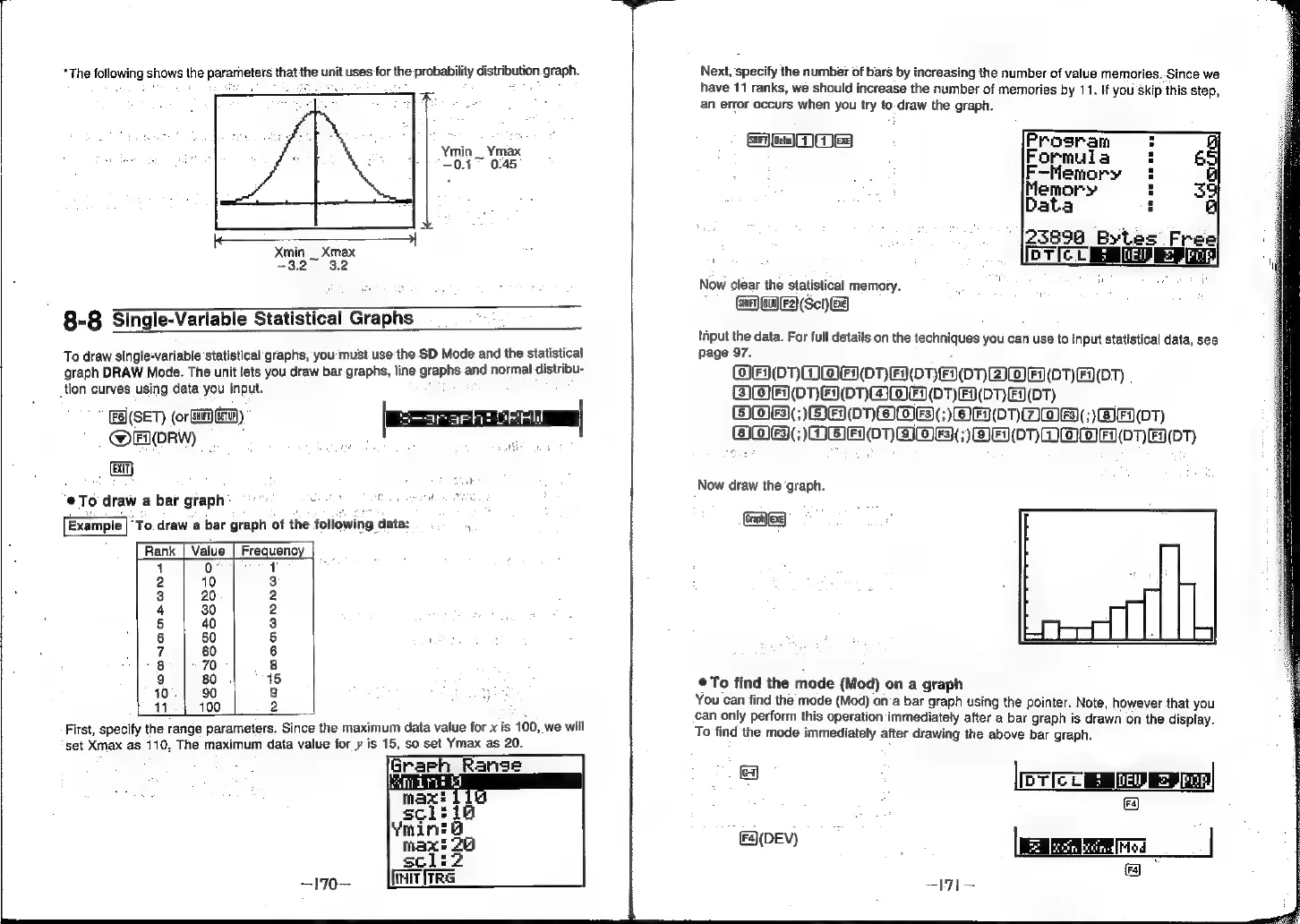
First,
specify
the
range
parameters.
Since
the
maximum
data
value
for
x
is
100,
we
will
set
Xmax
as
110,
The
maximum
data
value
for
y
is
15,
so
set
Ymax
as
20.
~170—
Init
ire
Next,
specify
the
number
of
bars
by
increasing
the
number
of
value
memories..Since
we
have
11
ranks,
we
should
increase
the
number
of
memories
by
11.
If
you
skip
this
step,
an
error
occurs
when
you
try
to-draw
the
graph.
Gem
GG
XE}
Now
clear
the
statistical
memory.
Gar
Gia]
F2)
(Sct)
8)
'iput
the
data.
For
full
details
on
the
techniques
you
can use
to
input
statistical
data,
see
page
97.
OHO)
OOAH0NR
ON
OnHMF
DT)
\0T)
BOA
ONHONMME
(01)
FDOT)
F(DT)
OOS
SH0OnOB()
OH
0)mOr;)
FT)
OOS;
DOH0O)OME()BH07nRMWH
(0TH
(0T)
lo}
[o}
Now
draw
the
‘graph.
Ext)
®To
find
the
mode
{Mod)
on
a
graph
You
can
find
the
mode
(Mod)
on’a
bar
graph
using
the
pointer.
Note,
however
that
you
can
only
perform
this
operation
immediately
after
a
bar
graph
is
drawn
on
the
display.
To
find
the
mode
immediately
after
drawing
the
above
bar
graph.
a
[ewer
s
eu)
=
Jc]
OEY
.
ame
|
ira)