EasyManua.ls Logo

Casio CFX-9800G - Page 105

Casio CFX-9800G
206 pages
Print Icon
To Next Page IconTo Next Page
To Previous Page IconTo Previous Page
Loading...
*The
following
is
the
formula
the
unit
uses
to
draw
the
normal
distribution
curve.
4
_beae
:
2
Sieve”
xan’
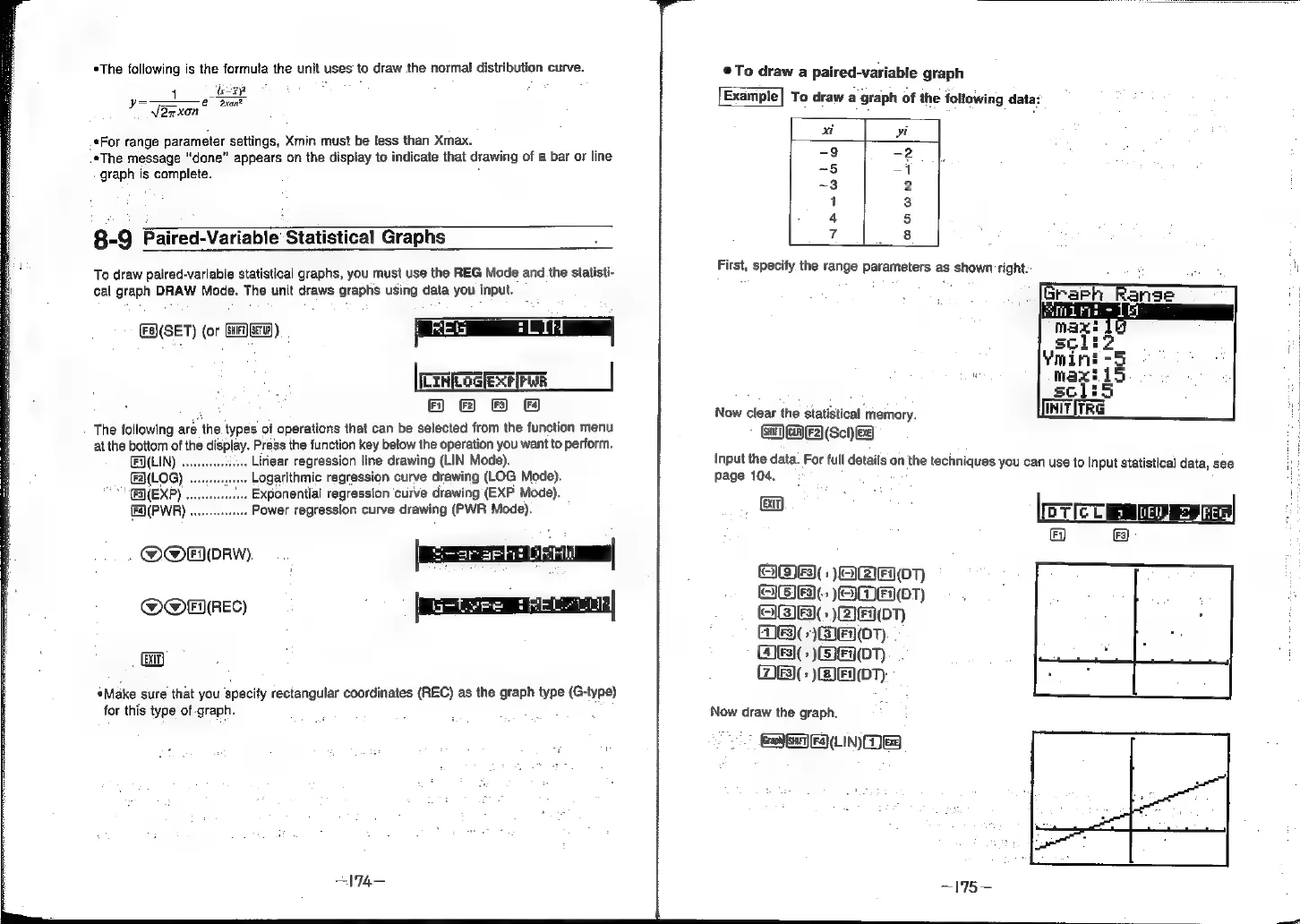
.*For
range
parameter
settings,
Xmin
must
be
tess
than
Xmax.
.*The
message
“done”
appears
on
the
display
to
indicate
that
drawing
of
a
bar
or
line
graph
is
complete.
8-9
Paired-Variable
Statistical
Graphs
To
draw
paired-variable
statistical
graphs,
you
must-use
the
REG
Mode
and
the
statisti-
cal
graph
DRAW
Mode.
The
unit
draws
graphs
using
data
you
input.
ES(SET)
(or
SAW)
PREG
LN
|
EACOSERFFUR
|
©
2
8 &
The
following
are
the
types
of
operations
that
can
be
selected
from
the
function
menu
at
the
bottom
of
the
display.
Press
the
function
key
below
the
operation
you
want
to
perform.
EQ(LIN)
...
.
Liriear
regression
line
drawing
(LIN
Mode).
(LOG)
.
.
Logarithmic
regression
curve
drawing
(LOG
Mode).
“"EB(EXP)
.
Exponential
regression
curve
drawing
(EXP
Mode).
fQ(PWR)
.
Power
regression
curve
drawing
(PWR
Mode).
O@norw
peesrerh
rr
|
QOHUREC)
|
aEE=beon|
(ti)
Make
sure
that
you
Specify
rectangular
coordinates
(REC)
as
the
graph
type
(G-type)
for
this
type
of-graph.
To
draw
a
paired-variable
graph
To
draw
a
graph
of
the
following
data:
xt
yi
-9
-2
-5
=
~3
2
1
3
4 5
7
8
First,
specify
the
range
parameters
as
shown
right:
Now
clear
the
statistical
memory.
GaF)
Gin)
F2]
(Sc!)
EB)
Input
the
data.
For
full
details
on
the
techniques
you
can
use
to
input
statistical
data,
see
page
104.
:
'
FA,
F3)
OMFS):
BE
0T)
OBIE
(>
EME
(PT)
OBE)
)2IE(0T)
3)(
+)
)EN(DT)
5
)
07)
MES
)EOTy
Now
draw
the
graph.
Geol)
BHF)
Fa)
(LIN)
Be)